QuickBooks Desktop 2021: Getting Paid Faster, Being More Efficient, and Improving Data Security

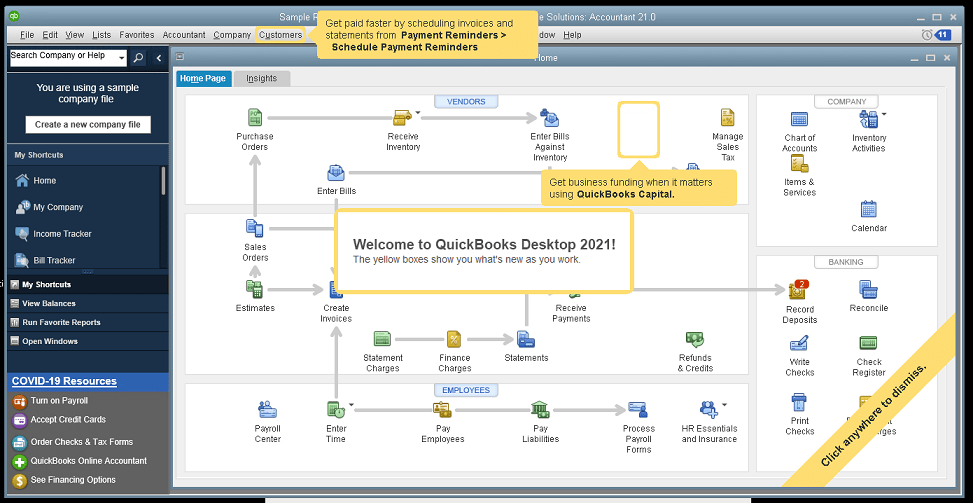
The new QuickBooks Desktop 2021 editions have new and improved features that help businesses get paid faster and secure data more effectively, making the software work even better for your company.

Many of the improvements center on automation and workflow, enabling users to get more done with fewer keystrokes and setting up automatic activities so that items don’t have to be handled manually.

Other improvements center on data and information access, allowing admins to get granular with setting user permissions and access to certain types of information, even down to the record.

Intuit has also delivered several enhancements to existing functionality in QuickBooks desktop, especially in the Enterprise edition and where inventory is involved.

Here is a brief summary of the main changes or additions introduced with QuickBooks 2021 editions.

Improved Bank Feeds
Review bank transactions and match them to existing ones in your books or quickly add new transactions using the advanced bank feeds capability. You can automatically categorize or batch-edit bank transactions by payees, accounts and classes. This can dramatically reduce the time and complexity of reconciling entered transactions with the items the bank processes.

Automated Payment Reminders and Statements
Now you can send statements automatically to customers, with each statement tailored to the customer’s needs or preferences. Set automatic reminders for customers when their invoices are due and schedule statements for your customers to let them know when they have invoices they still need to pay you for. Timely communications with customers regarding their invoices and activity is more likely to keep a customer coming back for more. It also reduces the time required to communicate individually with customers, making AR management and collection activities more efficient.

Customized Payment Receipts
Want to send certain customers a customized message on their receipts? You can use custom templates for forms like invoices, sales receipts, estimates, statements, and purchase orders so each form has the right look and information. Then use the new customer groups capability to get the right form for the right customer every time.

PDF preview
It is always a good idea to preview a document before you send it via email, but that wasn’t always a convenient thing to do in QuickBooks. Now QuickBooks lets you automatically preview attachments before emailing them to customers. You can even preview multiple attachments at once without having to manually open each one outside of QuickBooks, saving huge time and effort and smoothing out a previously-clunky workflow.

Receipt Management
Receipt management in QuickBooks desktop is a new feature that makes entering expense receipts easier and faster. You can give users access to upload expense receipts to QuickBooks using the mobile app or directly from your computer. Automate creating categorized receipt expense entries using the QuickBooks Desktop Mobile App, an option available only with the Plus subscriptions (not the one-time purchase option).

Create Customer Groups
Improve customer communication with rule-based customer groups based on fields like customer type, location, or balance. Creating customer groups allows you to find all customers that match certain criteria. Then you can create automated statements, send payment reminders or create mailing lists for specific groups of customers.
In QuickBooks Desktop Enterprise, you can even use customer groups to define permissions and access at customer and vendor group level.

Data Level Permission
Data level permissions is a new feature in QuickBooks Enterprise 21.0 that gives you more control regarding restricting access for users and roles. This makes it so the admin can create users and roles with access permissions all the way down to the record level for customers and vendors.

With data level permissions you can improve security and confidentiality of information by assigning users access only to the specific data, transactions and reports that they are responsible for. Users will only be able view, edit, or delete specific customers, vendors, or data with the permissions you delegate to them.

NOTE: Data level permissions don’t appear to be available in QuickBooks Enterprise Accountant, nor are they available with a Silver or Gold subscription. To get this feature, you have to go Platinum or Diamond, so it’ll cost you.

Add prices to barcode labels
Wouldn’t it be great if you could print barcode labels with pricing information as well as the item name and description? Now you can! Barcode labels help you accurately identify and manage inventory, providing the information most often needed by employees and customers.

Landed cost
Gain more control and flexibility over how you calculate and share landed inventory costs. Set up landed cost accounts as “COGS” (Cost of Goods sold) or “Other current assets”, and accurately calculate landed cost for old item bills from closed accounting periods. You can also print bills with or without landed cost, allowing you to better control the information you present.

Alternate vendor reports
Key inventory reports can now include alternate vendor information, improving visibility into vendor information on inventory stock status by item, inventory valuation summary and other reports. Linking to alternate vendors via these reports simplifies and streamlines the process of reordering from alternate vendors.

QuickBooks desktop software continues to be the cornerstone of small business accounting. From very small business to the growing enterprise, QuickBooks delivers the functionality that every company needs to manage their income and outgo, customers and vendors, and all their banking activities.

Starting with the early 1999 version to the current 2021 release, Intuit has continued to add capability and enhance features and usability to keep QuickBooks as the most popular small business accounting product on the market. Remember the motto “if you can write a check, you can do your own books“? That’s QuickBooks.

jm bunny feetMake Sense?

J

QuickBooks changes and enhancements for 2020: My 2 Favorite Fixes and Let’s Talk Cloud Hosting

Accounting professionals and small businesses worldwide use QuickBooks software to manage business finances. Launching Basic and Pro versions in 2000 and increasing market share from 74% in 2004 to boasting more than 94% in 2008, Intuit continues to successfully serve the needs of small and growing businesses.

Over the past few years, Intuit has focused quite a bit on SaaS and online services, promoting QuickBooks Online Edition, mobile payments and full service payroll as solutions that can meet specific business needs and which drive new customer adoption of the products. While customers may initially attach to QuickBooks because of one of these capabilities, it is the richer functionality found in Pro, Premier and Enterprise which often causes the business to run the desktop editions.

Intuit knows that the desktop editions remain hugely popular, which is why they continue to be updated and supported. And this is also why payments, payroll and other functions supported by the product are handled as integrated service rather than software; It’s a great way to make sure customers upgrade their QuickBooks software regularly, even when it sits on the desktop.

qbwordle

The changes in QuickBooks for 2020 aren’t amazing… it seems like they are more tweaks and adjustments than real feature releases. I’ll list a few of the changes below, but first I’d like to point out the 2 changes that I think might make a big difference.

These are my 2 favorite changes with QB 2020

1. QuickBooks Enterprise 2020:  Landed cost

How did you get along without this before? Manual calculation, that’s how. Landed cost capability gives visibility to actual, complete product costs because it adds freight, duties, insurance and whatever other expenses relate to the purchase. Allocate the costs to item bills and you now have a complete view and tracking of the real cost of bringing in the product.

2. It is Now Easier to Reset the Admin Password

Yay! No more 20 questions! The Admin password for a company file may now be reset without having to enter a bunch of information and answer a lot of questions to verify identity.  The process now asks that the user pick their email address from a drop down list of emails registered with the QuickBooks license. A token is emailed to the address to use in resetting the Admin password.  The key here is to make sure your QuickBooks registration information remains up to date so that an email you can get to is used for this process.

Here’s the list of changes in QB 2020.

You can see more on Intuit’s website.

QuickBooks Desktop Pro, Premier, and Accountant

  • Automated Payment Reminders
  • Automatically add customer PO# to Invoice emails
  • Combine all invoices meant for a single customer into one email
  • Find and open your company files with the addition of a file search option
  • Enhanced Accessibility to improve usability for vision-challenged users
  • Collapse columns in reports
  • View detailed status of direct deposit payroll
  • Smart Help: Press F1 for improved content and search experience

QuickBooks Enterprise Solutions 20.0

Here are the changes specific to QB Enterprise

  • Complete picking and packing operations as part of single workflow
  • Track product landed cost
  • Manage product vendors with primary and alternate vendor selections

Intuit continues to do a fine job of making QuickBooks desktop the most useful and easy-to-use solution for small business finance, and we make it run best in the cloud.

Where QBO (the online edition) might work for very small businesses and those with very limited requirements, the real work gets done in the desktop editions. My team helps make running the QuickBooks desktop editions easier and even more useful in the cloud.

A quality cloud hosting approach can deliver anytime/anywhere access, greater IT resiliency and faster disaster recovery, but only if done properly (note my favor for private tenant hosting rather than multi-tenant or shared hosting). The wrong platform introduces poor performance, limitations on applications and breaks in processes and workflows, and may even compromise security and complicate recovery when something does go wrong.

QuickBooks desktop solutions are the right fit for many small businesses, and these businesses demand mobility, security and flexibility in their IT systems. Providing this is our way of helping make QuickBooks desktop a little bit better.

jmbunnyfeetMake Sense?

J

QuickBooks changes and enhancements for 2019: Making things easier for non-accountants and non-IT users

Intuit QuickBooks has been the standard of small business bookkeeping for many years. The number and depth of QuickBooks advisors, consultants, developers and service providers is unmatched in the market. Yet Intuit was able to establish a QuickBooks foothold in the market based on a couple of fairly unintuitive elements, such as leveraging highly unconventional sales channels for accounting software and promoting a bookkeeping tool for people who do not know business bookkeeping.
qbwordle

Today, Intuit continues to leverage a variety of innovative sales channels, such as through payment solution providers like Square (sales data from Square is now available for Mac with QB 2019), and to offer features to support the non-accountant in all of us.

Here is a shortlist of the changes and enhancements for QuickBooks 2019 desktop editions. Some of these items may not apply to everyone or every edition, such as the purchase order or sales order process enhancements available to Enterprise Platinum level subscribers. Others, like changes to QuickBooks installation and update processes, will apply to just about everyone.

HELPERS FOR NON-ACCOUNTANTS

Accounting professionals understand the rules of bookkeeping and can fully appreciate the nuances of classifying transactions properly, like cost of goods sold versus regular expenses.  For most people… not so much, which is why having a product like QuickBooks has been so helpful to so many small business owners. Intuit’s motto for QuickBooks was “if you can write a check, you can do your own books” and the popularity of the application is a testament to its ease of use by non-accountants.

In keeping with this philosophy of simplicity are a couple of new changes to QuickBooks that help ensure transactions are handled properly.  It is like that these two items represented a large share of corrections accountants make in their clients’ books.

1. Transfer open credits between jobs

This is a HUGE deal for businesses that track by job. You set up a job for a customer, and then you end up setting up another job for the same customer because there is another phase, another project, or another something that you’re going to do for them.  The payments they made against your invoices were posted to the first job, but it left a credit open. Subsequent invoices were posted against the second job, but the customer doesn’t really owe you any money because of the open credit on job 1. QuickBooks now provides the means to easily and properly apply open credits and transfer credits between customer jobs. The process involves the back-end posting to a new GL account for credit transfers so that the asset is recorded prior to being applied to the other job invoice. This protects from overstating job revenue and earnings, eliminates hard to explain entries in the bank account, and keeps job profitability reporting squared up.

2. Write a check and pay a bill

When is writing a check to pay a bill not writing a check? In QuickBooks! Seriously, though, this is another one of those things where trying to make accounting software for non-accountants gets tricky. Instead of talking about vouchers and accounts payable, QuickBooks offers Paying Bills. That’s easy enough.  But then there is the functionality to Write Checks.  Not intended as a replacement for paying the vendor bills, writing a check in QuickBooks is really intended to be the single entry of a payment of some sort, and not the payment of an existing vendor bill. The unfortunate result of this is that a lot of vendor payments end up getting entered twice… as a bill and again as a check. Thankfully, Intuit has introduced to QuickBooks the logic that helps catch when a check is being written for a bill already in the system. By looking up or matching the vendor name, QuickBooks can prompt the user to see if the check they are about to write should actually be treated as making a bill payment. The effect here is that the back-end transaction posts against accounts payable rather than recording the cost or expense again, reducing the need to make more manual entries to reclassify the transactions.

IMPROVED VISIBILITY

With any application software there are functions and data that are not fully visible to the user. Depending on the complexity of the application, there may be far more hidden than shown. In many cases, data displayed on the screen is not actually stored by the software but is instead calculated on the fly. A profit and loss statement is usually footed with a calculated profit/loss value which is not necessarily stored anywhere. Changes in the revenue, cost and expense numbers will result in a change to the calculated profit/loss value. It wouldn’t be very useful if the totals didn’t change as the reported items did… the report wouldn’t balance and accounting is all about balance. The point is that there is information deep in the data of QuickBooks, and now you get to see a bit more of it.

3. Invoice history

Technology is ever-evolving, and in the area of email click-tracking QuickBooks has now caught up a bit. Some time ago, Intuit introduced the ability to email invoices to customers and this was very helpful for many users. Now, using technology similar to that found in many e-marketing systems, QuickBooks can show you when a customer opened and viewed an emailed invoice. Revealing the customer name and invoice view date helps eliminate those “I didn’t see your invoice” excuses for customer non-payment, hopefully easing the collection process and improving the clearing of outstanding receivables. It is important to note that this functionality may not work with users of Outlook 2010, so those working on some hosting platforms or with older Office applications may not receive the benefit of this functionality.

4. Employee pay rate history

Changing the hourly or other pay rates for an employee is a relatively straightforward process, but previous to the new change, seeing when the change happened and what the historical rates was only as simple as printing reports for all the past periods. While the system shows what the current rate is, you had to go looking for information on historical pay rates. That employee that said they haven’t had a raise in 5 years might realize how challenging it is to find when rate changes occurred, hoping you’ll take their word for it rather than spend your time looking it up. Now QuickBooks offers a little more visibility into historic pay rates for employees, so operators are able track rate changes more easily and can be fully informed in preparation for those pay rate discussions.

5. Sick and vacation pay tracking

Knowing how much time an employee has coming for sick or vacation is among the most popular requests for information from any payroll department. To ensure compliance with local, state or federal regulations – or to simply comply with company policy – it is important to have a handle on the vacation, sick and other time-based benefits due to an employee. No employer wants to over-compensate their workers with wages or benefit hours, and no employee wants to miss out on benefits they are due. QuickBooks now provides the ability to enter information about accrued sick and vacation time so that the payroll includes and works with this data. Not only relieving balances of accrued benefits as they are taken, the system also helps prevent oversubscription of those benefits. Having the information printed on paystub is also a big improvement, providing the employee with a clear accounting of their used and available benefits.

6. Better warnings regarding payroll data visibility

User roles in QuickBooks allow an administrator to be somewhat selective in terms of what information and functions QuickBooks users are granted access to.  Unfortunately, some roles aren’t well-described, and may provide unintended visibility to certain sensitive information, like payroll data. It can come as quite a surprise to the business owner when they find workers snooping into payroll information they aren’t supposed to see, particularly when it was believed that the data was secured from prying eyes. Recognizing the potential sensitivity of the payroll information, Intuit now has QuickBooks prompting the Admin with a warning when a user role is selected that will allow payroll data visibility.

7. Inventory report totals now can include inactive items

Items come and items go, and keeping the product information updated in QuickBooks can be a full time job by itself. One of the challenges for some QuickBooks inventory users has been reporting for all of the stock on hand, whether the stocked items are currently being sold or not. Inventory reports tended to focus only on items actively being offered and not so much on parts that were expired and made inactive, which makes sense. Sometimes product changes occur very frequently or maybe there are just a lot of products, which makes the reports simply too long to be useful if they include both active and inactive items. On the other hand, just because an item is no longer being actively offered doesn’t mean there wasn’t stock already received and sitting on the shelf or in the warehouse. Active or not, the stock item is still on the books, and it is a good thing that the inventory report totals now reflect that.

WORKFLOW HELPERS FOR ENTERPRISE ADVANCED INVENTORY USERS

8. Purchase order management worksheet and better receiving using handheld/mobile devices

Few workers just love the process for receiving inventory and matching against purchase orders. When the PO data is in the computer which is in the office but the stock gets delivered to the warehouse or receiving area, there isn’t a great way for entering or validating the received items. The process involved lots of communicating back and forth between the office and the receiving location and lots of typing, which could result in lots of errors.  Fortunately, users of QuickBooks Enterprise Platinum with Advanced Inventory can now utilize a more efficient process for receiving stock against purchase orders by using the Purchase Order Management worksheet. By assigning and downloading PO data to handheld/mobile devices used by receiving workers, the workflow for getting inventory in match against PO data – and for updating PO data with corrections or adjustments – becomes much more efficient and is far less likely to have errors in item or quantity inputs.

9. Better pick, pack and ship workflows with mobile sales order worksheet

Just as the stock receiving process is greatly improved by enabling meaningful access to purchase order information for those in the receiving locations, the outbound item processes can also be significantly improved by providing the order information where it can be directly addressed. With mobile device and sales orders in-hand, the user is able to quickly enter picked item quantities, notes and adjustments, and even complete the order with weights and dimensions.

SMARTER FILE UTILITIES AND SIMPLIFIED PROGRAM MANAGEMENT

Many people find that using QuickBooks for their business finances is very simple. Those very same users can often find managing the company files and software application to be a bit more challenging as not everyone has a penchant for IT. To make things a little easier and smarter, Intuit has introduced a few improvements for those who work with the QuickBooks files and program installation.

10. IIF file import improvements

The file format used in QuickBooks for importing and exporting list and transaction data is the IIF (Intuit Interchange Format) proprietary text file format. With data in this format, users are able to get data quickly into a QuickBooks company file, like doing a bulk update of item cost information or importing transactions from Paypal into QuickBooks. Intuit’s improvements in the IIF import processes for QuickBooks 2019 will be welcomed by those who use IIF imports. While the IIF import/export capability in QuickBooks is a handy feature, it wasn’t very smart and often allowed poorly formed data to be entered into the company file. Now, the IIF import process benefits from data validation and error checking, error reporting and other functionality that QuickBooks developers use when bringing data in to QuickBooks.

11. Condensing the QuickBooks file allows to keep or remove audit trail and selected transactions

QuickBooks company files can get big, but the program can only efficiently handle files of a certain size. With this in mind, it seems that condensing a QuickBooks data file is a good idea, but it hasn’t always worked well when done with the utility built in with QuickBooks. Probably due to irregularities with data introduced through incomplete entry, bad imports or broken integrations, the condense function didn’t always work as expected and sometimes left users with damaged and unusable files. Intuit has made some changes to the process with QuickBooks 2019, providing options to remove the audit trail data but leave transactions, or to remove certain selected transactions while compressing the file.  The vast majority of users have no problems with this functionality, and running a utility to condense the file and clear out old audit trail data is a very good idea.  Users should always remember to run a complete backup of the data before doing any maintenance on a company file, just in case.

12. Intuit Data Protect can backup all QuickBooks data and other files

Speaking of backup… imagine thinking that you have all your valuable financial data backed up safely on Intuit’s servers only to find that just the company file, no attachments or other supporting data is there. Every business owner knows it is important to protect their data, and some users may have believed that the utility they used with QuickBooks to backup their QB company file was also protecting the other files they use with QuickBooks, like attachments, templates, exported reports and other data. The Intuit Data Protect utility which can provide cloud backups of QuickBooks company files can now include that other data on the computer, backing it up to the cloud along with the QuickBooks company files and providing another level of protection for the business.

13. Moving QuickBooks to another computer

QuickBooks desktop editions are like most other software; if you want to use it on a different computer you need to install it on the other computer. Unlike most other products, however, Intuit makes moving QuickBooks from one computer to another a simple process and not a multi-step project with license keys and original installation CDs required. If you install and use QuickBooks 2019 on a computer and then need to move it all to a new computer, all you really need is a USB drive big enough to carry everything (a little less than 250MB) and a functioning Internet connection. The process for moving your QuickBooks installation looks like it is facilitated by other improvements in QuickBooks that came with 2019, including the upgrade/activation and data protect. Intuit is able to identify the account and license from the installation on the current PC, and is able to identify company files by looking at recently used file lists. Packing it all onto a flash drive so it can be ported to another PC, the entire profile of the QuickBooks installation can be recreated on the new computer in one seamless process.

14. Easier upgrade of QuickBooks to new version

The same features that enable moving the QuickBooks installation from one computer to another are the core of what also makes QuickBooks easier to upgrade this year. Intuit has been increasingly turning program functionality into web service, which means that QuickBooks licensing and activation via the Internet are more integral to the product than ever. QB Enterprise customers and others with license payment plans find that their software will no longer update without an active paid subscription. Connected service users risk loss of functionality if they don’t keep current with their software maintenance. The benefit of the connection between the software and Intuit’s servers is that the process for installing the new version and subsequent updates is smoother and requires less work. When the new software is installed, it connects to the user existing Intuit account and gets version, license and other information required to activate the installation.  Previous to this new release, users had to locate their files on the PC and upgrade them manually after a program upgrade, but now this part of the process is simpler, too. The process identifies company files and prompts the user to upgrade the data along with the software and adding the company file to the list of recently used files for the new version.

IMPROVEMENTS FOR MAC VERSION

QuickBooks desktop editions run on Microsoft Windows or on Mac and the two platforms have very different characteristics.  While both are installable editions of QuickBooks, the features and functionality can vary even more dramatically than the differences between desktop and online editions. As a side note, I often wonder why Mac users of QuickBooks don’t simply adopt a hosted delivery model, like a cloud server running Windows and using the Windows version of QuickBooks, enabling multi-user capability, supporting the widest variety of 3rd party integrations, and delivering on the anytime/anywhere promise of mobility and device independence. I get it. Mac users love their Macs.

For those Mac users that prefer to keep the Mac edition of QuickBooks locally installed on the Mac, Intuit has a few updates and improvements for you with QuickBooks Mac 2019 (Surprise!). Intuit had indicated that QuickBooks Desktop for Mac 2016 would be the last version available, with the product continuing to be supported by until May 31, 2019, so a new version for 2019 should give Mac users renewed interest in staying with QuickBooks. The primary focus of these upgrades is modernization and security, which sort of go together.

15. Passwords required

Passwords and encryption are now part of a Mac users’ life. Not a fortress of safety in a world fraught with platform vulnerabilities, Mac has seen its share of attacks. Bad guys don’t discriminate, so it is critical that Mac users protect their valuable data just as aggressively as those on Windows or Linux. QuickBooks 2019 Mac edition now embraces this reality by requiring passwords for company files and by encrypting personal information stored in the file. While entering passwords can be annoying, Intuit recognizes that security is important enough to force users to make an effort at it.

16. Discrepancy report for bank and credit card reconciliations

Allowing a transaction to be changed after-the-fact is among the user-friendly features of QuickBooks.  Not an awesome accounting tool, the ability to change transactions after they have already been reconciled can create errors that are very difficult to track down later. Now there is a report that will reflect these transaction changes, helping identify irregularities and errors in the books. The report will only work for items created after the new software was installed as transactions entered and reconciled prior to the upgrade weren’t being monitored in this way.

17. Email tracking for Customer and Vendor communications

Just as the Windows versions of QuickBooks desktop 2019 enhance visibility into certain communications, so does QuickBooks Desktop for Mac 2019. It used to be that the user had to copy their own address on emails sent to customers and vendors in order to track when email was sent and to whom.  Now QuickBooks has a tab that shows users information about emails sent to customers and vendors, increasing visibility into communications related to QuickBooks activity.

18. Import Square transactions in .csv format

QuickBooks desktop editions generally allow only list data to be imported from .csv format files, requiring IIF files for processes involving the importing of transaction data.  Square, on the other hand, exports their transaction data in .csv format and Square is among the more popular payment solutions used with iPad tablets and other mobile devices. To simplify bringing Square payments and transaction data into QuickBooks for Mac (and obviously to encourage Square payments users to do their bookkeeping with QuickBooks) Intuit now supports importing Square transaction data using the .csv format.

19. Improved Report Windows

One of the key features of the Mac OS is the interface. Mac does things differently and users tend to either love it completely or they move to something else. Because there are different properties with each computing platform, interface conventions and program methods typically found in Windows applications won’t generally fly with Mac users. Programmers developing for Mac must use different tools and design elements than those working with Windows, and not all functionality or presentations will wind up in both the Mac and Windows editions. With QuickBooks Desktop for Mac 2019, Intuit has updated certain report windows and display elements to make them work better with more modern Mac OS releases. Spacing issues with tabs and report data have been corrected, making the overall readability greatly improved.

20. Sharing a QuickBooks company file with iCloud

I am not fond of this feature, but many users will find it to be really helpful until they lose their changes or corrupt the file. QuickBooks Desktop for Mac 2019 allows users to store/share their company file using iCloud, which is the Apple version of an online file sync and storage service. Similar in concept to Dropbox or Google Drive, iCloud allows users to store data on their device and have it automatically synchronized with their iCloud account online. This may be a convenient way to keep a QuickBooks company file backed up online, or to make it available to work on at different times from different locations. On the other hand, this is not a good way to try for pseudo multi-user or anytime/anywhere working access.

When a desktop opens the file into QuickBooks, it has exclusive use of that file. Any changes exist with the file in memory on the desktop and not in the copy of the file on the hard drive. When a second instance of QuickBooks opens the iCloud file and a user makes changes, there are now two copies of the file and each copy has its own set of changes. QuickBooks will notify the first user who opened the file and give them the option to overwrite the file with their changes, or to abandon their changes and re-load the file. Both sets of changes aren’t able to be saved, so one of the users ends up having to re-do their work.

While Intuit has done a fine job of making QuickBooks an easy-to-use solution for small business finance, the technical aspects of running QuickBooks desktop in a business remain a challenge to many. This is among the reasons why so many businesses elect to work with professionals that can help them run the Windows version of QuickBooks desktop on a managed cloud server environment. A quality hosting approach can deliver more fault tolerance as well as anytime/anywhere access businesses need, and reduce or eliminate concerns of local software installation issues or finding the right way to make QuickBooks available for multiple users and/or from multiple locations. For single-users of QuickBooks, on the other hand, the technical enhancements in QuickBooks Desktop 2019 are likely to come in handy.

jmbunnyfeetMake Sense?

J

Like your Cheese, the QuickBooks ProAdvisor Website has Moved

Intuit is making big changes to the QuickBooks ProAdvisor program and website, clearly reflecting the desire to keep QuickBooks Online edition at the forefront of the solution set.

The QuickBooks ProAdvisor benefits are now delivered within QuickBooks Online Accountant, including desktop licenses, etc.  Earlier this year, Intuit began redirecting to QBOA for those looking for the ProAdvisor program information, and now the entire ProAdvisor site is about to be fully retired.

Those working with QuickBooks desktop editions should pay close attention here, because being a ProAdvisor no longer means simply getting training and software.  The belief is that all ProAdvisors are professionals serving a client base, and that these professionals should use QuickBooks Online Accountant to manage that client base.  Staff accountants, bookkeepers and those who wish to get accredited for their QuickBooks training, whether desktop or online, will be able to manage that activity only from within the QBOA app.

The ProAdvisor website used to be where enrolled advisors could obtain their training, certification, manage their listings for referrals, and get their software.  With the introduction of client and practice management features geared towards helping ProAdvisors manage their entire client bases (QBO and QB desktop clients), it seems that QBOA is now the sole way for professionals to engage with Intuit as ProAdvisors, too.  No longer a standalone site, ProAdvisors must now enroll and access their program benefits – including desktop benefits – as QuickBooks Online Accountants.

read more on Intuit’s website: ProAdvisor Website moving to QBOA – QuickBooks Learn & Support

Make Sense?

J

Mobility Solutions to Support the Booming Home Health Services Market

The market for home health care services is growing rapidly and is not likely to slow any time soon. The expanding need is due in large part to the aging of the baby boomers, those born between 1946 and ‘64.  The boomers were once the nation’s largest living generation, defined by a notable increase in births in the United States following World War II. As this generation ages, it is creating a boom of sorts in the home health services industry.

Roughly 10,000 baby boomers turn 65 every day, and increasingly these seniors wish to continue living in their own homes rather than being moved to nursing homes or assisted living facilities.   According to AARP, nearly 90 percent of seniors want to stay in their own homes as they age, referred to as “aging in place.” Most seniors (up to 82 percent) would prefer to stay in their homes even as they need daily assistance or ongoing health care.  Few seniors say they would prefer to move to a care facility, and even fewer identify living with extended family as a desirable option.

The rate of home ownership among boomers is higher than with the rest of the population today, which is one of the primary reasons for increased demands for home care services.  Reports reflect that 81% of seniors today own their own homes, compared to 68% for the rest of the population. The majority of these seniors live alone or with a spouse – we’ve already established that living with extended family isn’t a frequent choice, possibly due at least in part to reduced home ownership rates. There are also suggestions that the reduced economic status of later generations has similarly reduced the capacity for extended families providing the long-term care for their seniors.

Projected to double by the year 2050, the number of Americans requiring daily help with living at home is expected to grow from the current 12 million to 27 million.  Older adults will make up almost 20 percent of the population, if not more.

These and other factors are driving rapid growth and expansion in the home health care field. Projected job growth for home health providers and personal care aids is expected to reach a whopping 70 percent by 2020. Larger than any other occupation grouping in the country, direct care workforce is projected to exceed teachers from kindergarten through high school (3.9 million), all law enforce and public safety workers (3.7 million), and registered nurses (3.4 million). Between 2010 and 2020, the fastest growing occupations in the country are projected to be Personal Care Aides and Home Health Aides.

Home health care businesses providing in-home senior care, hospital after-care, veteran care and numerous other specialized and general services are supported by a number of specialized software solutions designed to meet the specific needs of this segment of the healthcare industry.  The software used to support the business generally includes specific functionality for managing client and patient records, caregiver and provider information, scheduling and dispatch, payroll and HR, billing, and other back office and accounting processes.

Many of the industry-specific solutions available on the market address different or unique aspects of operating the home health care business, integrating data from their system with separate accounting and finance applications (such as QuickBooks desktop editions) for the rest of the functionality needed.  This allows the developer of the line of business application to focus on the valuable features and capabilities that will make the practice more efficient, compliant and profitable, leaving general accounting processes (payroll, accounts payable, general ledger and reporting) to the accounting software.

With greater frequency, the applications servicing the home health care industry are SaaS solutions, crafted with online access and mobility in mind.  This industry in particular has a specific need for remote and mobile access to information, as it is a “field service” operation at its core with healthcare rolled in.  The requirements to manage not just scheduling and services, but to deal with compliance, privacy and other factors involved with healthcare information complicates matters, placing an additional focus on the security and mode of access to the software and information.

Businesses using solutions such as Kinnser ADL, Shoshana Rosemark, Kaleida eRSP and Generations Homecare System rely on the software to streamline their operations.  Not only designed to support a remote and mobile workforce, these application services also provide business owners and managers with the ability to access essential business data at any time.  At issue is the rest of the software and systems which support the business operation and its processes.  Word and Excel or other productivity tools are almost certainly used at some level, and QuickBooks is in use, too.  These applications and their data typically reside on the desktop computer or local network.  As desktop applications, these solutions deliver the best power and performance for the business in terms of features and usability.  While some users may consider moving to web-based versions of these products, those who favor performance and functionality over framework often return to the feature-rich desktop applications that do the full job required.

In order to give business owners and remote workers the access they need to desktop applications and data, secure remote access solutions are required.  When the software and systems reside in the locked office of the business, the people operating outside aren’t usually able to access them in a way that is useful – or useful for more than one person at a time.  Remote control solutions that broker access to a PC cannot provide the multi-user support, application security or overall performance that most businesses require.  Attempts to implement simple RDS solutions or use similar products to create access often expose the business to unnecessary risk and limited capability while introducing heavy technical and licensing expenses.

With an offsite option, where the applications and data reside with the commercial hosting provider, business owners and line managers benefit from being allowed to focus on operations and not on managing the underlying software and systems. The business outsources the provisioning, management and protection of primary IT resources to support users, software and data, but the business should retain the capability to administer their own cloud as personnel changes impacting information access can occur at any time.

Whether their software and data are hosted on-site with existing equipment or offsite with managed hosting, home health care businesses need to have an easy-to-use solution for administration of user accounts, application access and secure filespaces.  For the home health care business, this is critical functionality that can mean the difference between spending too much time in the office handling general business and software matters versus meeting with clients and managing caregivers and revenue-generating activities.  In a fast moving, fast growing and highly mobile business, getting to information at anytime from anywhere using any device means being able to meet booming business demand.

Make Sense?

J

https://www.census.gov/newsroom/press-releases/2014/cb14-84.html https://www.ioaging.org/aging-in-america http://www.pewresearch.org/fact-tank/2016/04/25/millennials-overtake-baby-boomers/ http://www.iyhusa.com/AginginPlaceFacts-Data.htm http://economistsoutlook.blogs.realtor.org/2012/01/13/homeowners-by-age/

No REST for QuickBooks Desktop Integration Developers

No REST for QuickBooks Desktop Integration Developers

elastic-cloudIntuit, the maker of QuickBooks small business accounting software (among other things), is discontinuing service for the REST API and the Sync Manager on March 1, 2016 [1].  Developers with applications which integrate with the desktop editions of QuickBooks using this method must change their approach right away or risk having their integrations simply stop functioning.  It’s not that Intuit will DO something on March 1st.  Rather, they’ll stop doing something – like handling Sync Manager integrations.

There are a lot of different types of businesses in the world, and each of them produces and consumes a lot of information.   From sales to human resources; from operations to finance – every business generates and manages information to support the various processes which make up the business activities.  Computer systems and software represent the tools businesses use to develop and manage information, and often become foundations for structuring the information which flows through the organization. Just as there may be different people in the business, each with their own responsibilities and job functions, there are likely software applications which are similarly oriented to support different processes within the business.  Integrating or connecting different applications and processes within the business helps the organization be more efficient with information usage, generally increasing the quality of access and reporting throughout the business while at the same time reducing or eliminating redundant data entry and the potential for errors.  Software integrations are a big thing to many businesses, which is why the discontinuation of Intuit’s Sync Manager for QuickBooks Desktop editions is a big deal.

Intuit’s Sync Manager was the big thing just a few short years ago.  Providing developers with a seamless method for accessing QuickBooks company data and passing it to/from web-based and other applications was a boon to the online application model and paved the way for many disk-based integrated solutions to migrate to SaaS offerings instead.  Developers who saw success operating in Intuit’s QuickBooks marketplace as recognized add-ons were encouraged to use Sync Manager so that they would be able to seamlessly market to, subscribe and onboard new users who purchased QuickBooks products. Whether or not the developer participated in Intuit’s application marketplace, the Sync Manager and the REST API provided them with some very important capabilities and supported new methods now recognized as “standards” for development of web-based solutions and services.

The World Wide Web has succeeded in large part because its software architecture has been designed to meet the needs of an Internet-scale distributed hypermedia system. The modern Web architecture emphasizes scalability of component interactions, generality of interfaces, independent deployment of components, and intermediary components to reduce interaction latency, enforce security, and encapsulate legacy systems. http://dl.acm.org/citation.cfm?doid=337180.337228

In order to integrate a solution with QuickBooks desktop products, there are two essential problems to solve.  First, there must be access to the QuickBooks data.  Few products are able to directly access the data in a QuickBooks data file; generally, the QuickBooks program itself is used to ‘broker’ access to the company file. So, developers need a way to work inside of QuickBooks to use it to access the data their applications need.  Second, the data must be transported (via the Internet) to allow for data to come from QuickBooks into another app, or to allow data from the other app to come to QuickBooks.  The REST API and the Sync Manager addressed both of those problems and provided developers with the mechanisms required to facilitate the data integration as well as transport the data.

REST (representational state transfer) is “the software architectural style of the World Wide Web [2]” and represents a standard for creating scalable, distributed system interactions.  Using this method, developers were able to make their online solutions access, read and write data in QuickBooks desktop products because Intuit had first sync’d the data to its servers, so developers needed only to reach the Intuit servers to reach the data.  The Sync Manager provided the transport, carrying the data to/from the desktop installation where the Sync Manager service was running.  And, because the Sync Manager was basically built-in to QuickBooks, there was no additional software to install and maintain on the computer because it was all part of the QuickBooks installation.

Intuit did a fantastic job of getting developers to move to the API integration method, positioning all those lovely 3rd party solutions for linkage via an Intuit.com account and, now, to QuickBooks Online.  Intuit is clearly favoring the QuickBooks Online edition and the API integration method available with that platform, and is telling developers that they must convert their customers to QBO in order to retain the easy connective ability they had with the desktop editions via Sync Manager.

Now that Intuit has announced the discontinuation of the REST API and the Sync Manager, what options do QuickBooks integration developers have, and how can customers using 3rd party integrations keep using them?  Options do remain, and they aren’t all that bad.  In fact, the options which remain continue to be the methods of choice for certain developers. These developers recognized early on that Intuit’s somewhat “lightweight” methods couldn’t handle the complexity or full functionality of their integrations facilitated their solutions using the SDK and never looked back (and still don’t).  For this community of developers – many of whom likely never considered trying to market their solutions in the Intuit app marketplace – the elimination of the REST API and Sync Manager don’t really matter.  They didn’t bother with them in the first place, just as they aren’t bothering with QBO.  Those solutions don’t fit their customers, anyway.

The QuickBooks desktop SDK (Software Development Kit) has been around for years, and using the SDK developers have been able to craft tight integrations between their solutions and the QuickBooks desktop products.  From payment plug-ins to fully integrated sales, customer relationship, inventory and manufacturing solutions – a broad range of integrated applications built with the SDK have been successfully deployed to QuickBooks customers all over the world.   Many applications which integrate with QuickBooks desktop solutions are desktop products themselves and are designed to work within the same desktop and network environment as QuickBooks, so there is no need to worry about “transport” of the data over the Internet.

For other solutions, such as online applications and services, there may be a need to exchange data via the Web. The QuickBooks Web Connector has also been a very popular solution for developers of applications that integrate data with QuickBooks.  The Web Connector is just what its name implies: it is a way to connect QuickBooks to the web and vice versa. With the Web Connector application and a web connector configuration file, developers could provide a method of exchanging data between QuickBooks desktop and another solution fairly simply.  While the Web Connector is quite useful in providing a means to transport integrated data to/from the QuickBooks desktop to an external system (like an online application), it only allows access to whatever data Intuit decides.  For this reason, many developers use both an SDK application and the Web Connector so their applications can access all data required and also have a web service available to transport it.

There are numerous implications relating to the sunset of QuickBooks REST API and Sync Manager, and another among them is the impact in hosted environments.  For customers who are (or might) benefit from hosted QuickBooks delivery models, what does the end-of-life of the Sync Manager mean?  Since the Sync Manager was basically built into QuickBooks desktop editions, it meant that there wasn’t any extra software to install or manage when a company wanted to adopt a Sync Manager-based 3rd party integrated solution. In a hosting environment, this means that the customer could easily add integrated applications to work with their hosted QuickBooks and the service provider might never even know it was being done.  There would be no additional software to install on the host servers; so many providers would simply be unaware that their customers were using these other solutions.

As developers return to SDK and Web Connector implementations in order to integrate with QuickBooks desktop, customers will ask their hosting providers to install the QWC (QuickBooks Web Connector) and/or integration software in their service.  In shared service delivery models, this may be virtually impossible to do without potential compromise to existing customers using those servers or other applications resident on the systems.  Hosting customers will not always understand that a “simple plug-in” actually represents installable software that must be secured, maintained, managed, and kept from improperly interacting with other software in the environment.  Some providers may not even be willing to work with the new integration software, while others may allow it but will not take adequate precautions to ensure proper and secure function.

Intuit has said to many constituent groups that its focus on desktop editions of QuickBooks will continue, and new certifications and benefits for desktop ProAdvisors (and continued development of interoperability with other solutions, like the Revel POS integration for QuickBooks desktop) give support to those statements.  Yet developers who support integrations with QuickBooks desktop are once again adjusting to the not infrequent changes Intuit makes to developer programs and philosophies.  The push to QBO and connected apps may be the focus for QuickBooks marketing dollars, but there are still quite a number of (very busy!) developers supplying solutions to businesses who don’t shop inside their QuickBooks software.

Joanie Mann Bunny FeetMake Sense?

J

[1] https://developer.intuit.com/blog/2014/09/08/timeline-to-discontinue-the-quickbooks-desktop-rest-api

[2] https://en.wikipedia.org/wiki/Representational_state_transfer

Paperless_468x80