Migrating Your Processes and Knowledge to the Cloud

Adopting cloud platforms can bring great business benefit without forcing dramatic change.

Many business owners believe they must dramatically change their software and business processes just to embrace cloud working models. Too often they are left believing that any business use of cloud technologies requires changing software and systems over to subscription web-based solutions which enable the much-desired anytime/anywhere working model.  What too many businesses aren’t being told is that there are ways to move to cloud platforms without losing their investments in people, processes and business knowledge.

The benefits of a cloud computing model are many, with mobility and managed service being the most obvious.  Less evident are the potential cost savings, because the subscription approach to paying for IT services may, on the surface, look like an equivalent or even higher cost over time. 

What isn’t being considered is the potential to improve processes and increase productivity.  These benefits are often achieved simply due to a centralized management and access approach, and are not necessarily attributable to the adoption of new software tools.

The cloud is the right answer for deploying and managing IT for many businesses, and delivers more value than on-premises systems can for the same price.

Eliminating the on-premises server and network with a cloud server implementation should be considered first, before changing out the software and tools in use throughout the organization. Hosting the existing applications means users can access their regular desktop software via the cloud, allowing the organization to fully retain their investments in people, processes and knowledge, and to build on that foundation with centralized service and improved collaboration..

Businesses of all sizes and types are are finding that the cloud, hosted applications and remote access provide the answers to a variety of business IT problems.  Even more, those answers are being provided affordably, with a simplicity of setup and with higher levels of service than is usually provided for with localized IT.

Small businesses and enterprise organizations alike can experience many benefits with a cloud hosted and managed IT approach.  It doesn’t take a comprehensive application or process overhaul to begin improving internal IT operations for the business, and it makes no sense for a business to give up investments in training, process development, and people knowledge in exchange for a centrally managed and remotely accessible system. 

Rather, the smart business takes the steps to solve the real issues of IT management and mobility while allowing users to continue performing their tasks and doing business as usual – only better now because the platform is working for them.

jm bunny feetMake Sense?

J

Integrated is Better: Connecting Your Systems and Workflows

Small businesses need software and systems to help them get business done efficiently. The global pandemic has been fuel for recent growth in the small business software market where companies of all types are adopting more applications and services to better support operations.  Especially when users are no longer able to work in the office and consumers are demanding increasingly more personalized services, businesses need to find ways to get more business done in less time and with fewer resources.

According to Intuit® research “small businesses, on the average, use four or more apps to run their business”. You could consider it that business owners and managers buy software apps to get jobs done. Software can help structure the work and the information, creating workflows that improve efficiency and accuracy.

The key to getting the full benefit from any application or service is to have it connected to or integrated with your other solutions. There is almost never a completely disconnected process in a business; everything flows from and to something else. It should be the same with software and data. Saving time and improving accuracy of information means that data should only be entered once, and key data should sync between systems to remain up to date.

QuickBooks Desktop (Pro, Premier, Accountant and Enterprise), as well as other desktop accounting or ERP solutions like Sage100, AccountEdge and more, have a variety of 3rd party applications and integrations offering additional functionality or services. Just because the main solution is a desktop application does not mean that all integrated applications must also be desktop products.

To extend functionality of desktop products, developers often create web-based applications and services that sync or integrate data with the desktop product. In fact, many of the services inside of QuickBooks desktop are web-based application services which sync data to and from QuickBooks. Payroll, payments, and more are subscription-based services connected in QuickBooks but look like they are just part of the installed program.

When QuickBooks and other desktop applications are hosted with NOOBEH’s QuickBooks on Azure service, the system is running entirely on the Microsoft Cloud. This improves system flexibility, resiliency, and security, as well as providing the optimum platform for desktop applications and web-based services to connect – the bandwidth they use is cloud to cloud instead of cloud to your PC.

Even if the average small business uses four or more apps in the business, it doesn’t necessarily mean that all those apps are talking. Often, a business will implement a new application to handle a particular job but won’t consider the additional benefits to be gained by connecting the new app to the accounting system. Yes, the new app may make getting data from the field easier, as with a timesheet or field service management solution. Maybe it makes doing payroll easier because the calculation, reporting and delivery of paychecks is automated. Perhaps it is a website that takes customer orders and manages their payments.

All are cases where a business benefits a great deal from increased efficiency in data capture, reporting and more, but if all the information from the app needs to be re-entered into the accounting system, then a great deal of additional benefit is simply not there.  Data entry takes time away from other work and introduces the potential for errors that can take hours to track down (if they are even noticed).

When connecting any 3rd party solution with your accounting or ERP system, it’s important to make sure that the company fully supports the integration. Whether it is a direct connection to your QB or other software or is a “brokered” connection (as with an Integration-as-a-service connector), just make sure that the integration has the features and functionality you need and that the data will flow as you want.

We know that businesses need more than a single solution to address the variety of business problems that arise. We also know that sub-standard or improperly configured integrations risk doing more damage than good to the business data. That’s why we offer consulting and deployment services for a wide range of add-ons and integrated products. Even if it is a solution we haven’t worked with yet, our consultants know how to validate and test the integration within QuickBooks to ensure that the data flows properly and gets the right treatment in the financial system.

Get your software connected and working better for your business. Mendelson Consulting and NOOBEH Cloud Services help you focus on your business and not the IT that supports it, so that you can get more done with the resources you have. We help you work smarter, not harder.

jm bunny feetMake Sense?

J

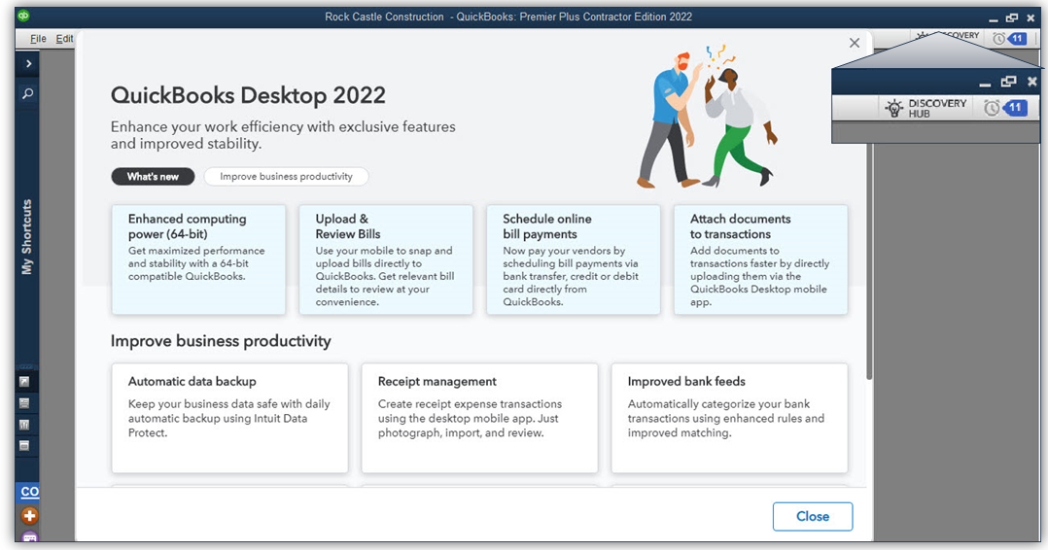
QuickBooks 2022 Boasts Modernized Foundation

Every year, businesses around the world anxiously await the release of the new versions of QuickBooks desktop software. While that may sound a bit silly, the truth is that QuickBooks is widely used in numerous countries around the world and when Intuit makes big changes to QuickBooks it impacts a lot of businesses.

While the focus for Intuit, like most software companies, is online subscription service, the fact remains that the desktop products and the ecosystem around them continues to grow.

Over the past few years, the company has invested in artificial intelligence and platform solutions that extend and add value to the desktop and online products. Some of these investments are becoming clearer with the launch of QuickBooks desktop 2022 editions.

64-bit QuickBooks [1]

The “guts” of QuickBooks was elderly and wasn’t up to current processing standards. Now, QuickBooks has a 64-bit foundation and the full capability of 64-bit processors can be used. This typically means faster application and data load times, faster report generation and an ability to handle larger data sets more efficiently. Beware of QB 2022 until you verify that your computers are all 64-bit machines, because QB 2022 can’t be installed on 32-bit systems. If you’re working with a hosting platform, you’ll need to make sure your host has modern infrastructure and up-to-date operating systems.

E-commerce for QuickBooks with Webgility [2]

Need to track your revenue from different selling platforms like Amazon, eBay, and Shopify, and sync the data directly with QuickBooks? There are a lot of e-commerce integrations for QuickBooks desktop, but Webgility wins when it comes to working with QuickBooks. There’s now a bundle that makes it easier to get the Webgility e-commerce integration for QuickBooks. Customers still must sign up with Webgility to get the service but purchasing the bundle package makes that quite a bit easier. Webgility uses a database to keep track of orders, so you’ll want to make sure your system is able to handle the extra load. If you’re on a hosting platform (other than NOOBEH), be ready to pay additional fees to support running Webgility.

Bill payment approval process

Improve your accounts payable process by creating a structured approval process so that only the right bills get paid. AP workflows can help businesses manage cash flow and improve transparency. Working in conjunction with the user’s Intuit.com account, the company can set up rules for QuickBooks to check which bills need approval for entry and payment. Users are then prompted to send bills for approval

Pay and schedule bills faster with Melio payments

Some subscription holders of QuickBooks Desktop Pro Plus, Premier Plus, or Enterprise are working with the new feature (from Melio Payments) that allows businesses to use QuickBooks to schedule and pay bills using a bank transfer, credit card or debit card. The vendor doesn’t have to have a Melio account; they can receive their payments either as ACH or paper check.

Bill entry automation and customized bill payment stubs

Save time and have QuickBooks automate bill entries from the QuickBooks Desktop mobile app (iOS or Android versions) or from bills sent via email. Review the bill data once it’s uploaded and match it to existing transactions in QB. Bill payment stubs are now on the list of customizable forms, so you can set up and email formal payment confirmations to vendors.

Upload documents [3]

Instead of scanning files on your PC to attach to QuickBooks transactions, you can now use the QuickBooks Desktop mobile app to attach documents to transactions. The attached documents feature of QuickBooks is awesome because it lets you use QB as kind of a document management solution where you can store original copies of bills, receipts, contracts, or other documents that associate with financial transactions or entities in your QB files. This new feature that allows documents to be uploaded via the QuickBooks Desktop mobile app is a great solution for businesses operating on some hosted platforms that can’t or won’t support scanning. One “gotcha” with attached documents is that many businesses forget that they have them, and when they go to migrate their QB data to another platform or computer, the file attachments either get forgotten or are so voluminous that it makes the migration difficult.

Choose from multiple customer contacts

Only available with Plus and Enterprise subscriptions is the ability to add multiple customer contacts to batch email runs. The program now lets you send emails more quickly by choosing batch mail recipients from a list of customer or vendor contacts, reducing the chances of email troubles caused by manual entry of addresses.

Instant deposit

When you use QuickBooks Payments (or any other payment service), it generally takes a few days for the money to wind up in your bank account. With a QuickBooks Payments account and for an additional fee, Intuit is now letting you get your money faster when customers pay. Instant Deposit is a service that works with a VISA or debit card to deposit the money into your checking account – any processing or other fees will continue to be debited from your regular payments bank account.

Payment links

Now you can do in QuickBooks what you can do with PayPal, Zelle and other money transfer apps. Businesses can use simple Payment links to collect payments before work is performed and even before an invoice is created. As with all other payments features, you need a QuickBooks Payments account to use this one.

Changes to software purchasing options

QuickBooks Desktop 2022 is only available as a subscription purchase. There is no outright purchase option for QuickBooks desktop any longer. For businesses that need only the most basic features of QB, Intuit is hoping the QBO platform will work, and changing the software from purchase to subscription is just one more step in moving users to adopt the web application. QuickBooks Pro and Premier are still widely used so they will be available for some time to come, but Intuit is clearly making moves to try to push smaller edition desktop users to the web.

[1] NOOBEH deploys only modern architecture, 64-bit systems for QB on Azure and other hosted solutions

[2] NOOBEH doesn’t charge extra to have Webgility or any other applications installed in your QB on Azure service

[3] NOOBEH QB on Azure  and other cloud hosting solutions support scanning directly from your local PC to QuickBooks, using specialty 3rd party tools. Whether you use QuickBooks mobile or scan directly to QB using the Attached Documents feature, NOOBEH supports it.

jm bunny feetMake Sense?

J

Considering Deploying Microsoft365 for Your Entire Organization? Success is in the details.

Technology is ever advancing, and even the smallest of businesses must keep in step to remain competitive. Efficiency is the key to modern, effective operations, yet keeping teams aligned and working towards the common goal can be tougher than ever when members are remote working. Microsoft solutions can help the business increase productivity and modernize their operations, and at the same time provide stronger security and enhanced protection.

For just about every business, it makes sense to consider using Microsoft 365 services. But there are a lot to choose from, and not all services work as you might expect, so here is a little information that might help with making service selection a little easier.

Does it make sense to implement Microsoft Teams for intra-company calls, meetings, and collaboration?

Teams is great for calling your co-workers, sharing screens, presenting content, and collaborating in workgroups or with the whole company. But be warned that Teams meetings don’t work for everyone, particularly those outside your organization or for users that don’t have useful Internet connectivity.

  • To use Teams with people outside the company, or even for users that don’t have Internet connectivity, you’ll need to also have a calling plan for each user.
  • A calling plan allows Teams to connect a phone number to the Teams meeting, creating a means for non-Teams users and those without internet to connect to the meeting audio.

Should you migrate employee email inboxes to MS365 (Outlook Desktop and/or Outlook Online)?

Using Microsoft for email services make a ton of sense, especially with the advanced phishing and threat protection that comes standard with the service. It is pretty much foolproof for most businesses and is a great value. If your business is migrating to Microsoft from a legacy email platform or from a different mail provider, there are a few things to consider.

  • Many companies use their desktop Outlook email folders as a sort of file cabinet, storing and categorizing emails for future use. In older MS Exchange environments, Public Folders were also used, enabling company-wide access to certain email folders and the file attachments within.
  • MS365/Office365 email services don’t support public folders, and every email box comes with a storage quota. If the business is used to saving lots of emails, then it might create difficulties with mailbox management.
  • Outlook Desktop still has limitations on the file size it can reasonably handle. This means that Outlook, when connected to hosted Exchange mail (Microsoft365), should run in cached mode, keeping only recent data in the Outlook file on the computer and leaving the rest of the mail on the server. Mail on the server is still available for search by Outlook; the program will simply search in the local data file first.

Can you, or should you, migrate your company’s files to the Microsoft cloud?

Keeping your files on the “cloud” is a concept that sounds convenient, but it isn’t quite as straightforward as it sounds. In this case, the idea is to migrate files from PCs and servers to Microsoft OneDrive or SharePoint, where the files can be available to all users regardless of where the user is working from.

  • Putting a big hard drive on your PC or server can be relatively inexpensive. “Storage is cheap” we hear quite often. Yet all storage facilities are not alike. It might be a cheap option to add a big hard drive or USB drive to your local system but paying for storage space on the web becomes a different deal. You may find that safe, protected storage for your files is not quite as inexpensive as you thought, especially over time. When you must pay every month for the storage you use, you rapidly realize why file housekeeping is essential.
  • File and folder permissions do not translate from your Windows file system to a SharePoint or OneDrive. You must create your own groups and set file and folder permissions as you want them AFTER the data is uploaded to the cloud platform.
  • Once the files are in the cloud platform, each user must determine what and how the files will sync with their local computers. There may be an option to “sync on demand” (depends on device platform) that can allow users to selectively sync files to/from their computers, but the fact remains that the data is being downloaded to the local computer so that it can be worked on. This still means that the local computer must have the necessary software installed, and the PC should be protected with backup, anti-virus and anti-malware and MFA.
  • Database files cannot work in a web file location. This means that programs that have associated database/data files must still have their files located on a network server for users to access them. QuickBooks, tax software, trial balance software, workpapers and fixed assets, inventory management or manufacturing, and more may require the server to serve the application and/or data to the users. This means that servers and networks and the need to manage the network and the individual computers remains in full.
  • If all other data is stored on the cloud platform, then you now have data and resources to manage both places.

What does the new Microsoft365 Cloud PC mean for small businesses?

  • The new Cloud PC from Microsoft365 can solve a tremendous problem for the very small business in that it can become the IT infrastructure and it is fully cloud platform.
  • Cloud PC is meant to replace your local PC as your operating environment. Rather than installing software and storing data on your local device, the idea is that your software gets installed on your Cloud PC and your data is stored, ideally, in your OneDrive, or maybe on the drive of your Cloud PC.
  • This makes the Cloud PC a perfect solution for that single user that needs to run their QuickBooks or other applications from anywhere.
  • The thing with the small business Cloud PC is that it cannot be networked. It may be able to “see” and work with your local device hard drive or even mapped drives that your local device is connected to, but it isn’t able to work with a network server or share like a local PC would.
  • This means that you may be able to store and retrieve files from servers or other drives on your local PC or network, but you won’t be able to access databases or other server or network-based applications that need the network to function.
  • This also means that you can’t share data on one cloud PC to another cloud PC… they aren’t networked together.

Why NOOBEH’s Cloud Service model is better

There’s a reason why businesses adopt NOOBEH QuickBooks on Azure services, and the benefits are as great as ever. Businesses work with NOOBEH and our QuickBooks on Azure services because we have the flexibility to do what the business needs, and to offer a comprehensive approach that doesn’t leave applications, services and data hanging around on local networks or unprotected computers.

Where the Microsoft365 Cloud PC is a great answer for the single-user, NOOBEH’s cloud servers are designed for multiple users needing access to common applications and/or data. Multi-user QuickBooks desktop applications, Sage or AccountEdge, MISys Manufacturing or Acctivate Inventory, ShipGear or Starship, Fedex or UPS and much more… we host the applications that businesses use every day.

NOOBEH keeps the applications and data securely running on private Microsoft Azure cloud servers. Centralized, server-based management of applications and data means that software does not have to be installed and maintained on individual computers, so the need for local PC backups and anti-virus and malware protection is also minimized. All users work on the same version of the same software, and everyone accesses the same data in real time. Version control issues and sync problems are entirely avoided when everyone is working in the live system with live data, and Microsoft’s Azure platform ensures that issues due to transient hardware failures are a thing of the past.

When the company has workers that must operate from their local computers, NOOBEH can enable a solution to keep SharePoint in sync with the cloud server, ensuring that workers on and off the server are able to reach the most current version of the files. Users working in QuickBooks can interact directly with SharePoint files and folders by using the native Windows File Explorer where users operating on their local PCs access SharePoint via OneDrive or via the web. This approach delivers the best of both worlds to businesses who need more flexible modes of operating.

Contact us today to find out more about how we can help your business do more in less time, improve efficiency and work more effectively with a system that works where and when you need it.

jm bunny feetMake Sense?

J

Considering Cybersecurity as Cloud Work Expands

When the pandemic forced many business users to move to remote work, it also forced the network security “boundary” to expand greatly and with great speed. Companies quickly adapted their tools and work so that it could be done somewhat effectively even as the employee working environment changed.  But new security models to match with new working models have not as quickly been adopted.

Business cloud workloads grew, by some estimates, as much as 20% just in the first 6 months of 2020. Yet many of those businesses electing to bring cloud working models to their business also made of the mistake of not expanding their security as they expanded the cloud network. This leaves systems and information vulnerable. Phishing, ransomware, credential theft and web app attacks have increased, catching businesses in their vulnerable states.

“In April to June of 2020 alone, security incidents increased by 188%.”

Even more than on-premises systems, it was the external cloud-based data and applications that were under attack because so many companies expanded their use of cloud services without enhanced security as part of the plan. Any expansion to include the cloud as network also significantly increases security risks. One report found that 35% of businesses made their cloud storage openly accessible to the public, allowing anyone to access it via the internet.

Don’t let your critical information be exposed or put at risk. When you begin using a cloud service, make sure to also address security for the new working mode or it could lead to lost or leaked information or a system breach.

Mendelson Consulting and NOOBEH cloud services take security very seriously. We help our clients keep their applications and data working properly and have a focus on methods to keep information safe regardless of what cloud you work on.

jm bunny feetMake Sense?

J

1 ( https://duo.com/blog/growing-security-safely-in-canada )

Into the Sunset with QuickBooks 2018

Every year when the new editions of QuickBooks desktop editions are released, Intuit discontinues services for certain older versions. This is referred to as the sunset of the version. In general, a QuickBooks desktop edition can live for up to 3 years. After that time, all bets are off. The software might continue to work, but connected services won’t, and there will certainly be no security or compatibility updates beyond that point. For businesses using QB 2018 and planning to continue using their QuickBooks software and data – you need to upgrade your QuickBooks software now.

Intuit generally notifies customers in various ways about the discontinuation of QB editions. Granted, there is a lot of other advertising about QuickBooks that users receive, so it isn’t unusual for these notices to be missed. But the software will also tell you, and those notifications shouldn’t be ignored.

May 31, 2021 marks the end of access to add-on services for QuickBooks Desktop 2018 (Windows).

This means that all Windows versions of QuickBooks Desktop, including Pro, Premier and Enterprise 18 will no longer be able to connect to add-on services like payroll or merchant services. For Pro and Premier users, the software will continue to run, but there won’t be any availability of add-on or connected services or live technical support.

From Intuit: “Your access to QuickBooks Desktop Payroll Services, Live Support, Online Backup, Online Banking, and other services through QuickBooks Desktop 2018 software will be discontinued after May 31, 2021. “

The discontinuation (sunset) also means that you’ll no longer get critical security updates for the QuickBooks 2018 software. With this being the case, and especially if you expect to continue using your QB 2018 software without connected services, make sure to install all security and other updates your software receives prior to June 1, 2021.

Here’s the list of products impacted by the discontinuation of services after May 31, 2021.

If your business uses any of these services and you want to continue using them, your option is to upgrade to the latest version of QuickBooks Desktop

  • QuickBooks Desktop Pro 2018
  • QuickBooks Desktop Premier 2018 (General Business, Contractor, Manufacturing & Wholesale, Nonprofit, Professional Services, and Retail)
  • QuickBooks Enterprise Solutions 18
  • QuickBooks Premier Accountant Edition 2018

Products for which services will be discontinued after April 27, 2021

QuickBooks Desktop Point of Sales 18.0 and 19.0 will lose access to QuickBooks Desktop Point of Sale 12 payments services

Products for which services will be discontinued after August 10, 2021

QuickBooks Desktop Point of Sales 18.0 will lose access to QuickBooks Desktop Point of Sale 18 payments services

Mendelson Consulting was the first and remains the best source for QuickBooks Enterprise and other QuickBooks software solutions and services.

If you know what you need and just want to get your updated QuickBooks software now, visit The QB Store now to buy online. It’s fast and easy and you’ll get your new software right away.

When you need a consultation regarding which editions of QuickBooks might be right for you, the team at Mendelson Consulting will help you select the right product. For data conversion, implementation, training, file repairs and any other services around the use of QuickBooks, Mendelson Consulting is the place to go.

The NOOBEH Cloud team, specializing in deploying QuickBooks on Azure, provides fully-managed hosting and cloud IT consulting to help your business implement a platform that delivers the resiliency and performance you need to keep things running smoothly.