QuickBooks Desktop 2021: Getting Paid Faster, Being More Efficient, and Improving Data Security

The new QuickBooks Desktop 2021 editions have new and improved features that help businesses get paid faster and secure data more effectively, making the software work even better for your company.

Many of the improvements center on automation and workflow, enabling users to get more done with fewer keystrokes and setting up automatic activities so that items don’t have to be handled manually.

Other improvements center on data and information access, allowing admins to get granular with setting user permissions and access to certain types of information, even down to the record.

Intuit has also delivered several enhancements to existing functionality in QuickBooks desktop, especially in the Enterprise edition and where inventory is involved.

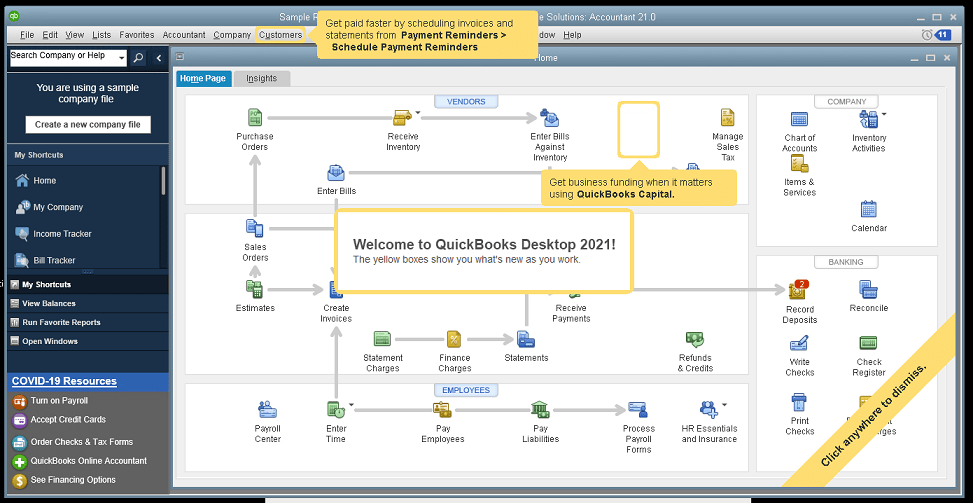
Here is a brief summary of the main changes or additions introduced with QuickBooks 2021 editions.

Improved Bank Feeds
Review bank transactions and match them to existing ones in your books or quickly add new transactions using the advanced bank feeds capability. You can automatically categorize or batch-edit bank transactions by payees, accounts and classes. This can dramatically reduce the time and complexity of reconciling entered transactions with the items the bank processes.

Automated Payment Reminders and Statements
Now you can send statements automatically to customers, with each statement tailored to the customer’s needs or preferences. Set automatic reminders for customers when their invoices are due and schedule statements for your customers to let them know when they have invoices they still need to pay you for. Timely communications with customers regarding their invoices and activity is more likely to keep a customer coming back for more. It also reduces the time required to communicate individually with customers, making AR management and collection activities more efficient.

Customized Payment Receipts
Want to send certain customers a customized message on their receipts? You can use custom templates for forms like invoices, sales receipts, estimates, statements, and purchase orders so each form has the right look and information. Then use the new customer groups capability to get the right form for the right customer every time.

PDF preview
It is always a good idea to preview a document before you send it via email, but that wasn’t always a convenient thing to do in QuickBooks. Now QuickBooks lets you automatically preview attachments before emailing them to customers. You can even preview multiple attachments at once without having to manually open each one outside of QuickBooks, saving huge time and effort and smoothing out a previously-clunky workflow.

Receipt Management
Receipt management in QuickBooks desktop is a new feature that makes entering expense receipts easier and faster. You can give users access to upload expense receipts to QuickBooks using the mobile app or directly from your computer. Automate creating categorized receipt expense entries using the QuickBooks Desktop Mobile App, an option available only with the Plus subscriptions (not the one-time purchase option).

Create Customer Groups
Improve customer communication with rule-based customer groups based on fields like customer type, location, or balance. Creating customer groups allows you to find all customers that match certain criteria. Then you can create automated statements, send payment reminders or create mailing lists for specific groups of customers.
In QuickBooks Desktop Enterprise, you can even use customer groups to define permissions and access at customer and vendor group level.

Data Level Permission
Data level permissions is a new feature in QuickBooks Enterprise 21.0 that gives you more control regarding restricting access for users and roles. This makes it so the admin can create users and roles with access permissions all the way down to the record level for customers and vendors.

With data level permissions you can improve security and confidentiality of information by assigning users access only to the specific data, transactions and reports that they are responsible for. Users will only be able view, edit, or delete specific customers, vendors, or data with the permissions you delegate to them.

NOTE: Data level permissions don’t appear to be available in QuickBooks Enterprise Accountant, nor are they available with a Silver or Gold subscription. To get this feature, you have to go Platinum or Diamond, so it’ll cost you.

Add prices to barcode labels
Wouldn’t it be great if you could print barcode labels with pricing information as well as the item name and description? Now you can! Barcode labels help you accurately identify and manage inventory, providing the information most often needed by employees and customers.

Landed cost
Gain more control and flexibility over how you calculate and share landed inventory costs. Set up landed cost accounts as “COGS” (Cost of Goods sold) or “Other current assets”, and accurately calculate landed cost for old item bills from closed accounting periods. You can also print bills with or without landed cost, allowing you to better control the information you present.

Alternate vendor reports
Key inventory reports can now include alternate vendor information, improving visibility into vendor information on inventory stock status by item, inventory valuation summary and other reports. Linking to alternate vendors via these reports simplifies and streamlines the process of reordering from alternate vendors.

QuickBooks desktop software continues to be the cornerstone of small business accounting. From very small business to the growing enterprise, QuickBooks delivers the functionality that every company needs to manage their income and outgo, customers and vendors, and all their banking activities.

Starting with the early 1999 version to the current 2021 release, Intuit has continued to add capability and enhance features and usability to keep QuickBooks as the most popular small business accounting product on the market. Remember the motto “if you can write a check, you can do your own books“? That’s QuickBooks.

jm bunny feetMake Sense?

J

Using a Remote/Cloud Server is Like the Green Screen Days – Only Better

Remote access and “dumb” terminals have been around for many years, allowing users to connect to computing resources located elsewhere… whether in another room or another state. Using hardware or software called an “emulator”, one computer system is able to behave like another computer system. In the case of the dumb terminals and green-screen devices, the emulator allowed the terminal device to mimic the keyboard layout and screen display properties so they would be recognized and used properly by the remote computer.

Consider that you might want to use your Macbook to connect to a remote Windows server. Microsoft Remote Desktop is an emulator of sorts which allows a local device (PC, Mac or mobile) to emulate the properties of a Windows remote computer so that screen, keyboard and other input devices function.

A cloud hosting environment operates similarly to the timeshare or service bureau systems of the past. You use a terminal – in this case a device or computer connected to the Internet – to operate your applications on the host computer.

The connection used to be over phone or fax lines, with modems making that squealing and squelching noise to let you know the digital handshake was being made. These days, remote access is much quieter, using the Internet as the network rather than making individual phone calls to reach the remote host.

Once your device – the PC, Mac or mobile device you are connecting with – establishes its connection to the cloud server, the computing resources and applications in the cloud environment become available.

Since the cloud server is a Windows environment, we are able to run most Windows-based applications and other network services you would typically find in a business. We manage the environment so your users can focus on running the applications that help them get their work done.

What’s different from the old green-screen terminals of the past is that you can use your modern devices – Windows PCs, Apple computers and iOS or Android mobile devices – and take advantage of the audio, video and other capabilities they support both on and off the cloud platform.

This environment provides you with the best of both worlds – the applications and familiar working environment you need, as well as the flexibility of accessing from any location and using any device.

When your business operates from the hosted cloud server there are no different versions of the software to worry about. All users work on exactly the same system in real-time so there is no more concern about software updates for individual computers, or licensing applications for use in multiple locations.

Files do not need to be moved or converted in order to work with the cloud platform. File are accessed centrally and in real-time so all users are working in the same database at the same time.

No sophisticated technology or training is required to take advantage of our hosting solutions since your users already know how to use Windows and QuickBooks. It’s a simple transition from operating on the local computers to working on the cloud platform.

Once you migrate your systems to your private cloud environment, you’ll wonder how you got along without it.

Make Sense?

J

QuickBooks changes and enhancements for 2020: My 2 Favorite Fixes and Let’s Talk Cloud Hosting

Accounting professionals and small businesses worldwide use QuickBooks software to manage business finances. Launching Basic and Pro versions in 2000 and increasing market share from 74% in 2004 to boasting more than 94% in 2008, Intuit continues to successfully serve the needs of small and growing businesses.

Over the past few years, Intuit has focused quite a bit on SaaS and online services, promoting QuickBooks Online Edition, mobile payments and full service payroll as solutions that can meet specific business needs and which drive new customer adoption of the products. While customers may initially attach to QuickBooks because of one of these capabilities, it is the richer functionality found in Pro, Premier and Enterprise which often causes the business to run the desktop editions.

Intuit knows that the desktop editions remain hugely popular, which is why they continue to be updated and supported. And this is also why payments, payroll and other functions supported by the product are handled as integrated service rather than software; It’s a great way to make sure customers upgrade their QuickBooks software regularly, even when it sits on the desktop.

qbwordle

The changes in QuickBooks for 2020 aren’t amazing… it seems like they are more tweaks and adjustments than real feature releases. I’ll list a few of the changes below, but first I’d like to point out the 2 changes that I think might make a big difference.

These are my 2 favorite changes with QB 2020

1. QuickBooks Enterprise 2020:  Landed cost

How did you get along without this before? Manual calculation, that’s how. Landed cost capability gives visibility to actual, complete product costs because it adds freight, duties, insurance and whatever other expenses relate to the purchase. Allocate the costs to item bills and you now have a complete view and tracking of the real cost of bringing in the product.

2. It is Now Easier to Reset the Admin Password

Yay! No more 20 questions! The Admin password for a company file may now be reset without having to enter a bunch of information and answer a lot of questions to verify identity.  The process now asks that the user pick their email address from a drop down list of emails registered with the QuickBooks license. A token is emailed to the address to use in resetting the Admin password.  The key here is to make sure your QuickBooks registration information remains up to date so that an email you can get to is used for this process.

Here’s the list of changes in QB 2020.

You can see more on Intuit’s website.

QuickBooks Desktop Pro, Premier, and Accountant

  • Automated Payment Reminders
  • Automatically add customer PO# to Invoice emails
  • Combine all invoices meant for a single customer into one email
  • Find and open your company files with the addition of a file search option
  • Enhanced Accessibility to improve usability for vision-challenged users
  • Collapse columns in reports
  • View detailed status of direct deposit payroll
  • Smart Help: Press F1 for improved content and search experience

QuickBooks Enterprise Solutions 20.0

Here are the changes specific to QB Enterprise

  • Complete picking and packing operations as part of single workflow
  • Track product landed cost
  • Manage product vendors with primary and alternate vendor selections

Intuit continues to do a fine job of making QuickBooks desktop the most useful and easy-to-use solution for small business finance, and we make it run best in the cloud.

Where QBO (the online edition) might work for very small businesses and those with very limited requirements, the real work gets done in the desktop editions. My team helps make running the QuickBooks desktop editions easier and even more useful in the cloud.

A quality cloud hosting approach can deliver anytime/anywhere access, greater IT resiliency and faster disaster recovery, but only if done properly (note my favor for private tenant hosting rather than multi-tenant or shared hosting). The wrong platform introduces poor performance, limitations on applications and breaks in processes and workflows, and may even compromise security and complicate recovery when something does go wrong.

QuickBooks desktop solutions are the right fit for many small businesses, and these businesses demand mobility, security and flexibility in their IT systems. Providing this is our way of helping make QuickBooks desktop a little bit better.

jmbunnyfeetMake Sense?

J

How Accounting Professionals Can Improve the Profitability of Their Existing Business Using Cloud

Working Closer with Business Clients

Accounting professionals are increasingly asked to provide more meaning behind the numbers they report on. Small business owners care about the bank balance and their tax bill, but they care far more about how profitable and productive the business is operating. And small business owners care about how they can improve performance – earn more profits and keep more of it. Accounting professionals can help their small business clients do this more efficiently using cloud and hosting technologies.

Small businesses need their accounting professionals to take a more direct level of involvement in support of daily processes than larger companies do.

For small and mid-size businesses, the accounting office may be asked to handle bookkeeping, payroll processing, bank account reconciliations, paying bills and invoicing customers and more. In order to have close access to the information and applications supporting these processes, it becomes necessary for accounting pros to be able to connect remotely to client systems. This isn’t a new requirement, but the technology available today to make it work allows for closer and more immediate interaction between the client and the accounting professional.

When a small and growing business runs their applications on a cloud platform, the variety of users that need to work with the information are able to access it regardless of where they are located because the Internet becomes the network.  This model doesn’t in any way require that businesses adopt web-based applications instead of the desktop applications they have come to rely on.  Desktop applications like QuickBooks, Sage50, Microsoft Office and more can be hosted on cloud platforms, allowing business users to login and use the software they are familiar with and that supports their various processes.

With a cloud hosting model for running business applications and storing business data companies can take advantage of fully-managed deployments of their software and systems without having to employ the IT staff to implement and manage it all. This allows small businesses to have the advantage of high performance IT without the typically high-cost budgets required to support it. The other advantage is that the accounting professionals working with the business are able to access the systems in real time from their offices or other locations, enabling the close working relationship the business needs.

The key value proposition for the accounting professional is the improved profitability to be found in existing client engagements.

Whether it is through an increase in the number and type of services offered to the client or through an improved level of efficiency found with operating on the hosted system, professionals can increase revenues and reduce costs of supporting existing clients. That’s the secret to success in working with the small clients: earn enough working for them while at the same time keeping their costs down so they can grow into larger more profitable business clients.

Make Sense?

J

Countdown to End of Life for QuickBooks 2016

Every year Intuit releases a new version of QuickBooks desktop software, enhancing functionality and adding features to keep the product useful in the modern world. As the program continues to move forward, keeping pace with newer operating systems and software conventions, the older technology and application models eventually expire. Without support and updates, key service features or service integrations, the end-of-life versions of QuickBooks become not only less functional, they become less secure and have a much greater potential for problems.

QuickBooks-Hosting-WordCloud

The QuickBooks Desktop Discontinuation: May 31st is the sunset date for 2016 Versions

While Intuit frequently communicates with license holders via various mailings and in-product notifications, including notices about the discontinuation of the version, the message is often lost amid the annoying messages customers receive via email or as disrupting popups in the program. It is very important that users not miss this notification because it really means more than just a need to update the software. Most businesses have more invested than than just a software purchase, they also have their data and operation to consider.

The real investments a business makes when it adopts QuickBooks desktop are the business processes the software supports, the transaction, customer, vendor, job and product information kept in the system, and the financial and performance data that comes from all of that. People, processes and information are the building blocks of the business and losing any of it can be far costlier to the business than the cost of an annual software upgrade.

When do services for QuickBooks 2016 stop?

May 31, 2019 marks the end of access to all services for QuickBooks 2016 Desktop editions. This includes QuickBooks Desktop 2016 Pro, Premier, Enterprise Solutions and Accountant editions for Windows, and the 2016 Mac edition. The software will continue to function at an basic level after that date, but technical support will end and all integrated services will stop working with the software.

What does it means when Intuit says services for QuickBooks 2016 will stop?

Software updates, online support and certain other added functionality within QuickBooks is provided as service integrated with the desktop software. When support and integrated services are discontinued, it means that subscription or added service functionality is no longer available. Payroll services, online banking, online backup and live support are some of the integrated services that will stop working on May 31, 2019.

Businesses that don’t need payroll, online banking or other services with QuickBooks should still upgrade the software.

While the basic functionality of QuickBooks 2016 will continue to work beyond the discontinuation date, the security and compatibility of the system should remain as top considerations. A major aspect of product discontinuation is the loss of software updates and security updates in particular. When users of 2016 QuickBooks versions stop receiving critical security updates, it could leave the installation vulnerable in a variety of ways. Weaknesses in security protocols or password storage, or failure to update software to remain compatible with new versions of Office or Windows (or Mac OS) could not just render the software unworkable but can also lead to potential data corruption or leave private information visible to hackers.

Upgrade to a newer version of QuickBooks Desktop to continue use of payroll, online banking, online backup, support and updates. For Windows users, 2017, 2018 and 2019 versions continue to be supported, but 2019 becomes the only supported version for Mac. Intuit previously indicated that there wouldn’t be a new Mac version, so having a 2019 edition represents a big win for Mac users who wish to keep their QuickBooks compatible with newer Mac OS versions.

People, processes and data are reliant on the software that supports the activities that keep the business running. Central to retaining the value of your business information and operational processes is keeping the software supporting them up to date with the most current feature set, service integrations, and application and update support. After all, the incremental investments made to maintain important assets of the business tend to be less costly than recovering from lost data and reduced productivity due to failure of an unsupported system.

Joanie Mann Bunny FeetMake Sense?

J


4 Rules of Thumb for Getting Business Benefit From EDI

The First Step in Transformation is to Stop Doing Things Twice

Double-entry is dumb. Entering data once introduces the possibility of making an error, and entering the data again only increases the chances for a mistake. Typing information into the computer also takes time and the more manual entry is done the greater the potential is for input errors which take even more time to find and correct. Manual entry of information may be required when starting with a paper-based process, but double-entry of information doesn’t make any business sense. In this age of computers, the internet and electronic commerce, reducing manual entry to increase performance and accuracy is more important than ever. Thankfully, manual data entry is being eliminated and EDI is the foundation that helps make it happen.

tall-tower-vancouver“… the key is the unattended and intelligent movement of data from one system to another.  People don’t have to get involved in order for the information to flow from one system to another… it just goes by itself.  Like a robot.”

Robots are just automation you didn’t know you needed

Electronic Data Interchange (EDI) is the use of computer and telecommunication technology to move data between or within organizations. EDI uses strictly structured information that can be transferred from one program to another without human intervention. EDI is one of the most important subsets of e-commerce, being the technology that helps two parties exchange information around a commercial transaction. One of the fundamental first steps in business transformation is the automation of business processes, and this is the main goal of EDI.

EDI addresses and solves problems inherent in paper-based processes. For many, EDI is the basis for reengineering processes and giving manual workflows an automation overhaul.

4-rules-of-thumbHere are 4 Rules of Thumb regarding implementing EDI in the business and where it can deliver the biggest benefits


Rule 1: Go paperless and reduce or eliminate paper-based processes

Delays in activity performance and access to information are often due to paper-based processes, where transportation, storage and retrieval of documents cost valuable time. Labor costs are also higher when paper-based processes reign, increasing overhead costs for document processing and handling. Non-EDI systems also tend to be more error-prone because information is keyed multiple times, and because documents are transported, stored and retrieved by humans.

Rule 2: Reduce operational costs by increasing the speed of business and decreasing processing times and errors

Cutting costs is a top benefit of implementing EDI in the business, centered on doing away with the use of paper while automating key business transactions, saving both time and money in the core process as well as in error correction and problem resolution. Increased productivity is an expected result of employing paperless solutions and technologies. By reducing paper-based processes and embracing electronic transaction processing, businesses can handle more operational activities with the same (or fewer) human resources.

Rule 3: Re-Structure workflows to improve activities that make customers happy

Using EDI in the business helps to structure information and workflows, increasing efficiency and process performance in a variety of areas.

EDI also improves performance because processing time can be reduced to seconds, enabling greater efficiency in services delivery and a level of responsiveness that makes customers happier. Because EDI permits access to a potentially vast amount of detailed transaction data, the information can now be used to automate other processes and stored for analysis.

Rule 4: Get better data and more insight

EDI solutions help to minimize errors in the data, creating a basis for better reporting and analysis. Mistakes in data entry or order taking can be significantly reduced (if not eliminated), and well-structured data removes the need for “interpretation” of the information. Replacing paper documents with electronic ones can also make it easier to keep track of the status of an item, which is why EDI solutions ensure traceability of transactions that paper-based tracking can’t readily provide. All this serves to help the business gain the insight necessary to respond more quickly to changing market conditions and customer demands.

Integrating EDI into the business processes is key to improving business performance in a wide variety of areas. Like moving from phone to fax orders, or from fax to online, EDI represents a big change in how transaction processing takes place. By enabling EDI transactions with current and new suppliers and channels, the business also enables more efficient, seamless communications between all participants in the supply chain. Removing the need to re-key data and reducing the need to rely on human manual processes, EDI systems connect orders and invoices and shipping and returns… and all the trading partners along the way.


jmbunnyfeet

Make Sense?
J


cropped-logo_mc_w_short-1Cooper Mann works closely with the experts at Mendelson Consulting, experts at QuickBooks and EDI.