QuickBooks Desktop Enterprise 2024 Security Improvements: Now with 256-bit encryption

Intuit’s release of QuickBooks Enterprise and other desktop editions for 2024 have a variety of new features, and among them is an improved level of security for your business data. Upgrading from 128-bit encryption, QuickBooks Desktop 2024 now has AES 256-bit encryption.

256-bit encryption is the strongest and most robust encryption standard commercially available. It’s widely used because it’s virtually impenetrable to brute-force attacks. 256-bit encryption is an encryption technique that uses a 256-bit key to encrypt and decrypt data. Plain text is converted to a cipher, and the encryption key is required to decrypt the data and return it to readable plain text.

256-bit encryption is used in most modern encryption algorithms, protocols, and technologies, including AES in wireless security, processor security, file encryption, and SSL/TLS.

According to Intuit, “You can be confident your data is protected with our enhanced security using industry-leading AES 256-bit encryption. QuickBooks safeguards your reputation by protecting critical customer and vendor data, such as business financials, banking information, and credit card details.

This means we translate your information into a code that only we can read to make sure only you and Intuit have access to your information. The type of encryption we use is called AES-256 (Advanced Encryption Standard with 256-bit keys) and it ensures the highest level of cryptographic security.”

With a series of robust security steps and a complex 256-bit decryption key, AES 256-bit standard is nearly impossible to break using brute-force methods and has been approved for the handling of confidential data by the U.S. Government.

A brute force attack is when a hacker tries different combinations until they arrive at the correct combination – the key. The larger the key size, the more difficult it becomes to break the encryption. We’re talking about 256-bit keys. There are 984,665,640,564,039,457,584,007,913,129,639,936 (that’s 78 digits) possible combinations. Even if you use Tianhe-2 (MilkyWay-2), which was the 4th fastest supercomputer in the world in 2022, it will take millions of years to crack 256-bit AES encryption.

In case you’re interested: The fastest supercomputer in the world, ranked in June 2023, is Frontier, an HPE Cray EX system run by the US Department of Energy, Frontier incorporates 3rd Gen AMD EPYC™ CPUs representing 8,730,112 cores that have been optimized for high-performance computing (HPC) and AI with AMD Instinct™ 250X accelerators and Slingshot-11 interconnects. Its HPL benchmark was 1.194EFLOPS (EXA – 1 quintillion – floating point operations per second). (via networkworld.com). Frontier is faster than Tianhe-2, so breaking the key could take a little less time.

Breaking encryption with no known flaws is kind of like guessing a password. If you make enough guesses, you might eventually get the password right. With strong encryption, this can take a long time. AES-256 is the most secure version of AES and is virtually unbreakable by brute force based on current computing power. It’s also considered quantum-resistant, which means that quantum computers aren’t expected to crack the cipher.

How long would it take to crack 128-bit encryption using a brute force attack? Most security professionals would answer “1 billion years”, but that’s just an estimate. A machine that can crack a DES key in a second would take about 149 trillion years to crack a 128-bit AES key. According to researchers, with the right quantum computer, AES-128 would take about 2.6110^12 years to crack, while AES-256 would take 2.2910^32 years. For reference, the universe is currently about 1.38×10^10 years old, so cracking even an AES-128 encryption with a quantum computer could take hundreds of times longer than the universe is believed to have existed.

While Intuit is improving the security of the information it stores and transmits between its systems, your company should be equally concerned with the security and protection of all your business applications and data. Using strong password policies, multi-factor authentication, and SSL for secure web app access, Noobeh’s QBonAzure services provide layers of protection on top of the $20Bn in security investments made by Microsoft.

We take data security seriously, providing solutions to address access, security, privacy and protection for business applications and data. When your QuickBooks Enterprise deployment needs a solid foundation that offers agility and performance as well as strong platform security, we have that.

Visit MendelsonConsulting.com/cloud to learn more.

jm bunny feetMake Sense?

J

When a Business Outgrows QuickBooks Enterprise

Small and midsized businesses use QuickBooks software to manage finance and operations. Since growing past 90% market share in 2008, Intuit QuickBooks proved over the years that businesses adopt accounting and finance software if it is affordable and easy to use. While Intuit’s focus today may be on gaining market share with the web-browser-based QuickBooks Online edition, QuickBooks Desktop Enterprise continues to serve the needs of companies requiring more robust functionality than QuickBooks Desktop Pro/Premier or QuickBooks Online editions offer.

Over the years the QuickBooks product line has grown to support larger businesses, with the Enterprise edition scaling to 40 users and boasting a load of features that fully support operational processes. Inventory management, order processing workflows, construction management, and other features give encouragement to businesses needing support for more complex processes. QuickBooks Enterprise allows the flow-through of product use knowledge, stored data and integration with other business solutions to be seamless and consistent when moving up from QuickBooks Desktop Pro or Premier editions.

When a business finds that it may be outgrowing the capabilities of QuickBooks, it does not necessarily have to abandon the product line in lieu of a larger framework such as with alternative ERP systems. While the larger web-based systems may boast greater capabilities, they often come with much greater cost of service and implementation.

For businesses invested in QuickBooks Enterprise, it makes sense to look at alternative technical or platform solutions to address certain operational needs rather than shifting to different finance and operations software. The cost and complexity of an entirely new ERP software implementation is often more burdensome and costly than is needed to meet the real business demand. Also, the value found in business data can be lost when converting from one solution to another, and the cost of change is often so burdensome that many businesses simply abandon their projects if they even get started.

When using QuickBooks, at times it is the platform — the local network, computers and server — that is not geared to handle more users, processes and applications working with QuickBooks and a more robust and agile situation is required. Businesses should also explore integrations or extensions that can address the functional requirements, supporting advanced and complex workflows with greater agility while retaining the full value of the historic data.

Some challenges with QuickBooks may indicate a business needs a more robust and scalable solution, but that does not necessarily indicate that the business has truly outgrown QuickBooks. Instead, it may be a situation best handled by extending QuickBooks through application integration with a more robust subsystem to address specific business needs, to add scalability, and to build on the existing history and business intelligence previously developed in the enterprise.

Large transaction volume, extensive inventory management, or performance issues can easily create the impression that a business has outgrown QuickBooks Enterprise. In most cases, these conditions are overcome by extending QuickBooks with solutions geared specifically to handle the complexities and volume of heavy inventory management processes. These solutions not only address the in-depth functionality required, but also tend to utilize more agile and robust database structures that can scale far beyond the capacity of any QuickBooks edition alone.

Some businesses wishing to provide more advanced reporting and analytics, along with delivering realtime insights, may initially consider QuickBooks reporting to be insufficient for their needs. Yet there are integrations available which make QuickBooks financial and operations data as accessible and usable as the most robust enterprise applications. Satisfying the need for highly customized reporting and analytics far beyond QuickBooks standard reporting, these solutions create visibility and give meaning to QuickBooks data in ways that cannot be accomplished within the application alone.

Mendelson Consulting understands how businesses can outgrow the core functionality of QuickBooks and provides the tools and solutions to address growth in practical ways that do not diminish the value of data, training and operational intelligence that has been so costly for the business to acquire. We help businesses expand their capabilities and improve efficiency without losing their investment in QuickBooks, addressing the needs of growing and complex businesses without forcing the change to more extensive and expensive solutions.

jm bunny feetMake Sense?

J

QuickBooks Desktop 2021: Getting Paid Faster, Being More Efficient, and Improving Data Security

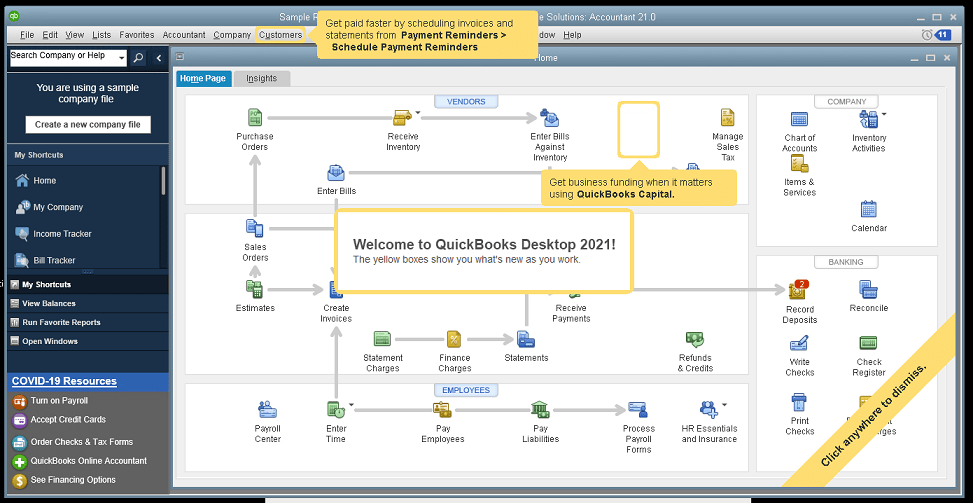
The new QuickBooks Desktop 2021 editions have new and improved features that help businesses get paid faster and secure data more effectively, making the software work even better for your company.

Many of the improvements center on automation and workflow, enabling users to get more done with fewer keystrokes and setting up automatic activities so that items don’t have to be handled manually.

Other improvements center on data and information access, allowing admins to get granular with setting user permissions and access to certain types of information, even down to the record.

Intuit has also delivered several enhancements to existing functionality in QuickBooks desktop, especially in the Enterprise edition and where inventory is involved.

Here is a brief summary of the main changes or additions introduced with QuickBooks 2021 editions.

Improved Bank Feeds
Review bank transactions and match them to existing ones in your books or quickly add new transactions using the advanced bank feeds capability. You can automatically categorize or batch-edit bank transactions by payees, accounts and classes. This can dramatically reduce the time and complexity of reconciling entered transactions with the items the bank processes.

Automated Payment Reminders and Statements
Now you can send statements automatically to customers, with each statement tailored to the customer’s needs or preferences. Set automatic reminders for customers when their invoices are due and schedule statements for your customers to let them know when they have invoices they still need to pay you for. Timely communications with customers regarding their invoices and activity is more likely to keep a customer coming back for more. It also reduces the time required to communicate individually with customers, making AR management and collection activities more efficient.

Customized Payment Receipts
Want to send certain customers a customized message on their receipts? You can use custom templates for forms like invoices, sales receipts, estimates, statements, and purchase orders so each form has the right look and information. Then use the new customer groups capability to get the right form for the right customer every time.

PDF preview
It is always a good idea to preview a document before you send it via email, but that wasn’t always a convenient thing to do in QuickBooks. Now QuickBooks lets you automatically preview attachments before emailing them to customers. You can even preview multiple attachments at once without having to manually open each one outside of QuickBooks, saving huge time and effort and smoothing out a previously-clunky workflow.

Receipt Management
Receipt management in QuickBooks desktop is a new feature that makes entering expense receipts easier and faster. You can give users access to upload expense receipts to QuickBooks using the mobile app or directly from your computer. Automate creating categorized receipt expense entries using the QuickBooks Desktop Mobile App, an option available only with the Plus subscriptions (not the one-time purchase option).

Create Customer Groups
Improve customer communication with rule-based customer groups based on fields like customer type, location, or balance. Creating customer groups allows you to find all customers that match certain criteria. Then you can create automated statements, send payment reminders or create mailing lists for specific groups of customers.
In QuickBooks Desktop Enterprise, you can even use customer groups to define permissions and access at customer and vendor group level.

Data Level Permission
Data level permissions is a new feature in QuickBooks Enterprise 21.0 that gives you more control regarding restricting access for users and roles. This makes it so the admin can create users and roles with access permissions all the way down to the record level for customers and vendors.

With data level permissions you can improve security and confidentiality of information by assigning users access only to the specific data, transactions and reports that they are responsible for. Users will only be able view, edit, or delete specific customers, vendors, or data with the permissions you delegate to them.

NOTE: Data level permissions don’t appear to be available in QuickBooks Enterprise Accountant, nor are they available with a Silver or Gold subscription. To get this feature, you have to go Platinum or Diamond, so it’ll cost you.

Add prices to barcode labels
Wouldn’t it be great if you could print barcode labels with pricing information as well as the item name and description? Now you can! Barcode labels help you accurately identify and manage inventory, providing the information most often needed by employees and customers.

Landed cost
Gain more control and flexibility over how you calculate and share landed inventory costs. Set up landed cost accounts as “COGS” (Cost of Goods sold) or “Other current assets”, and accurately calculate landed cost for old item bills from closed accounting periods. You can also print bills with or without landed cost, allowing you to better control the information you present.

Alternate vendor reports
Key inventory reports can now include alternate vendor information, improving visibility into vendor information on inventory stock status by item, inventory valuation summary and other reports. Linking to alternate vendors via these reports simplifies and streamlines the process of reordering from alternate vendors.

QuickBooks desktop software continues to be the cornerstone of small business accounting. From very small business to the growing enterprise, QuickBooks delivers the functionality that every company needs to manage their income and outgo, customers and vendors, and all their banking activities.

Starting with the early 1999 version to the current 2021 release, Intuit has continued to add capability and enhance features and usability to keep QuickBooks as the most popular small business accounting product on the market. Remember the motto “if you can write a check, you can do your own books“? That’s QuickBooks.

jm bunny feetMake Sense?

J

QuickBooks 2018 Updates and Enhancements

QuickBooks 2018: Changes You See and Updates You Can’t See

QuickBooks 2018 has been released, and there are a number of beneficial enhancements and changes to the application that many will find very useful.  Sometimes it is the little things – like a past-due stamp that can be printed on invoices when they are re-sent to a customer – that can make getting the work done just a bit easier. Being able to search the chart of accounts is another thing that doesn’t sound like a big deal, but becomes one when you just can’t remember the account number you’re looking for. Frequently having to scroll through the list of accounts is taking more of your time than you’d think it would.

For the most part, it looks like there are some nice and needed changes that come with QuickBooks 2018. These changes address some functionality and usability issues (like supporting multiple monitors) and are visible to the user.  There are also other important changes that come with QB 2018 editions that aren’t quite as visible.

All editions (Pro, Premier and Enterprise) in the US, Canada and UK got some common updates, including:

  • Multiple monitor support
  • Search in the Chart of Accounts
  • Cash/Accrual toggle on reports
  • Past Due Stamp
  • Keyboard shortcuts for copy/paste lines in transactions
  • Secure Webmail option

For folks using payroll, there are now useful reminders for payroll tax liabilities, and for accountant edition users there is now the ability to merge multiple vendor records.  An exciting feature for many users of QB Enterprise is improvement to the sales order fulfillment process, including support for mobile (un-tethered) barcode scanners.

The changes that remain less visible to the user are primarily component updates and security improvements.  Additional encryption for certain PII (personally identifiable information) fields, version updates of framework and database components, and reliance on Internet Explorer v11 are among the items addressed. While these are not visible changes that impact the program functionality directly, they are necessary to keep the product up to date with Windows platform and to modernize the security in the product. In particular, users should pay attention to the requirement for Internet Explorer v11.  While Microsoft continues to promote Edge as the power browser for Windows 10, it is Internet Explorer v11 that QuickBooks requires.

It is important to note that Intuit‘s support for 3rd party applications is sometimes impacted with QuickBooks updates, particularly when it comes to security, encryption and unattended access to QuickBooks data.  Changes made to how QuickBooks encrypts stored credentials (among other things) caused many 3rd party solutions to lose their ability to connect to and sync data with QuickBooks while unattended (like a middle of the night sync, when nobody else is working).  Many applications had to return to a user-attended sync process, where a user in QuickBooks had to manually initiate the sync which allows the application to connect to QuickBooks and run.  With the release of QuickBooks 2018 this issue remains, which means that you should check with your 3rd party software provider regarding any possible automation changes or additional configuration that might be required due to the update.

For those running QuickBooks in a server-based or hosted environment, there are a few additional considerations regarding some of the changes in QuickBooks 2018. Some of these items represent known technical limitations of working in a terminal server/RDS/hosted environment, and sometimes they’re limitations or restrictions based on the technology being used and how it is applied. It is in this area where the suggestion that hosted QuickBooks will work EXACTLY as the program does when locally installed is not entirely true.

Multiple monitor support, for example, may or may not be easily handled by your hosting provider or remote access solution.  In particular, if you access your hosted service as a Remote Desktop or Virtual Desktop, you may have only one actual Window (the remote desktop window) to work with.  Even if your hosted QuickBooks were to attempt to open multiple popup windows so you could move them to different monitors, you’ll still be limited to the dimensions of your remote desktop. If the remote desktop doesn’t span over multiple monitors, then the QuickBooks windows that open in the remote desktop window won’t either.

The option to keep a user logged in to QuickBooks is another item that may not be useful or workable in a hosted environment, and isn’t necessarily a great idea even if running QB on a local computer.  This option keeps the user logged in to the QB “instance” which can make working with lots of company files a bit faster and makes loading/unloading QB seem faster because it doesn’t really unload or shut down.  While it may be convenient to eliminate the wait times during these login processes, the offset in security risk and problematic application functionality may be higher.  Leaving a user connected to QB for a fast login means that an unattended PC becomes a vulnerability as someone could access the app and files without having to enter credentials every time.  In a hosted environment, the functionality tends to leave QuickBooks running in a user session, often causing the user to be unable to launch QuickBooks if they log off and back on to the host system (getting the message that QuickBooks is already running or the company file is already open).

Support for 3rd party integrations varies in hosting environments, too, but the granting of administrative permissions to users is largely consistent: users do not get administrative permissions. This means that some applications which require Windows administrator permissions to run cannot be easily handled in a hosted delivery.  Additionally, applications that run as services on the computer, and particularly those with controls accessible via the task manager, are difficult to manage in a hosted environment because users are generally not able to access the task manager on the machine to start or stop running services.

Among the most challenging items to support in a hosted environment are mobile and handheld scanning devices.  Mobile scanning devices have become essential tools for inventory and product management, providing users with the ability to rapidly access item information by simply scanning a barcode.  Manually keying in data increases the potential for errors, but also requires a machine with a keyboard be nearby. With mobile scanners, workers are able to input item information regardless of whether they have a computer nearby or not (which is often the case in a warehouse or out on the shop or store floor). The software sees the barcode scanner input as though the data were typed in, which eliminates input errors and failed lookups by ensuring the item number is correctly entered every time.

Where the challenge with a hosted solution comes to play is in communicating between the hosted software (QuickBooks in this case) and the scanner device.  Usually, a scanner must be able to “see” the computer running QuickBooks on the local network.  The scanning device, like a networked printer, is able to communicate directly with the PC on the network so it is able to work with the software running on the PC.  When the QuickBooks software is running on the hosting provider’s computers, the mobile scanners in your business location aren’t able to “see” the host computers on the local network so they may not be able to communicate.

The time for software upgrades is also the time to take a look at how you’re implementing the software to ensure that your business has the most effective and easy to manage system possible. Rather than simply installing the new version on top of the old, consider whether your systems and software might be handled in a more cost efficient and useful manner.

If you’re installing the new QuickBooks editions in-house, maybe it makes sense to take a look at doing a server-based approach, which reduces the number of software installs required, centralizes the access and applications which makes managing the system easier, and creates a single system to back up and administer.

If you’re looking to eliminate the burdens of installing and maintaining your software, backing up your systems and dealing with hardware issues, moving to a managed hosting solution may be the right answer.

Software upgrade time is the right time to explore these options, giving your business the opportunity to test out new delivery models and services without impacting the production system.  There is always some element of risk in updating applications, so it is important to make sure things are ready before starting the process. Make sure all systems are fully backed up, and make sure you have the tools necessary to re-install the old versions of your applications just in case there are changes you can’t work with or problems you didn’t expect. If you’re not sure the best way to approach upgrading your QuickBooks system, contact me and we’ll find the right answer together.

Make Sense?

J

Hosting Intuit QuickBooks Desktop Editions Delivers Big Benefits for Small Business

Big Benefits with Hosted QuickBooks

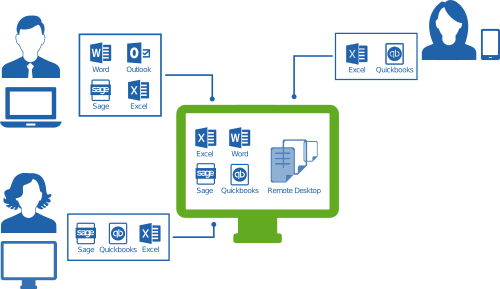
diagram_self_hosting-500_289Everyone, it seems, is adopting outsourced IT and cloud computing models yet one size does not fit all when it comes to serving business – whether it’s the software or infrastructure under discussion. Cloud, mobile and online application models deliver big benefits for small businesses, but it is important to know the options available before investing in something that’s hard to get out of later. Initially, a hosted application model might be the best approach, allowing the business to achieve the mobility and on-demand service they desire but without an investment in SaaS solutions that are much more difficult to change out of or grow with later.

When “QuickBooks” and “cloud” are mentioned in the same sentence, most people are likely to think about the QuickBooks Online Edition, which is Intuit’s version of QuickBooks accounting software that was developed specifically for the web.  But QuickBooks Online isn’t the only QuickBooks “flavor” finding success in the cloud.  QuickBooks desktop editions have made their way into online and hosted deliveries, giving customers the ability to run the business and grow the organization with the software they’ve already invested in, but running the apps in the cloud.

QuickBooks Online lacks the features and functionality present in the desktop product lines, and the range of 3rd party applications which integrate or work in conjunction with QuickBooks desktop is huge and continues to grow.  Developers with SaaS products often find that their target customers prefer the desktop editions of QuickBooks, even though there may be connections to QBO available.  All of these connected software products can be hosted with or connected to hosted QuickBooks, providing businesses with mobile and remote access for all their business applications, not just the web-based ones. *Note: not all QuickBooks hosting companies will also host whatever 3rd party integrations a business needs, so make sure to verify before you buy! What sounds like a great hosting deal now could turn into something you need to change later.  The good thing is, you can change…. unlike with QBO.

The popularity of desktop application hosting continues to grow because users have investments in software, data and business processes. Adding remote access and mobility doesn’t require an entire change of software, but it does introduce new benefits that can have a big positive impact on work quality, productivity and efficiency. QuickBooks hosting models and application hosting in general gives business owners a basis for helping employees balance (or integrate) work and life time and activities, and addresses the issues of data security and mobility by keeping information securely stored on the host.

Better information security, work/life balance, mobility, making the most of your existing investments and creating sustainability in the business so you can grow. These and more are benefits of hosting QuickBooks software for your business.

jmbunnyfeet Make Sense?

J


Focus on the Finance Department: QuickBooks in the Cloud

Focus on the Finance Department: QuickBooks in the Cloud

Vendors and IT solution providers are all buzzing about their cloud services and solutions available via the Web.  This buzz often includes statements about lower cost of IT acquisition and service management and how mobility and remote access benefits the business.  These statements are proving true for many businesses, yet there are still vast numbers of small business operating on local computers and unmanaged service.  The reasons which hold back these business from adopting cloud computing models are as many and varied as the businesses themselves, but there is a consistent thread to be found in these reasons, and it has to do with a lack of understanding of what certain applications really mean to the business.  In this case, the discussion is about the focus on strictly operational or administrative areas of the business and not on the finance department which, in so many small businesses, uses QuickBooks.

Cloud solution providers are in business to make money, and hosting companies in particular are looking for the right applications which will drive usage and revenues on their platforms.  When these providers look at the small business market, they’re trying to identify the applications and services that small business owners will adopt in volume.  Identification of these opportunities to serve a large customer base is essential to the provider’s economy of scale and profit model.  It makes sense that hosts would want to offer the applications which drive the highest degree of usage in their environments, so they tend to focus on the applications used by the greatest number of users within the customer organization.  In the small business market, these applications are email and productivity tools – solutions which are used broadly throughout the business and which serve a horizontal rather than vertical industry orientation.  Those are the two easy picks; finding the next most valuable solution represents a bigger challenge for the provider.

qbcloudWith Intuit QuickBooks desktop editions boasting the lion’s share of the small business accounting market, it seems that hosting QuickBooks products would be the next natural selection by hosting providers already serving their small business clients with email and productivity solutions.  However, because these service providers do not fully understand the essential functions QuickBooks serves in the small business, the assumption is that the usage of the solution is so nominal that it doesn’t make sense to develop the capability to offer it.  It is a misunderstanding that many providers have, and is the result of a lack of historic participation in the product.  QuickBooks, you see, is a direct to consumer product rather than a channel product, and most IT service providers and hosting companies recognize the product name but not really what it does or how it operates.  And these hosts are often large companies and therefore have no direct experience using the product, so there is no frame of reference for them to work from.  These service providers are simply overlooking the important role that QuickBooks solutions play in many small businesses, where it is used to handle various operational aspects of the business as well as being the product of choice for bookkeeping and accounting.  Particularly with the QuickBooks Premier and Enterprise editions offering additional functionality and industry-specific features, the products are used widely by small businesses and not just for accounting and finance.

The point of the discussion is that hosting companies and “cloud server” providers should look at the mixture of applications used by their small business customers, and they are likely to find that QuickBooks products are pretty high on the list.  Even if there are only a few people in the accounting department, and the usage by these individuals is not representative of the entire hosting opportunity, hosts should recognize that those few individuals and the software they use are not only essential, but are probably processing payroll for all those other users on the system and are paying the bills for products and services purchased.  After all, if you’re going to make anybody in the company happy, make sure to focus on the finance department and help them get their QuickBooks in the Cloud, as they’re the ones that will be paying the bill for the service.

Joanie Mann Bunny Feet

Make Sense?

J


Google+