Security and Agility for C-Stores, Retailers, Inventory -Based Operations and Small Manufacturers

Noobeh hosts PDI Technologies, Sage 50, Sage 100 ERP, QuickBooks Enterprise Desktop, AccountEdge, Acctivate Inventory, MISys Manufacturing and more.

Purchasing hardware to support your accounting or ERP solution and SQL databases is costly—especially on top of software and service expenses. Keeping systems on premises can add up quickly when done properly. This is a well-recognized problem for convenience store operators, fuel retailers (all retailers, really), inventory-based businesses, small manufacturers or any business running their software and systems in-house.

Noobeh offers a better alternative to buying and maintaining your own server: a private virtual server hosted on Microsoft Azure. It is your server in your own Microsoft account, and it offers agility and performance capabilities not available with traditional server hardware.

Shared hosting providers and platforms introduce risk and loss of control. As your managed service provider, Noobeh gives you complete control and authority over your environment without sacrificing security or support. It’s like working with a hosting provider, but you own the infrastructure. Our focus isn’t on keeping a loaded shared platform operational. If something goes wrong with your system, our priority is getting you back up and running.

Your business gets a fully managed system with comprehensive service and support—without relying on unnamed hardware in a co-located server hosting facility. With Microsoft Azure, your systems run in Microsoft data centers on Microsoft-managed hardware, benefiting from the same security protections Microsoft uses for its own services.

Prevent Data Loss and Strengthen Business Continuity

Noobeh provides 24/7 monitoring and protection, with multiple redundancy, backup, and protection options to help keep your systems and data available.

Your business faces real risks, from cyberattacks to natural disasters. Noobeh helps reduce those risks by hosting your systems in a safer, more secure environment than most on-premises setups. Local and regional redundancy options give you failover flexibility, including the ability to place redundant systems across the country.

Because each Noobeh customer uses their own Microsoft account, every business can be confident that its domains, networks, and servers support only its operations. Our technical and support teams work diligently to provide the right system for each customer—keeping business running, users productive, and data secure and accessible.

Ready to protect your business, reduce IT complexity, and run with confidence?

Contact Noobeh today to discuss a managed Azure hosting solution built around your applications, your data, and your business goals.

4 Rules of Thumb for Better Mobile Device Security

Security threats are everywhere, lurking in alley ways and around corners and even in your favorite coffee shop. Yet mobility is in demand, and people will use their smartphones and other mobile devices because it’s convenient, even if company policy suggests against it.

This is a big deal for IT and security professionals and CIOs, which is why it took a while for IT to recognize the need to address mobile device security rather than simply deny mobile device use. With data breaches, ransomware attacks, hacks and information leaks happening on an almost daily basis, businesses must find ways to protect their valuable applications and data from loss or misuse while at the same time enabling mobile device use.

The following 4 rules of thumb are not comprehensive but are four essential rules of thumb to help guide business owners in addressing mobility management and security within their organizations.

Rule 1: Make sure there are clear mobile device use policies and support them with ongoing administration and strict enforcement.

I can’t say enough about having good security and mobile device policies and keeping them modernized, relevant, and actually enforcing them. Too many businesses say they have a “security and use” policy in place, yet it is outdated and doesn’t reflect the actual tools or processes currently in use.  Even more frequently a business will develop a policy just to say it has one, but won’t actually train workers or enforce compliance.

Rule 2: Require and enforce strong passwords, manage access in real time, and force password changes with some frequency.

It is essential that all user access to applications or data be controlled at minimum by password-protected logins to the device and corporate resources coupled with periodic forced password changes. Users often prefer to not require passwords or other authentication for device access, but corporate policy should not only require them but also enforce their use.  Also, user access should be managed in real time, meaning that any aspect relating to access should be disabled or revoked immediately upon employee termination or reassignment. Too often these forgotten chores are relegated to after-the-fact IT administration, which allows users to access resources beyond their rightful boundaries.

Rule 3:  Do something to contain the applications and data on the device.

Whether the approach is with containers, cloud hosting, server-based computing or something else, it is really important to try to “contain” the applications and data accessed from the mobile device. Risk is created when users sync data directly to the device’s storage or install applications directly on the device to access corporate data. Password and other security measures prevent unauthorized access, but allowing applications, credentials or data to be stored directly on the mobile device allows those things to interact with other things on the device.  Containers, hosting and server-based computing models keep the applications and data within secured spaces, often not even storing essential items on the device but only accessing them via the device. This allows the business to provide users with the access and functionality they need to do their jobs, but also reduces the vulnerability of applications and information assets.

Rule 4: Keep device software up to date and download fewer apps.

Updating mobile device operating system versions and release levels is important to make sure the device has the most current security patches and threat protection.   Some mobile OSes even have capabilities which can help keep personal and work apps separated.  Limiting the number of apps users can download to their devices should also be considered. Users may randomly download and install applications to their devices with little regard for the quality or security of the app, and often accept terms of use without really reading them. Consumer apps from app stores may pose risks to data and the device, so IT should check regularly for problematic apps if the device is used to access the corporate network, applications or data.

Mobile and wireless are in demand

Just about every business has people who use their phones and tablets for some business use, and every one of those mobile devices and the apps running on them could open the door for a hacker, ransomware, data theft or compromise. While there are many benefits to be gained by enabling remote and mobile devices in the business workflow, unrestricted access only creates risk.

Keeping mobile devices secure for business use takes multiple approaches, as there is no single method or solution that works for every situation. Our 4 rules provide a basic foundation for business mobility management, offering a starting point for developing a more thorough and detailed plan.

Make sense?

J

Mobilizing QuickBooks Desktops

 Hosted QuickBooks for Remote and Mobile Access

There was a time not too long ago when the “thought leaders” in information technology said that the desktop is dead, and all software will be accessed via the web. (Note: I put “thought leaders” in quotes because industry thought leaders are often those with the greatest media influence.  After all, you can’t lead them if you can’t reach them, right?). The whole no software thing is a dramatic oversimplification of what is happening with computer software, but one thing is kind of coming true: nobody wants to be tied to their desktop.  It’s not that the desktop is dead… it’s just not all there is. For users of the desktop editions of Intuit QuickBooks software, the question really isn’t whether they intend to give up their familiar and trusted software to use a different, online solution. The question is how to use the QuickBooks desktop software they want in the cloud so they can use it on desktops that aren’t the primary desktop computer, or on mobile devices.

Computing technology has finally reached a level of accessibility that was previously only imagined in science fiction stories.  Communicating instantaneously with anyone anywhere around the world; accessing extensive (limitless?) libraries of information, art and music with a simple handheld device – these are the things that people do every day without a second thought.  Business users may even be able to access their business documents, email, contacts and appointments etc. from mobile devices, enabling a productive and functional mobile workforce.
desktop-appsYet the desktop remains as the primary workhorse for most business users. This is where the productivity applications live, where large spreadsheets and full-screen applications are run, and where keyboarders and production data entry users operate.  Tablets, touchscreens and mobile devices just don’t provide the same capabilities unless you tether them to full size monitors and keyboards.  Even then they may not because they might not run the same OS as the desktop.  The point is that the desktop hasn’t gone away and isn’t likely to any time soon.  Users may use more mobile apps and devices, but this isn’t diminishing use on the desktop as much as it augmenting it.  This is what fuels the interest in application hosting and virtual desktop computing models – the desire to mobilize desktop and network applications and working environments.

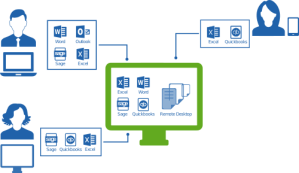
Hosting applications and data gives businesses the flexibility of working in desktop applications and accessing data just as if they were in the office, yet users may be located anywhere there is Internet connectivity. When the applications and the associated data are managed in the datacenter, businesses are able to centralize their information assets and manage them more effectively than if the data were distributed among multiple computers.  While most sync and share solutions require files to be downloaded to local computers in order to open and edit, a hosted application service with virtual desktops and file sharing provides a security model which keeps business data secure yet available for user access without compromising security by downloading information to the user device.

A hosted solution approach can make license utilization more efficient and compliance easier to maintain, too.  By enabling access to applications on a centralized platform and eliminating the installation and maintenance of software on individual computers, businesses reduce the reliance on local IT personnel to install and update applications and user accounts, and improve their ability to control application assignments and usage.

Hosting helps businesses take advantage of technology that would otherwise be unaffordable, and delivers the mobility and centralized management required to boost productivity and contain costs.  There is a high cost to managing a business network, and creating secure mobile access to that network can represent an exponential increase in IT spending (just to initially set up, not to mention ongoing costs for security management, monitoring and support). Rather than taking on the entire burden of service management and delivery directly, businesses electing to work with hosting providers find that they are able to focus more on business operation, strategy and growth – and spend less time worrying about the IT supporting them.  Costs are reduced, workers are empowered, and capabilities are increased while knowledge and process investments are preserved.  When it comes to mobilizing business applications like QuickBooks desktop editions, it all starts with a hosted approach.

Joanie Mann Bunny FeetMake Sense?

J

Confusing Value Propositions: Cloud Platforms and Hosted Applications

it-balancing-actConfusing Value Propositions: Cloud Platforms and  Hosted Applications

When a service provider is in the business of selling computing resources – like bandwidth, processors and memory, and disk storage – it makes a lot of sense to also leverage the value of software products and systems which drive consumption of computing resources.  In short, they market and sell software that runs on the platform in order to get folks to buy the platform, no different from selling desktop and server software in order to sell the hardware to run it.  It’s just that these days the hardware and networking components are often referred to as the “platform” or maybe “the cloud”.

Let’s face it… cloud computing platforms are just no fun if there’s nothing to run on them, and a hard drive has little value when there isn’t anything stored on it.  Once there is something there – an application, data… something – then the part has actual value in terms of driving revenue.  This is the difficulty and the basis for confusing value propositions when it comes to offering and delivering services in the form of a hosting platform.  Once again: platforms are just no fun if there’s nothing to run on them.  Is the value is really about the applications, not the platform? Or is the value in the platform, because it’s necessary for running the applications?

The truth is that both are essential parts of the entire “solution”, and the value of how the solution is packaged and offered is purely up to the purchaser to determine in terms of applicability to the business.  When it comes to hosted application offerings for businesses, there isn’t a single one-size-fits-all approach that will work.  Sometimes people want to purchase from different vendors and put their own solutions together, and sometimes folks want turnkey delivery of whatever they need.  Even channel partners and value-added resellers are finding that, with diminishing margins and aggressive competition prevalent in the market, removing the time-consuming aspects of solution delivery becomes paramount to achieving some level of profitability on the work.

What this means is that providers are looking for ways to increase the overall value and usability of their solutions, and when it comes to platform services there are only two directions to look: automation to support self-service, and application software delivery to drive consumption and usage on the hosting platform.

So now we’re back to the applications again.  There’s no way to avoid them, but there’s no great way for platform companies to engage with them, either.  Working with business application software is sometimes complicated, often annoying, and can be exceptionally time-consuming and resource intensive. And there are few licensing models which make it really easy for hosts and ISVs (Independent Software Vendors) to work together.  Then, of course, there is the desire for exclusivity on one side or the other.

Software companies don’t generally want to select a single platform provider for their software for a very simple reason: they don’t want to limit their potential user base.  Now that Windows platform is available just about anywhere – on local computers, on mobile devices, from platform and infrastructure hosting providers – how does the ISV make a decision on a single delivery channel or model or provider?

Some lean towards working with hosting providers to create branded, point-deliveries of the application.  Too often, however, this approach removes the ability for customers to benefit from other applications or integrations, eliminating some of the value of the solution and certainly curtailing benefits for integrating partners of the ISV.

Host it themselves?  The last thing most software developers want is to be responsible for hosting and maintaining some other guys’ software products; they have enough to worry about with their own offerings.  If the solution is standalone, maybe this approach works.  But there are few solutions made for the desktop which don’t have some strange integration point with MS Office apps, Adobe reader, Internet browsers or other things prevalent on the user desktop.

There isn’t any proven or easy path for software developers, IT suppliers or small business customers looking to create mobility and managed subscription service around desktop and server applications, and there is likely never going to be a single story line that all will follow.  This is among the reasons for the popularity of the “hybrid” cloud approach and growing importance of managed application hosting and ISV-authorized delivery models.  Yet even key providers in those areas have a tough time really communicating what they do in a way that is meaningful to the buyer.  Are they selling a platform, applications, or both? Folks in the industry know the jargon and how to use it, and are often skilled at adjusting their language in order to obfuscate or confuse certain sticky issues regarding software licensing in the cloud and other similar aspects of hosting.  It’s no wonder that many customers remain confused as to what, exactly, they’re being asked to buy, and where the lines of flexibility and responsibility are drawn.

The applications justify the platform, and there are possibly multiple platform approaches to delivering the app. It is a confusing situation for business buyers of IT as well as for their resellers and suppliers, and the increasing number of options for how businesses approach purchasing and using information technology makes it unlikely that the process will become as simple as some suggest.

jmbunnyfeetMake Sense?

J

Small Business IT Governance: You really need it now

it-balancing-actBig changes are going on in the world of information technology and business.  Where social computing and  mobility are no longer purely consumer concerns, enterprise IT departments face a growing requirement to embrace user devices and access in environments which were once strictly and closely controlled.  Enterprise IT may be challenged when presented with user personal devices and demands for remote access to enterprise data, yet the governance of systems is generally well-defined and strictly performed.  In small business, however, the people, policy and process issues (collectively incorporated into “governance”) tend to be more organic, and the use of personal devices and open access is more frequently considered to be a normal part of the overall business IT profile.

It is a focus on defining controls and processes, and influencing the activities and attitudes of the people involved, which has become an essential requirement in small business.  Where management of information technology resources was not of great concern to the small business owner before, increased device and information mobility (removal of physical boundaries) and erosion of logical boundaries around personal and business computing have become a really big deal for everyone in business. Small businesses just don’t often have departments of people working on the problem.

Technology use in business has always come at a price, and as various influences continue to change how users interact with devices, applications and systems, business owners and IT managers will continue to face difficult choices between balancing security of information resources and providing a productivity-enhancing user experience.   Too many security barriers result in avoidance of security protocols, slow or immobile company computers result in users working on their own machines and portables, and restricting access for mobile users results in “shadow IT” implementations of mobile sync and other data access approaches.

Yet “shadow IT” tends to be the norm with many small businesses, where there are often fewer barriers to implementing solutions which address individual user issues or problems.  Lacking the resources or understanding to develop a strong plan for managing information systems and technology within the business, small business owners often consider the computer systems and computerized data to be tools to get jobs done rather than strategically valuable assets to be strictly controlled and protected.  These business owners are not recognizing the ever-increasing need to not simply secure business information, but to establish processes and rules which will govern how users and devices access and interact with the information and systems.

Enterprise IT departments have often viewed their small business counterparts (customers, suppliers, etc.) as potential points of vulnerability, an attitude which was once considered to be centered not on real assessments of the risk but more in terms of ego, level of sophistication, and hierarchy in the food chain.  In today’s world of real risk introduced by myriad technological and human elements in every link in the supply chain, enterprise IT conclusions regarding the risk potential of doing business with anyone – including small businesses – may not be entirely unfounded.  Whether it be commentary and information distributed by individuals via social media or malware or corruption introduced inadvertently (or not) via computerized interaction, there is the possibility of risk introduced with every system, person and process involved.  Enterprise to enterprise, these issues may be more often recognized and remediated; where the SMB is involved, not always so much.

This is a brave new world of computing, and there is truth in that even the smallest of businesses can “compete with the big guys” when the right mixture of technology and process is applied – for good or bad.  Technology enables businesses to be more productive, get more done with fewer resources and perform at higher levels. IT Governance in small business is no longer an optional area of focus, addressed only during infrequent discussions with the local contract IT guy when he comes in to defrag the hard drive on a slow computer.  Establishing the proper processes and controls to wrap around IT use in the business has become an imperative; a necessarily specific and considerate approach to how information technology is used within the business, who uses it, and what IT is composed of.

Just about every business, and most individuals, are connected in some manner via some type of network, representing a dramatic and dynamic change to the traditional composition of business IT and the landscape of vulnerabilities which threaten it.  The increased connectedness, capability and complexity of systems and networks requires a greater focus on overall IT governance – exercising authority and controls – as the impact (just like the information) can easily and unintentionally reach far beyond the boundaries of the individual business.

jmbunnyfeetMake Sense?

J

“People are nothing more than another operating system”, says Lance Spitzner, training director for the Securing The Human Program at SANS Institute.  “Computers store, process and transfer information, and people store, process and transfer information,”  How Hackers Fool Your Employees

Turning a Product or Service into a Solution: the Value Add of a Reseller

Turning a Product or Service into a Solution: the Value Add of a Reseller

There is quite a bit of chatter on the web and among IT resellers about how opportunities to serve business customers are diminishing, yet business adoption of cloud computing, managed services, and mobile technologies is growing tremendously.  It seems that use of technology is increasing, but the opportunity for “traditional” IT resellers and channel partners to make money by selling IT-related products and services is diminishing.  This is not new, and is simply a finer form of the problem that has been revealing itself for years.  In order to provide value, suppliers must provide businesses with solutions to business problems rather than just trying to sell them products and services with a hefty profit margin.

Whether it is a physical item like a computer or an intangible item like consulting services, businesses will buy if they see value in it.  In the eyes of the consumer, the value is likely tied to far more than the item at hand; the value tracks to some expectation of business benefit to be achieved now and in the future.  Businesses will pay for solutions to problems they experience more readily than they will pay for shiny things or big ideas, and it is this truth that many “value added” resellers tend to forget even though it is part of their business description.

For many years channel resellers have struggled with competitive elements that reduce revenue and profit potential on core products and services.  When computer hardware prices dropped years ago and businesses found that going through distribution or direct to the manufacturer was often a more affordable path than buying through a reseller, the resellers re-trenched and began providing more value in terms of solution architecture, training and implementation support, and system management services.  As the delivery chain for information technology continues to compress and more products and services are delivered direct-to-consumer, the pressure for resellers to discover their “value add” grows even more severe.

The days of simply reselling technology products to make a living are quickly coming to an end. There isn’t enough profit margin available to eek out a living just selling hardware and software, and it takes a large volume of subscribing customers to reach any significant revenue level by reselling commoditized cloud services. Yet the customers are there to be won if the offerings represent solutions to defined and recognized business problems – solutions that introduce quantifiable business benefit rather than creating more business problems – and where the reseller plays an integral part in making the selection a successful one for the customer.

While it may seem that business cloud computing, hosting services and SaaS solutions all come with easy-to-read instructions, do-it-yourself installation and painless upkeep, the truth is often very different. Some consumers realize this when they go shopping for solutions and come up with more questions than answers; some only figure it out after they have made the wrong decision. Either way, these businesses could use the help of a professional who will provide the added value of taking time to understand the problem to be solved, consider the variables which exist in the client organization, and clear a path which takes the customer business to a better place.

Cloud computing and SaaS may be changing HOW businesses purchase and use technology, but it is not changing WHY they do it.  Businesses buy IT because they think it will solve a problem – they have expectations. The reseller can find and provide the added value: the reasoning (meeting expectation) for selecting the solution, why it is the right choice for the customer organization, and how they will ensure that the solution delivers the benefits described and expected.

Joanie Mann Bunny FeetMake Sense?

J

Read  more about Helping a Small Business Customer Choose Your Solution