
Your Server Shouldn’t Be Living in a Closet

Why hosting QuickBooks Desktop and other business applications on Microsoft Azure with Noobeh is a smarter way to work

I have seen a lot of servers in my career. Some were humming away in pristine data centers. Others were tucked under desks, squeezed into storage rooms, or sharing a shelf with copier paper and somebody’s forgotten lunch bag.

That may have worked when everyone came to the same office, used the same network, and crossed their fingers during thunderstorms. It is not a great foundation for a modern business. Today, your team may be working from the office, from home, from a client site, or from an airport between flights. They still need dependable access to QuickBooks Desktop, line-of-business applications, and the files that keep the company moving.

Hosting those systems on Microsoft Azure with Noobeh gives your business a secure, professionally managed environment without asking you to become an infrastructure company.

QuickBooks Desktop—without being tied to a desktop

QuickBooks Desktop remains essential for many businesses because it supports familiar workflows, specialized integrations, and years of valuable company data. The problem is often not the application. The problem is where it lives.

When QuickBooks lives on one office computer or an aging local server, access can become a daily obstacle. Remote users may struggle with complicated connections. Performance can vary. Backups may depend on someone remembering to check them. A hardware failure can turn an ordinary Tuesday into a business emergency.

In an Azure-hosted environment, authorized users connect to a centralized workspace where QuickBooks Desktop and other applications run close to the company data. The experience stays familiar, but the infrastructure behind it is built for secure access, business continuity, and growth.

What the business gains

Work from almost anywhere

Your people need access to their work, not a scavenger hunt for the one machine that has the right software installed. A hosted environment gives approved users a consistent way to reach the applications and data they need, whether they are in the office or working remotely.

Reduce the risk of aging hardware

Servers do not improve with age. Eventually, warranties expire, drives fail, and replacement parts become harder to find. Azure shifts the conversation away from buying and maintaining a physical box and toward providing the right computing resources for the business.

Strengthen security with layers

Security is not one product or one checkbox. It is a combination of identity controls, access policies, system maintenance, monitoring, backups, and good operational practices. Noobeh designs and manages the environment so these pieces work together, based on the needs of your organization.

Plan for interruptions before they happen

A local power outage, failed server, or inaccessible office should not automatically stop the business. A thoughtfully designed cloud environment can support backup, recovery, and continuity objectives that match the company’s tolerance for downtime and data loss. That planning matters far more than simply saying, “We have a backup somewhere.”

Scale without another hardware project

Businesses change. You hire people, add applications, open locations, or hit a busy season. Azure resources can be adjusted as requirements evolve, which makes growth a planning conversation instead of another round of shopping for a server that may be too small next year or far too large today.

Why Noobeh?

Microsoft Azure is a powerful platform, but power alone does not create a good business outcome. Someone still has to ask the practical questions: How many people need access? Which applications must work together? What performance does QuickBooks require? How should data be protected? What happens when a user needs help?

That is where Noobeh comes in. We bring cloud expertise together with an understanding of the applications businesses actually use. We help design the environment, move workloads, configure access, and manage the infrastructure after launch. You get a cloud solution built around the way your company works, not a pile of technology and a wish for good luck.

And because every business is different, the answer is not automatically “move everything.” The right approach may include QuickBooks Desktop, supporting applications, shared files, or a broader hosted workspace. Noobeh evaluates the full picture and recommends an environment that makes sense operationally and financially.

The real value is confidence

Cloud hosting is not exciting because a server is running somewhere else. It is exciting because your team can log in and get to work. Because adding a new employee does not require a weekend hardware project. Because your critical systems are managed intentionally instead of being quietly ignored until something breaks.

That is the point: fewer infrastructure distractions, better access to the tools people depend on, and a technology foundation that can keep pace with the business.

Is it time to get your server in a better place?

If your business depends on QuickBooks Desktop or other server-based applications, now is a good time to ask whether the current setup is helping you grow or simply giving you one more thing to worry about.

Talk with Noobeh about an Azure-hosted environment designed for your people, your applications, and your business. Let’s move the infrastructure out of the way so your team can focus on the work that matters.

Make Sense?

bunny feetJ

Better QuickBooks Hosting: Noobeh Cloud Solutions on Azure Help Businesses Avoid Data Loss, Improve Application Performance and Implement QuickBooks Integrations

They said back in 1999 that the desktop was dead, but desktop software is far from gone. In fact, application hosting services for products like QuickBooks desktop editions just keeps growing in popularity because it delivers the access, mobility and managed services businesses need.

Service providers have been hosting QuickBooks for years, and I’ve been right there all the way, ever since the model was originally developed. In fact, the company I worked with is still selling that original service model today while many other providers have come along to follow it and take advantage of the opportunity.

Using the cloud to support accounting and other business processes makes a lot of sense, and the best part is that it doesn’t require businesses adopt the online versions of the software that just doesn’t work as well. I have a background in accounting so I understand the issues of working remotely with clients, when the business is done in one place but the accounting is done in another. And I love the technology and finding ways to make it easier and more efficient to get small business accounting done.

The benefits of using hosted QuickBooks services are many.

Anytime/anywhere access and fully-managed service are among the most obvious benefits for QuickBooks desktop users, but the advantages of centralized information and applications, secure support for mobile and remote workers, and real-time integrations and analytics capabilities can be transformational for the entire business.  Having the means to affordably extend applications to the entire workforce and keep everyone working with the same data in real time can become the foundation for improved processes, greater efficiency and better business performance.

Among the key benefits of the application hosting model is the fact that businesses are not forced to adopt software subscription services or invest their data in web applications that do not provide the functionality or features required. Even more, the business can elect to move their hosted system back to in-house computers, because the hosting is simply an alternative platform for running the software the business owns. You can take your ball and go home if you don’t want to stay.

With all the benefits of hosting QuickBooks, there are also risks involved, especially when working with shared hosting platforms.

Shared hosting platforms are architectures where the service provider spreads the cost of their infrastructure across many customers to help keep the costs down. Using conventional technologies to create divisions between customers on servers, networks and so on, services providers can deliver at a lower cost when they are able to generate revenue from lots of customers for the same pieces of equipment. As more customers are added, more servers are joined into the network. After a while, there are many servers handling the customer load.

Unfortunately, the greater the number of servers, the more complicated and costly it becomes to update the platform. This is among the reasons why many service providers have aged platforms, with server operating systems that are going out of support and offering only legacy desktop views. In addition to compatibility and modernization, a big problem with allowing the platform to age is that it becomes less secure and more difficult to keep protected.

Protecting against disaster is not the same as doing backups.

Many hosted QuickBooks customers have been faced with the ugly reality that their service provider backups are not enough to recover from disaster. This is largely the fault of the providers and is somewhat by design.  Businesses hosting their financial and other business applications and data want to know that their information is safe and secure. Performing data backups is part of the promise of protecting customer data, so most customers believe that their service provider is backing up in a way that ensures the data can be recovered.

What most hosting customers don’t understand is that the provider backups are there to help the provider recover from disaster and not necessarily to get the customer back where they were.

Hosting companies know that they need to do backups so they can support customers when files get deleted or become corrupted. Hosting companies typically do regular backups of customer data, but they do not necessarily retain individual backup data sets and they often backup all customer data together. This means that the backup data is constantly being updated, and that fully restoring the data of just one customer may be problematic. Service provider backups are there to support the continued operations of the service provider and may not provide the level of archive or retention needed by the customer. Just to make sure their data is safe and recoverable, I strongly recommend that clients keep any hosted data archived in at least one other location off the host’s platform.

In just the past year, outages caused by malware have been experienced by service providers Cetrom, Skyline, Cloud9 and Insynq, demonstrating just how devastating an outage can be when the service provider doesn’t have adequate protections in place.

In many cases customers lost data because the service provider wasn’t able to recover it from compromised or nonexistent backups. Suggesting that customers should have their data backed up locally is never part of the marketing or onboarding with the QuickBooks host, but it is often the fallback position in times of trouble.

Perhaps the most troubling aspects of these provider failures are that many of the problems stem from the shared nature of the platform.

When we first started building QuickBooks hosting services the hardware and software to make it work was terribly expensive. To approach some level of affordability, a shared platform approach was developed. This allowed the service to scale while offering a lower cost of service to customers. When the services were initially developed, there was concern about protecting from viruses and Trojans, but the nature of malware in the wild was not nearly as troublesome as it has become. Things were manageable.

But technology has evolved and so have the threats and bad actors.

The smarter bad guys should be forcing platform providers to reconsider their shared management and delivery models.

Affordable computing resources are available from platforms like Microsoft Azure and Amazon AWS, offering small businesses the opportunity to have not only powerful and scalable platforms for their business IT, but also offering a means of operating privately. Not being forced to operate in the same network or on the same VMs as other companies means not having to worry about the behavior of other people or applications in your business network. It also means that the focus is on recovering your system if disaster strikes, not on recovering the systems of hundreds or thousands of other businesses at the same time.

Considering the move to a more private cloud hosting solution is an important way to reduce risk and improve IT performance for the business.

When they were in-house, the networks were private and no other businesses were sharing the servers. Moving to the cloud should not radically change that profile, and should offer customers the same privacy from outsiders and the same flexibility to implement whatever applications the business needs.

The Microsoft Azure platform provides this capability and businesses can benefit without compromising the budget. With private accounts on the Microsoft Azure platform, our customers are able to take advantage of the current and emerging technologies while safely and affordably supporting their business requirements, which is something the shared platforms fail to offer.

Make Sense?

J

Avoid the Aftertaste| QuickBooks Desktop Hosting Comes in Many Flavors

Avoid the Aftertaste| QuickBooks Desktop Hosting Comes in Many Flavors

There is a lot of activity and interest around the hosting of desktop applications in the cloud, and it is no wonder that a great deal of the effort centers on the use of Intuit QuickBooks desktop editions.  QuickBooks is among the most popular software products used by small businesses, so it makes sense that service providers and hosting companies are taking advantage of that market share to reach prospective hosting customers.  After all, a hosting platform may be kind of neat, but it is not all that valuable unless there are applications and data living on it.

For the average small business, the applications of choice include Microsoft Office and QuickBooks.  Yes, there is an online edition of the QuickBooks product (called QuickBooks Online, of course).  However, the market share Intuit earned for QuickBooks wasn’t accomplished with an online application, it was done with the desktop applications which still own market share today.  Hosting service providers recognize this truth, and are taking steps to bring those QuickBooks desktop solutions into the cloud.  Now we have the ability to get QuickBooks Desktop editions online – which is not the name of a service but a description of what it offers – available from a variety of authorized hosting providers (and from many unauthorized ones).

I’ve said before that there is a fine art to hosting QuickBooks desktop for lots of users.  There are a great many different considerations and possible use cases, and not all providers will be able to meet every requirement.  There are also lots of different technology models and methodologies which may be applied to the hosting model, and each has some benefit or barrier depending on the specific need of the client.  Hosting companies may throw around terms like “cloud server” or “published application” or “remote desktop”, but at the end of the day, the systems are still Windows computers running QuickBooks software.  How those systems are wrapped up, how you connect to them, and how you operate with them often becomes the real difference in the service experience.

The specific technology a hosting provider applies to the service does not necessarily describe exactly how the service works.  Just because a provider may use Citrix doesn’t mean they have more capability to provide quality service than a provider using other technologies, or a host using VMWare is not necessarily creating better cloud servers than a host using Hyper-V or Parallels or some other virtualization strategy.  The technology may impact how the infrastructure is operated and can impress upon the customer experience, but the real differences in delivery often come down to the provider’s understanding of the software product, the customer need, and their ability to meet the need directly.

Does the experience of connecting to and using the service work for the users, and are people able to get their jobs done quickly using the service without a lot of support or frustration?  (**Please note that hosting services aren’t a solution for bad software and poor working processes.  If the software or processes aren’t workable now, they’re likely not going to become magically more workable if hosted).  Does the hosting service address issues like making the right data available to only the users who need it, and giving access to applications only when a user is permitted to use them?  What about “external” users like contractors or client businesses… does the host offer a way for them to also participate in the solution?

It’s important to consider all of the aspects of how the service will be used, and by whom and under what circumstances, to ensure that the delivery offered is the solution needed. The point of all this is to encourage users to concern themselves a little less with exactly what technology the host is using to deliver QuickBooks applications, and to evaluate the actual solution.  It won’t typically matter to an end-user what specific technology is being used to provide them with service as long as the service works well for them.

While some people do adopt a fondness for a particular “flavor” of technology or approach, the reality is that a quality user experience coupled with a useful and reliable system means much more to the business.  And knowing that there are future options for growing, expanding or simply changing the service is essential.  It’s not so much the flavor of technology users should be concerned with when shopping for QuickBooks hosting services, it’s avoiding that icky aftertaste that comes with selecting a QuickBooks hosting approach that just doesn’t meet the business need.

Make sense?

J

Good Habits for Healthy QuickBooks

Keeping_QuickBooks_HealthyUsing a QuickBooks desktop product is pretty simple – you install it and then you run it.  For many users, it’s just that easy and uncomplicated because they don’t need 3rd party integrated software, they don’t sync their files to other computers or services or try to share their QuickBooks data, and they remember to exit QuickBooks and back their files up each and every time they use them.  On the other hand, many QuickBooks users experience quite a lot of frustration with the product – frustration which may often be the result of a poor practice when using the software.  QuickBooks has been engineered over many years to be as simple to use as possible, but at the same time has grown to be a product with lots of features, add-ons and extensions.  Users have also found ways to make QuickBooks do things it wasn’t really designed to do, this truth being one of the good things and the bad things about the product.  When it works, it works great.  When it doesn’t work, it’s beyond frustrating.  It is a shame that a lot of the problems users have with solution may be rooted in the habits and behaviors of the QuickBooks users themselves.

Bad software use habits will cause problems whether the software is installed on the user PC or whether it’s being managed by a hosting service provider.  Certainly there are some issues that hosts may mitigate, but the following is a list of good habits for keeping the QuickBooks software and data healthy and working that should be standard operating procedure for any QuickBooks user, whether QuickBooks is being hosted or not.

Keep the company file in good condition.

I cannot stress enough the importance of keeping the file in good condition.  What’s the accounting and financial data worth, after all?  A little time spent taking care of the file can save on a lot of time and headaches trying to reinvent the information. A QuickBooks company file is really a database, and is a rather complicated framework for keeping track of all sorts of related information.  Anyone who has used QuickBooks desktop products for a while understands that the data file can get screwed up for a variety of reasons, and it is no fun.  Yet QuickBooks has utilities to verify and rebuild data files, so it makes sense to periodically use them to check for problems.  Like a check-up with the doctor, these utilities can help diagnose issues with the data file before they become really big issues.  Another good practice is to back up the company file to a “portable” once in a while, and to then restore it for use.  This process can not only validate the integrity of the file, it also helps condense and “condition” the file.  Particularly when using a hosting service, but also when just running local on the PC, conditioning the data file once in a while can help prevent data corruption and/or loss (of data, time, productivity, revenue).

Close the company file and exit QuickBooks once in a while, would ya?

Users who leave their computers on all the time are missing out on the fun of letting their machines reset and do a POST (power on self-test), which means the machine or operating system could have an issue and the user wouldn’t recognize it until the machine was powered off and then restarted.  For this same reason, programs and their data files should be closed when not being used – so they can run through their own startup and validation routines before you use them.  Also, leaving the program open means it is active on the computer, and leaving the data file open means that it’s available (read=vulnerable).  A random bypasser accessing the computer, a program crash, a machine crash… loss of power or a kitten running over the keyboard could all result in catastrophic damage to the application and/or data.  It’s just better for all involved if the files and programs are closed when not being used.  Maybe use a screensaver with a password, too.

Don’t try to use QuickBooks with a VPN (virtual private network) connection.

Just because a user can connect their remote PC to the office network doesn’t mean the PC will work like it’s in the office.  In the office, it’s a Local Area Network, and the speed is fine enough to allow multiple computers to share a QuickBooks company file in multi-user mode.  When there is a remote PC connected via a VPN, it’s usually a Wide Area Network connection, meaning that the network has been extended to include the remote computer, but that network connection IS NOT fast enough to allow the remote user to open QuickBooks along with others in the network.  QuickBooks multi-user access only works on a local network (where local means the machines are all “local” to each other – on the same LAN).  When QuickBooks is hosted by a service provider, the QuickBooks stations and the data files are all located inside the host’s network, making it all LAN stuff.  The only remote part of it is sending the input and output (display, printing, keyboard and mouse) information “over the wire”.  This is why a hosting model works when the app and data are hosted, but doesn’t work when only the data file is hosted.

Use Automatic Update, not Manual (but DO update).

Features change, new technologies must be supported, and user expectations adjust based on a wide variety of influences.  What this means is that software products will necessarily experience change over time and users will be expected to update them.  The first release of any new product is rarely flawless.  It’s during that first introduction to a volume of users where many issues are found, making the v1 release of a software product something many people try to avoid. Yet there are still lots of folks who just can’t wait to have the newest thing, even when it comes to something like software patches.  Regardless of how much they may put at risk, these folks want each and every patch and update as soon as it is available somewhere.  These are the users who end up debugging the software for the rest of us, so I guess we should thank them.

For most users, however, it makes sense to wait until the software has been out for a bit and those initial issues identified and corrected, perhaps bypassing v1 and going straight to v2.  If the product will allow, that is.  QuickBooks has this great (or annoying, depends on how you look at it) feature that can tell users when there is an update available.  This “automatic update” feature checks with Intuit to see if there are updates available for the product, and then tells the user they can download and install them.  Generally, Intuit pushes these updates out only when they’ve been debugged and are deemed ready for volumes of users.  If people want to get an update before Intuit pushes it out, they may be able to obtain it for manual installation.  This is not the recommended method of handling QuickBooks updates; for most users, waiting until the product tells them it’s time to update is best.

Make sense?

J

QuickBooks online, or QuickBooks Online? Use Software on the web without using Web-based software

cloud-computingThere is a trend among software makers these days to more fully leverage the “power of the web”, and why wouldn’t they?  The Internet has become the way businesses and users get and stay connected, and has become a foundation for how business gets done.   Remote and mobile access to information and applications has become an expectation of users, as social computing models have encouraged them to remain connected on all of their devices and from any location.  Online describes a working model that many businesses strive for, and software makers are seeking to capitalize on the trend.
The belief that software should no longer be installed and run from a local device has been adopted by some of the largest software vendors in the market, which would lead many users to expect that this is the important trend to follow.  Being encouraged to ditch their desktop software products and transition to using the web-based or SaaS alternative, users who have grown to trust their software products are now facing new buying decisions.  Any time a customer is forced to make a buying decision – like moving from a desktop product to a SaaS solution – there is a potential that the customer will go with a different vendor and leave the product line altogether.   Yet this is exactly what is happening with small business applications, and specifically with the tried-and true QuickBooks products – the solutions which had become the cornerstone of small business finance.

Where QuickBooks Pro, Premier and Enterprise desktop editions were the favored and trusted small business accounting solutions, Intuit is now on a wholesale push to get users transitioned to the QuickBooks Online edition.  In doing so, they’ve opened up the door for new competitors, because they’re forcing their QuickBooks users to make a new buying decision.   Assuming that customers will adopt the QuickBooks Online solution simply because it’s “QuickBooks” was perhaps a poor assumption on the part of Intuit.  Particularly by naming the product “QuickBooks”, Intuit invested the trust and long-standing recognition of the brand and product line into the online edition, and the user base and market has not been amused.  “It may be called QuickBooks, but it’s not the QuickBooks I want” says one customer.  Apparently, the QuickBooks Online edition is not what many experienced QuickBooks desktop users are looking for in a new version of the product.

Desktop QuickBooks users don’t have to move to the Online edition just to get the benefits of the cloud with their beloved QB.  The hosting and cloud service providers I work with help businesses run the QuickBooks desktop products as online service.  We deliver fully managed applications and data, allowing users to access their QuickBooks desktop products online and from a variety of devices just as if they were web-based.  Gaining the benefits of anytime/anywhere access with the added advantage of not changing software is a direction many users are electing to go.  While the price of a hosted solution may not be as low as a QuickBooks Online subscription, it is generally far less than a subscription to Salesforce.com, for example.  Isn’t the business financial data at least as valuable as CRM? The price isn’t unreasonable, and the benefits of online/remote access, managed IT, protected data, and an ability to take your ball and go home if you like are huge.  Grab your data file, install QuickBooks on your PC, and you’re back in action.  Can’t do that with most SaaS solutions, can you?  It’s only do-able with desktop software, which you can run in the cloud with a hosting provider or run on your own PC.

Assuming that all software will ultimately run online could be a big a mistake.  As technology advances and new capabilities introduce new complexities, the “heavy lifting” shifts from the center to the end points and back again.  While there may be a trend towards SaaS and leveraging the power of a remote system, the reality is that our devices – desktops and laptops, tablets and phablets and phones – are all getting more powerful.   Many SaaS applications and remote access technologies rely upon (and find ways to push more resource utilization to) the local device.  Video processes more quickly, input and output devices are more easily recognized, and the storage on the device is faster and easier to access.  A lot of work happens on the local device, and it will continue to be this way as the devices continue to get smarter and more powerful.  “There’s an app for that” for a reason: apps on the device work well and give users the functionality necessary to get things done efficiently.

SaaS is not all that’s out there – much of the software businesses know and love is still available the way they want it.  QuickBooks users need to know they can get their QuickBooks online without having to use QuickBooks Online.  The desktop is not dead, and it won’t be for a long time.  Desktop software isn’t dead either; it’s just being pushed to the background as software companies attempt to wrap their arms firmly, with subscription based business models, around their respective customer bases.

Make sense?

J

Read more: Cloud Hold Out No More: QuickBooks Desktop Editions in the Cloud

Hosting Intuit QuickBooks Desktop Editions Delivers Big Benefits for Small Business

Big Benefits with Hosted QuickBooks

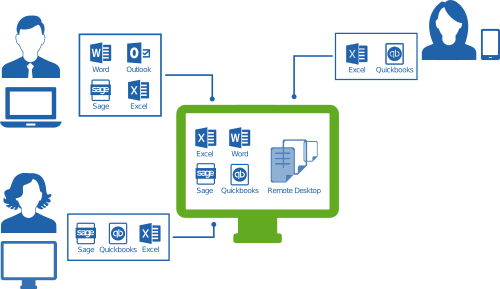
diagram_self_hosting-500_289Everyone, it seems, is adopting outsourced IT and cloud computing models yet one size does not fit all when it comes to serving business – whether it’s the software or infrastructure under discussion. Cloud, mobile and online application models deliver big benefits for small businesses, but it is important to know the options available before investing in something that’s hard to get out of later. Initially, a hosted application model might be the best approach, allowing the business to achieve the mobility and on-demand service they desire but without an investment in SaaS solutions that are much more difficult to change out of or grow with later.

When “QuickBooks” and “cloud” are mentioned in the same sentence, most people are likely to think about the QuickBooks Online Edition, which is Intuit’s version of QuickBooks accounting software that was developed specifically for the web.  But QuickBooks Online isn’t the only QuickBooks “flavor” finding success in the cloud.  QuickBooks desktop editions have made their way into online and hosted deliveries, giving customers the ability to run the business and grow the organization with the software they’ve already invested in, but running the apps in the cloud.

QuickBooks Online lacks the features and functionality present in the desktop product lines, and the range of 3rd party applications which integrate or work in conjunction with QuickBooks desktop is huge and continues to grow.  Developers with SaaS products often find that their target customers prefer the desktop editions of QuickBooks, even though there may be connections to QBO available.  All of these connected software products can be hosted with or connected to hosted QuickBooks, providing businesses with mobile and remote access for all their business applications, not just the web-based ones. *Note: not all QuickBooks hosting companies will also host whatever 3rd party integrations a business needs, so make sure to verify before you buy! What sounds like a great hosting deal now could turn into something you need to change later.  The good thing is, you can change…. unlike with QBO.

The popularity of desktop application hosting continues to grow because users have investments in software, data and business processes. Adding remote access and mobility doesn’t require an entire change of software, but it does introduce new benefits that can have a big positive impact on work quality, productivity and efficiency. QuickBooks hosting models and application hosting in general gives business owners a basis for helping employees balance (or integrate) work and life time and activities, and addresses the issues of data security and mobility by keeping information securely stored on the host.

Better information security, work/life balance, mobility, making the most of your existing investments and creating sustainability in the business so you can grow. These and more are benefits of hosting QuickBooks software for your business.

jmbunnyfeet Make Sense?

J