Hosting Intuit QuickBooks Desktop Editions Delivers Big Benefits for Small Business

Big Benefits with Hosted QuickBooks

diagram_self_hosting-500_289Everyone, it seems, is adopting outsourced IT and cloud computing models yet one size does not fit all when it comes to serving business – whether it’s the software or infrastructure under discussion. Cloud, mobile and online application models deliver big benefits for small businesses, but it is important to know the options available before investing in something that’s hard to get out of later. Initially, a hosted application model might be the best approach, allowing the business to achieve the mobility and on-demand service they desire but without an investment in SaaS solutions that are much more difficult to change out of or grow with later.

When “QuickBooks” and “cloud” are mentioned in the same sentence, most people are likely to think about the QuickBooks Online Edition, which is Intuit’s version of QuickBooks accounting software that was developed specifically for the web.  But QuickBooks Online isn’t the only QuickBooks “flavor” finding success in the cloud.  QuickBooks desktop editions have made their way into online and hosted deliveries, giving customers the ability to run the business and grow the organization with the software they’ve already invested in, but running the apps in the cloud.

QuickBooks Online lacks the features and functionality present in the desktop product lines, and the range of 3rd party applications which integrate or work in conjunction with QuickBooks desktop is huge and continues to grow.  Developers with SaaS products often find that their target customers prefer the desktop editions of QuickBooks, even though there may be connections to QBO available.  All of these connected software products can be hosted with or connected to hosted QuickBooks, providing businesses with mobile and remote access for all their business applications, not just the web-based ones. *Note: not all QuickBooks hosting companies will also host whatever 3rd party integrations a business needs, so make sure to verify before you buy! What sounds like a great hosting deal now could turn into something you need to change later.  The good thing is, you can change…. unlike with QBO.

The popularity of desktop application hosting continues to grow because users have investments in software, data and business processes. Adding remote access and mobility doesn’t require an entire change of software, but it does introduce new benefits that can have a big positive impact on work quality, productivity and efficiency. QuickBooks hosting models and application hosting in general gives business owners a basis for helping employees balance (or integrate) work and life time and activities, and addresses the issues of data security and mobility by keeping information securely stored on the host.

Better information security, work/life balance, mobility, making the most of your existing investments and creating sustainability in the business so you can grow. These and more are benefits of hosting QuickBooks software for your business.

jmbunnyfeet Make Sense?

J


The Line in the Sand: Your RPO (Recovery Point Objective)

The Line in the Sand: Your RPO (Recovery Point Objective)

IMG_0108Businesses and individuals are increasingly more dependent upon the technology supporting their various activities, and the volume and velocity of information moving through these systems is increasing at astonishing rates.  With the growing reliance on information technology and electronic business data, you’d think that more businesses were paying close attention to protecting these assets. I recognize that there is a broad understanding of responsibilities as they pertain to system security, and businesses of all sizes and types are increasing their awareness of the variety of threats facing their systems and are taking steps to address them.  Yet there remains an aspect of business data protection that too few businesses are really zeroing in on, and that is the time and complexity of recovering or restoring business data in the event of an outage or loss – and the absolute line drawn in the sand which says that “here” is the tolerable loss we can experience: no more and no less.

This line in the sand is referred to as the RPO, or Recovery Point Objective. A recovery point objective is part of the business continuity plan (or should be!), and describes the maximum tolerable period of time for which data might be lost from a major IT service incident.  The necessity to establish this time frame – the RPO – exists whether the business is small or large.  In fact, small businesses have data protection needs quite similar to their enterprise counterparts.  In an article in SmallBusinessComputing.com, Kieran Maloney of Quantum Corporation is quoted as saying that “from a data protection standpoint, smaller businesses face challenges that are similar to those of larger enterprises; the amount, and the value, of their data is growing significantly while their budgets are not”.

What doesn’t seem to make sense is that businesses continue to view data backup as a necessary evil rather than a strategic element, and spending considerations for creating and meeting a realistic RPO remain low.  An article in TheStreet.com on the subject quotes Terry Cunningham, president and manager of EVault, saying “When largely preventable data loss conservatively costs businesses hundreds of millions of dollars annually, it is time to rethink your priorities”.  The author also writes that “while 95 percent of US IT decision makers said they have some type of disaster recovery plan in place, only 44 percent have remote, cloud-based recovery capabilities… More than twenty percent of IT organizations that manage between 2-7 TB of data suffered a data loss in the past year – in fact, more than half of this group suffered 2-3 data losses – each with an estimated average cost of 2-5 percent of total company revenues”.

Part of the continuity plan and a consideration in developing an approach which will meet the RPO timeframe should be the implementation of remote cloud based service, yet this has remained a low priority for many business owners.  Reliance upon more traditional data protection approaches, including tape backups and on-premises HDD solutions provides IT managers with a false sense of security and often cannot even reasonably address recovery from data loss due to hardware outages, much less for potentially catastrophic failures including loss of the location.

When considering the RPO – the minimum acceptable point for data recovery (or maximum tolerable point for loss) – businesses must look at their data management and backup strategies in order to address recovery approaches for various types of outages.  There are benefits and drawbacks associated with the different methods of backing up data, and the cost/benefit of employing any solution must factor in to the requirement to meet the stated RPO.  Daily backups may be the standard procedure, but is a potential loss of 24 hours of data acceptable to the business?  On the other hand, what is the potential cost of re-creating the data, if it can even be recreated?  Consider also that the timeframe for data recovery is not the point at which the last backup was completed; it is the point when the last backup was started.  This could result in a loss window greater than the established 24-hour boundary.

Many businesses would suggest that their tolerance for lost data – due to the cost of lost productivity and order activities – is far less than 24 hours, yet solutions employed to reduce the potential data losses often do not fully address the issue in any comprehensive manner.   IT personnel working with separate products to handle incremental data backups, machine recovery (bare metal) and snapshots of disk arrays often have a tough time trying to piece together the various pieces of the puzzle and often simply hope for the best in terms of outcome.

The prudent move is to thoroughly consider the business disaster recovery and continuity plan, and establish the boundaries for tolerable loss.  No business wants to expect to lose valuable data assets, but expecting technology to perform flawlessly is unrealistic, not to mention the unexpected impacts from acts of nature or other forces majeure.  Architecting systems to withstand service outages and having a comprehensive plan for recovering from system outages in a timeframe survivable by the business is the essential element to making a continuity plan worthwhile.  Draw the line in the sand, and then develop the system protection and recovery plan that will help make sure you never have to step over it.

Make Sense?

J

Here are a few data loss statistics for your reading pleasure… Enjoy  🙂

(stats drawn from summary on BostonComputing.net.  They may be a bit dated, but the numbers have only increased since then.) http://www.bostoncomputing.net/consultation/databackup/statistics/

The following statistics were gathered from various sources:

  • 6% of all PCs will suffer an episode of data loss in any given year. Given the number of PCs used in US businesses in 1998, that translates to approximately 4.6 million data loss episodes. At a conservative estimate, data loss cost US businesses $11.8 billion in 1998. (The Cost Of Lost Data, David M. Smith)
  • 30% of all businesses that have a major fire go out of business within a year. 70% fail within five years. (Home Office Computing Magazine)
  • 31% of PC users have lost all of their files due to events beyond their control.
  • 34% of companies fail to test their tape backups, and of those that do, 77% have found tape back-up failures.
  • 60% of companies that lose their data will shut down within 6 months of the disaster.
  • 93% of companies that lost their data center for 10 days or more due to a disaster filed for bankruptcy within one year of the disaster. 50% of businesses that found themselves without data management for this same time period filed for bankruptcy immediately. (National Archives & Records Administration in Washington)
  • American business lost more than $7.6 billion as a result of viruses during first six months of 1999. (Research by Computer Economics)
  • Companies that aren’t able to resume operations within ten days (of a disaster hit) are not likely to survive. (Strategic Research Institute)
  • Every week 140,000 hard drives crash in the United States. (Mozy Online Backup)
  • Simple drive recovery can cost upwards of $7,500 and success is not guaranteed


Banks and Small Business: Finding the “Just Right” Fit Isn’t Easy

Banks and Small Business: Finding the “Just Right” Fit Isn’t Easy

Banks need business customers because business accounts provide more profitability than consumer accounts.  By volume, there are more small businesses in the US than mid-size or enterprise businesses, which you would think would be a good thing for the banks – more business customers, right?  It seems not so much.

For many banks, the problem is that they don’t appear to really know how to service – or even identify – these small business customers.  The majority of small businesses in the US don’t have employees, so direct deposit and payroll solutions aren’t something they are looking for.  Many of these small businesses operate from the business owner’s home rather than an office, and don’t generate the revenues (=deposits) that bigger businesses do.

To a bank, most small businesses look like consumers.  These small businesses are treated like consumers – are offered consumer-level services and are not educated on what business banking services might be able to do for them.  In reality, the banks really don’t have much to say to these small business owners, because the services offered by the banks are simply not a great fit.  There are studies which suggest that the small business market is fairly evenly divided, with approximately 50% using consumer banking services rather than those designed for business use.  Given the inability of the banks to even identify those consumer banking customers who are actually small businesses, I would suggest that the percentage is even higher.

There are three primary elements tied to banking which should be better-positioned to assist small business owners in leveraging their banking relationships to the benefit of the business and not just the bank.   If the financial institutions can find a way to meet these three essential needs for smaller businesses, they would likely find that more small businesses would embrace business banking services, resulting in greater profitability for the bank.

e-Payments

Use of electronic payments services represents a growing trend in small businesses and needs to be better-addressed by the financial institutions rather than purely retail providers.  Small businesses are increasingly using the Internet and online technologies to service their various business needs, and payments processing is among the top sellers.  Providing SOLO/SOHO and other small businesses with the ability to process payments at any time and from anywhere has become a big driver for this type of solution.  The popularity of Pay Pal, Intuit GoPayment and Square payment solutions is a testament to the need for such services in the small business market, yet the broadest use continues to be within retail providers rather than directly via the financial institutions.

Entitlements

Security and access controls to account and transaction information (frequently referred to as “entitlements” attached to business accounts) are hugely valuable for small businesses.  Most small business owners engage bookkeeping or accounting professionals at some point, and the process of accounting for the business activities is improved dramatically when those professionals are able to access the information directly from the financial institution.  Unfortunately, it is only with the more expensive business class accounts that most banks provide the means for account holders to grant access to account and/or transaction information for accountants and bookkeepers, financial advisors, etc.  Allowing small businesses to benefit from this type of security and control of their accounts is tremendous, yet the overall costs of the associated business banking solutions are often simply too great for the small business to bear.  The result is either a lack of privacy, security and control, where the business owner must grant unfettered access to account information to a 3rd party bookkeeper or accountant, or the business owner simply continues to pay for manual bookkeeping transaction entry.

Cash Management

Most small businesses operate on cash, and expense and cash management is essential to maintaining operations.  Consumer banking solutions may offer limited capabilities for expense and cash reporting, but the services offered through many business banking portals would be far more beneficial for the business, reflecting trends and providing more insight relating to business financial activities and business behavior.  Unfortunately, many of these services designed for business customers are oriented towards the larger organization, and are far too complicated or expensive to provide real value to the owner of a small business.

Small businesses fuel the economy, yet remain a largely untapped market in terms of business banking and other services.  Small businesses run “under the radar” of many service providers because they have not reached the point where the obviously available business services (e.g, the more profitable banking solutions) seem attractive to them.  Banks need to recognize that serving the small business customer well – providing the services which help small businesses grow into bigger businesses – is ultimately the key to acquiring new customers for whom the big banking solutions fit.

jmbunnyfeetMake Sense?

J

Read more about small business banking and credit

Considerations for Disaster Recovery Planning | Accounting and Business Technologies

Disaster Recovery Planning is currently a leading topic of discussion for business IT administrators and owners, just as issues relating to business and technology operation and continuity have become a central point of discussion for many organizations. After the disaster occurs is the wrong time to determine whether or not your company is adequately protected. Unfortunately, when you need your plan most is when you find that you either do or do not have things well in hand.

Hurricanes, floods and tornadoes have taught many companies some hard lessons ranging from the inability to locate or communicate with employees to the entire loss of the business and surrounding community infrastructure. Certainly, the current situation is a reflection of the worst-case scenario, but it also points out some fundamentally important considerations that a company must incorporate when creating a technology plan for disaster recovery and business continuity.

EMPLOYEES ARE PEOPLE

One of the first things to remember in any disaster is that your employees are people. They have families, homes, lives outside the office, and responsibilities. They have fears and concerns. In short, they are human beings. This is a reality that is frequently overlooked in a disaster plan.

Much consideration may be taken with respect to handling business issues such as customer or vendor communications, technology and systems continuity, etc. But in the event of a disaster where lives are at stake, can the company expect personnel to overlook those personal impacts that present themselves, all in the name of keeping the company going? Probably not, unless perhaps they are in health care, law enforcement, or the military. Even in those cases, caring for family and loved ones may take precedence over job responsibilities. Businesses need to make certain that there are SYSTEMS in place to assist with continuity and recovery, as personnel may be hard to come by.

YOUR BUILDING IS NOT AN ISLAND

Businesses rely on facilities.

Facilities are created from infrastructure.

Infrastructure, more often than not, is not in your control.

Telephone service, connectivity, electrical power, street access to the building, access to the surrounding areas – these are infrastructure elements that you have little control over, if any at all. The loss of infrastructure, however, impacts you significantly. It does not matter how much backup power you have if you have no physical access to the building. And telephone service becomes valueless (frequently) if the power is out.

Redundancy can come in many forms, but creating fully redundant facilities means being redundant with the infrastructure. Opening offices in multiple locations, distributing personnel and resources to various locations – these all come with potentially tremendous cost impacts to the business. There are, however, affordable technologies and services available today which can help mitigate the impact of the loss of a location or facility, and whenever possible these services should be incorporated into your daily processes to ensure portability and a smooth transitioning of systems should the worst occur.

DEGREES OF PROTECTION

Developing an IT recovery and continuity plan is similar in nature to purchasing various types of insurance. The level and cost of protection must be evaluated based on the benefit to be derived, and weighted by the risk. For example, low-cost flood insurance is probably not worth the investment where there is no water. Obviously, there is cost associated with different levels and types of protection, and different situations warrant different types and levels of coverage.

In terms of IT continuity and recovery, the most frequently implemented form of “insurance” is redundancy or the duplication of a resource. Every business, however, has requirements that extend beyond a reasonable ability to fully duplicate. A small flower shop, for example, cannot reasonably afford to implement “alternative business locations” or a remote office in the event of the loss of the primary facility. With this reality in mind, the business must focus on addressing those conditions that are within its reasonable ability to control, as well as those that it can mitigate to some degree.

via Accounting and Business Technologies | Joanie Mann: Considerations for Disaster Recovery Planning.

Licensing the Cloud: Software Distribution and Use in a Remote Access World

Licensing the Cloud: Software Distribution and Use in a Remote Access World

Whether we like it or not, and whether we agree or not – software developers have a right to decide how and where their licensed products are run.  There have always been arguments in this area, where software license purchasers take the position that they should be able to do what they want with their licenses, and where commercial software developers believe they have the rights to dictate authorized usage.  Truly, when it comes down to the legalities of it all, the software companies will win because they have the legal footing to fall back on  – the EULA containing use rights and terms which licensed users have agreed to.

The problem has been ongoing, with software developers constantly and consistently seeking methods to reduce unauthorized software distribution and unsupported use, and users spending amazing amounts of time and resources finding ways to break the rule.  Copy protection, “phone home” license validation models and all sorts of approaches have been developed to prevent software theft and unauthorized distribution.  But it happens anyway – a lot – and the cloud is turning into a great facilitator.  Surprisingly, it’s an “in your face” approach, too, where the previous iteration of web-enabled software theft (unauthorized digital downloads and license cracking) was fairly quiet and tried to be secretive to stay out of the gun sights of the developer.  Today’s “flavor” is right out there, being marketed to any and all who care to view the ads.

With businesses more frequently turning to “cloud” server providers to run business applications, it is no wonder that the IaaS and PaaS companies would want to make their services easier and more valuable to acquire than the next guy’s.  Aside from a groovy control panel and great networking and VM pricing, the added value from these providers is in the applications they are able to service.  More frequently, hosting service providers are marketing their solutions in the context of the applications customers run on the service (which makes sense, because the application’s what really matters).  Leveraging the brand value and recognition of popular commercial software products makes sense, as it improves overall visibility and increases the potential of the “right” kind of prospect engaging and becoming a customer.

The problem arises when these service providers sell hosting services for, or which support, applications they are not authorized or licensed to deliver, and this is where the argument comes full circle.  The hosting provider wants to host applications customers use, customers have licenses for those applications, but not a right to have them hosted.  The host deploys the application anyway, because that’s what the customer wants.  “What’s the risk?” they ask… “the customer has the software license”.

The risk is, unfortunately, greater for the service provider than for the customer.  Even if the customer has a license for the software product, that license may not actually be eligible to run on a hosted server.  “Businesses lease computer equipment all the time, and they can run the software on those systems” is the next argument generally offered by the service provider.  But, in the eyes of the software developer, there may be a big difference between leased equipment run in-house versus subscribed platform services deployed via a commercial hosting provider.  Even Microsoft recognizes the benefit and value of providing “mobility” of application licensing, and has specific licensing models to allow commercial hosts to deploy customer-owned licenses.  While many service providers understand and recognize the requirements to ensure that customer applications are properly licensed for hosted delivery, there are a great many who think the rules simply do not apply to them.  These folks are introducing a great deal of risk into their hosting businesses, even if they are not willing to recognize it.

When a customer runs their software in an unauthorized manner, they risk losing the rights and benefits associated with their software license.  When a commercial hosting company runs software on their servers that they have no right to install and run… they are potentially guilty of unauthorized software distribution and copyright theft.

Actions against facilitators of unauthorized content distribution – you can equate “software” with “content” – have received much press in past months, yet much of the discussion centers on music and video content (as in the Megaupload story).  Actions involving commercial software products tend to be somewhat less visible, probably due to reluctance by commercial developers to have what could be perceived as negative press flowing through social media venues.  It’s popular to protect music and videos, but hosting providers aren’t seeing the wisdom of preserving the integrity of a commercial software product license.  Instead, they’re relying on the customer to indemnify them (the customer has a license, remember?).   But the customer can’t protect the host; the host must protect the host – it’s the prudent business approach.

Infrastructure providers, platform providers and businesses operating as application hosting companies should pay close attention to the content living on their servers.  Taking a position that the customer has the right to do whatever they want with the system is not a viable position; the precedent has been set that the hosting provider is responsible for the content on their systems.  In the case of hosts offering service for small business applications like Microsoft Office and Intuit QuickBooks, for example, it is essential that a service model which conforms to and supports proper license usage be in place, and that any required authorizations are, too.

Software is just another form of content, and the cloud makes distribution of and access to content a lot easier, even when it shouldn’t be.

Make sense?

J

Better QuickBooks Access, Management and Security – QuickBooks Licensing and Hosting Models

Whether hosted in-house or offsite, licensing models for hosting QuickBooks can be very confusing.

driving1-ANIMATIONThe demand for solutions to address user mobility, better collaboration and improved information security is increasing as connectivity improves and cloud services and threats evolve. Server-based computing models and application hosting are increasingly popular as businesses seek to embrace teleworking and telecommuting models for their entrenched applications and systems, creating a foundation for improved productivity and work/life balancing (or integration).  On the technical side, the benefits of centralizing applications and data include improved efficiency in managing, maintaining and securing systems. For many small businesses, this means centralizing the installation and maintenance of core business applications like Intuit QuickBooks Pro, Premier or Enterprise.

Whether it be offsite with a commercial hosting provider or on a co-located server somewhere, or an onsite installation on the in-house server, hosting Intuit QuickBooks licenses can be straightforward or complicated depending on what you are trying to do with them. Because QuickBooks was designed as a standalone single-user application, there are a number of challenges when it comes to preparing it for server-based use.  The primary issue is often simply understanding the QuickBooks licensing model, which is not particularly INTUITive (sorry).

Licensing hosted QuickBooks applications comes with two different sets of implementation issues: the technical implementation (the installation and setup) and the logical allocation of licenses to users (the licensing rules).

When it comes to the technical implementation, many an experienced engineer has beaten their head against the wall trying to get QuickBooks to work properly in a workspace or session-based system (e.g., terminal server), all because they expect the product to implement like a “normal” client/server application. While QuickBooks may use the Sybase database manager guts to handle multi-user access to QuickBooks data files (I think it is still Sybase), the architecture required to properly service a networked QuickBooks installation does not necessarily mimic what would be used with, for example, a .NET desktop client application with an MS SQL back-end.   First, the QuickBooks data files cannot be remote to the application, meaning that both the client and the database manager (which is actually working as an adjunct to the client) must exist on the local network; it will not work over a WAN connection, which is why so many folks get frustrated when they put their server “in the cloud” and attempt to connect from a local client using a VPN.  It just won’t work that way with QuickBooks; it all has to be on the local network – client, server, data… all of it.

It is notable that many businesses use Dropbox and other file sync solutions because they want to be able to get to their data from multiple locations, but the data they’re getting must be “local” to the apps that use it.  It doesn’t allow for simultaneous multi-user access, but it can be an effective way to share a file.  The caveat is that the file (at least in the case of a QuickBooks file, or Outlook PST file, etc.) should not actually be used from the sync folder.  Sync folder should contain copies of data files that users wish to sync or share with other devices.  But I digress…

With a server-based implementation of QuickBooks, technicians will install the QuickBooks desktop software on the server, and will determine whether or not that same machine will also handle the company data files.  The QuickBooks DB manager is part of the installation of QuickBooks, and the file system and drive where the QB files are to be managed must be recognized as a local drive on the server running the QBDB manager.  The overhead used by the database manager isn’t huge, but it can impact the performance of users on the server.  For this reason, some techs will decide to implement a separate file server to manage the QB data files, taking that load off the app server.

  • The QuickBooks software uses the database manager to “host” access to company files.  This simply means that a single server with the data on it is providing managed access to remote-desktop-sessionsQuickBooks application users.
  • When QuickBooks application software and data is installed and centrally managed on a server (instead of QuickBooks being installed on individual PCs), that means QuickBooks application is being “hosted” on that server.
  • When a 3rd party provider supplies the server, the QuickBooks installation, data storage, and your way of connecting to it all,  that provider is a “host” providing hosting services for your QuickBooks.

In a dedicated hosting environment, the data is often stored on the same server as the applications, whereas in a shared hosting environment, the data is often stored on central file servers which serve multiple customers. This is why, in some shared hosting situations, one bad data file can take down the database manager services for all the customers using that same file server.

Users open the QuickBooks application on the server instead of having the application installed on individual PCs.  The single server-based installation of the software is able to be used concurrently by all users logging in to that computer. With the database manager running, the file is essentially “hosted” on that machine, and the file may then be opened in multi-user mode.  OK so far.  The problem generally comes about when a second user on the same computer/server wants to open the same QB data file as the first user.

Because the QB database manager is looking at the license of the client application accessing the data file, it will recognize when two different users/sessions with the same license key attempt to open the company data file.  If that license key is a single-user key, then the database manager knows it should allow only 1 concurrent user in the file.  QuickBooks doesn’t get installed for each user on a computer or server; it is installed one time on the machine and each user on that machine runs from that single shared installation. Any particular version of the QuickBooks application may be installed only once on a single computer, but it is possible to install multiple editions, year versions, and “flavors” of QuickBooks on a single machine (cannot be more than one installation of each unique product). There will be more than a few annoyances when running a variety of QBs on the same computer, but it is technically possible.

In order to allow multiple users to simultaneously access the same data file from a central installation of QuickBooks, the license key installed on the computer must be a multi-user key.  QuickBooks Pro, for example, can be keyed to 3 concurrent users, meaning that the license will allow up to 3 users with that same license key to simultaneously access the same company file.  Technically (but not lawfully) this installation of QuickBooks on the machine could allow a virtually unlimited number of users to launch the QuickBooks application simultaneously, limited only by machine resources.  This is where the logical allocation of licensing comes in.. the rule of licensing QuickBooks.

The logical allocation of unique licenses for each QuickBooks user is a little easier to understand than the technical implementation.  The rule is simply that each user of QuickBooks is required to have a valid registered/activated license. That valid license is a license purchased and activated for that business.
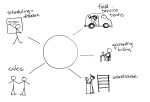
total-businessMaking QuickBooks desktop editions more useful by adding secure remote access and centralized management makes a lot of sense.  For companies who rely on the functionality and features of the desktop products (QuickBooks Pro, Premier and Enterprise), a hosted approach is the only way to really address mobility and multi-location requirements.  Remember that hosting doesn’t necessarily mean offsite, although that could make sense for the business, too.

Centrally-managing QuickBooks applications and data creates greater efficiency and improves overall IT management capability for the business.  At the same time, a centralized model introduces a better strategy for mobilizing the workforce and connecting remote users and offices. The struggles of understanding and implementing proper QuickBooks licensing begin to seem very small when compared to the benefits of deploying a centralized system that’s easier to access, manage and secure.

Make sense?

J