

QuickBooks Pro and Premier Subscriptions No Longer Available After July, and It’s Bye Bye for QuickBooks for Mac

Final sale date for QuickBooks Pro and Premier
On November 30 of this year, Intuit notified its partners and customers that the final date for new sales of QuickBooks Desktop Pro, Desktop Premier, Mac, and Desktop Enhanced Payroll is July 31, 2024. Starting in August, QuickBooks Pro and Premier subscriptions, along with Mac versions and desktop payroll services, will no longer be available for purchase. QuickBooks Enterprise, which is a desktop edition, is the only QuickBooks version that will remain available for new subscriptions.
For several years, Intuit has been improving their online version of the product while migrating as many customers as possible to that platform. Now, businesses that have invested years of user training and business process development are forced to decide if the online version of QuickBooks will meet the needs that the desktop editions have for years, and they must look at the realities of potentially re-training users and re-developing workflows and processes.
QuickBooks Enterprise is a viable alternative
The alternative is that businesses adopt QuickBooks Enterprise edition and retain the value of user knowledge and process support by remaining in desktop QuickBooks. For businesses that manage multiple company files, QuickBooks Enterprise provides the same multi-company capabilities that Pro and Premier do, something the online edition does not currently support.
There is no change to QuickBooks Desktop Enterprise subscriptions. All QuickBooks Desktop Enterprise subscriptions (Silver, Gold, Platinum, and Diamond) will continue to be available for purchase for new customers. QuickBooks Enterprise Gold, Platinum, and Diamond subscriptions include integrated payroll.
Flexibility of Desktop Applications on the Cloud
With the announcement, many accounting professionals and their clients are not sure what the best path forward is. While there is momentum behind the online application, there are options for staying with QuickBooks Desktop and still take advantage of the cloud.
For businesses that want the flexibility of using the cloud but that need the features and functionality of desktop QuickBooks, Noobeh cloud offers QuickBooks on Azure services. This empowers businesses to use their QuickBooks Desktop software – Pro, Premier, or Enterprise – along with all their add-ons and integrations, and to run it all securely on the Microsoft cloud. Note that Noobeh’s hosting service also works with Mac devices, so even Mac and iOS users can work in hosted Windows versions of QuickBooks.
QuickBooks Desktop is Not Dead
The retirement of QuickBooks Desktop Pro, Premier, Mac and Payroll products currently impacts only new customers looking for those solutions, or existing customers that do not have current subscription licenses. If a business has an existing QuickBooks Desktop Pro Plus, Premier Plus, Mac Plus, or Enhanced Payroll subscription, they can continue to renew their subscription after July 31, 2024. Intuit will continue to provide security updates, product updates, and support for existing subscribers.
Intuit will also allow accountants to continue purchasing QuickBooks Accountant Desktop Solutions, including ProAdvisor bundles, directly through the QuickBooks Accountant Sales team.
What to Do
To avoid losing access to QuickBooks desktop, businesses should purchase a QuickBooks Desktop Pro Plus, Premier Plus, or Mac Plus subscription through the QuickBooks Accountant Sales team before July 31, 2024. Businesses that need a desktop payroll solution should consider purchasing a QuickBooks Enhanced Payroll subscription before July 31, 2024, or upgrade to QuickBooks Enterprise Gold, Platinum, or Diamond, all of which include integrated payroll and can still be purchased after July 31, 2024.
Mendelson Consulting, Intuit’s first solution provider and the go-to experts on QuickBooks Desktop and QuickBooks Online, are perfectly positioned to provide businesses with the help they need to decide which path to take with their QuickBooks software. Recognized as specialists in working with larger businesses using QuickBooks Enterprise and as top performer with QuickBooks Online, Mendelson Consulting’s team has the depth and breadth of knowledge and expertise to make sure your business makes the best possible choice for its financial systems.
 Make Sense?
J


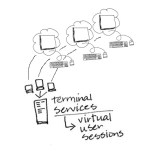 Cloud computing and SaaS applications are all the rage, and businesses are finding tremendous benefits with the mobility and managed service these models provide. On the other hand, there also continues to be huge reliance on the desktop computer and the software running on it. From basic productivity tools to more advanced business solutions, desktop-based software and locally installed applications remain in favor for the vast majority of businesses around the country. Adoption of web-based solutions is certainly increasing, but the need for tried-and-true business applications that were traditionally installed and managed directly on the PC or local network doesn’t seem to be going away. At least part of the reason for this is the functionality and performance these applications deliver. Another factor is that hosting and remote access solutions have matured to the point where hosting applications is just as “mainstream” (and often more useful to the business) as using a SaaS solution. Managed application hosting models have made solutions like Microsoft Office and QuickBooks desktop editions available anytime, anywhere and using just about any device. I call hosting the best “tweener” solution available, because users can have the functionality they need and still get fully managed, on-demand service.
 Make Sense?
 Yet the desktop remains as the primary workhorse for most business users. This is where the productivity applications live, where large spreadsheets and full-screen applications are run, and where keyboarders and production data entry users operate. Tablets, touchscreens and mobile devices just don’t provide the same capabilities unless you tether them to full size monitors and keyboards. Even then they may not because they might not run the same OS as the desktop. The point is that the desktop hasn’t gone away and isn’t likely to any time soon. Users may use more mobile apps and devices, but this isn’t diminishing use on the desktop as much as it augmenting it. This is what fuels the interest in application hosting and virtual desktop computing models – the desire to mobilize desktop and network applications and working environments.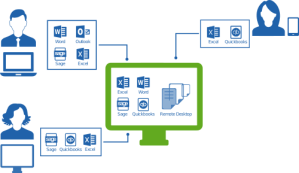

 Cooper Mann Consulting