


“AI FOMO” (Fear of Missing Out) has become a major force behind business adoption of artificial intelligence.
Rather than pursuing AI with a clear strategy, too many organizations are investing because of competitive pressure, media buzz, and fear of falling behind. This reactive approach often leads to rushed, expensive, and poorly executed initiatives that fail to create real value—and can even spark internal friction.
Surveys show that a large share of IT leaders and executives—sometimes more than 60%—acknowledge that FOMO significantly influences their AI adoption decisions. This fear is fueled by rapid technological change, assumptions that competitors are gaining an advantage, and limited understanding of what AI can and cannot actually do.
Implementing AI without thoughtful planning or alignment to business needs often results in wasted investments in tools that don’t address real problems. Projects may stall in the early stages or fail to produce any measurable benefit or return on the investment.
Among the biggest challenges with AI centers on data and trust.
When a business puts speed of development above quality and security, it can lead to data errors, AI “hallucinations” and just plain wrong answers that diminish trust in AI systems. Workers may already feel threatened or undervalued, which creates anxiety and slows tech adoption, so care must be taken to not prematurely introduce AI that may further erode trust in the technology.
I’ve always understood that technology isn’t just a tool, it can be a strategic advantage helping businesses gain in ways not previously available. The key is to move away from fear-based adoption and toward a deliberate, value-driven approach.
Start with identifying the real business problem. With AI, figure out what problems you need the technology to solve for you rather than asking what AI can do. Just because AI can do something doesn’t mean you want it to do it for you, or that it will deliver any real value to your process or operation.
Change for the sake of change makes no sense, so it is essential to understand if there is actually a problem that AI may be able to solve and that the benefits of the solution outweigh the cost to develop and the risk potentially introduced. Start small and have pilot projects in low-risk but high-impact areas of the business where the organization can learn and refine before scaling.
Among the most important aspects of AI in business is the data the AI works with. This is where many businesses fail in their initial attempts with AI development, due largely to the fact that data is siloed or segregated and completely unclassified or categorized.
For AI development to deliver effective business benefit, high-quality, organized data and solid data infrastructure are essential.
AI systems learn directly from the data they are given. If the data is incomplete, inaccurate, inconsistent, or poorly managed, the AI’s performance will reflect those flaws. AI models are only as good as their data because AI systems—especially machine learning and generative AI—identify patterns and make predictions based on training data.
Poor-quality data results in biased, unreliable, or incorrect outputs. High-quality data supports accurate, trustworthy, and consistent results. If an AI is trained on inaccurate or inconsistent information, it will learn (and repeat) those errors.
Shift from a fear of missing out to a fear of missing the advantages of AI.
The focus should be on maximizing AI’s potential to create a competitive advantage, taking strategic risks that are aligned with the business goals. Replace fear-driven decision-making with thoughtful, goal-oriented planning and turn AI into a meaningful source of long-term value and differentiation rather than an anxiety-inducing trend to chase.
Noobeh cloud services works on the Microsoft Azure platform, creating data platforms and delivering services that fuel and support AI development. Let us create the dynamic data infrastructure your business needs to develop the intelligence to propel you forward.
 Make Sense?
J


 On July 9, 2019, support for SQL Server 2008 and 2008 R2 will end. That means the end of regular security updates and general support for the product. Are you ready?
 Make Sense?
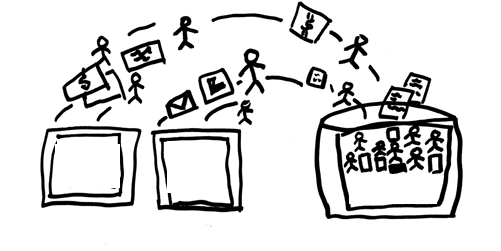 For example, with an installation of QuickBooks accounting the point-of-sale “master location” on the host, the core financial data is able to be secured and protected in the virtual environment without risking lost productivity (and lost sales!) due to connectivity failures at the retail locations. The end-of-day process at each location is to then copy the POS data to the host system where it is integrated with the accounting system. If the POS system is something other than QuickBooks POS, it simply means that there is another piece of software – the specific POS integration tool – required to transfer the POS data into the accounting software. QuickBooks desktop accounting integrations are available for most popular POS systems including Micros, POSiTouch, Aloha and others. The integration software (often just a QuickBooks plug-in) would be installed on the computer running QuickBooks, enabling the entry of the POS data into the QuickBooks accounting system.
 Make Sense?
 Businesses are migrating their systems to the cloud, it’s true. Organizations of every size and type are taking advantage of the cost savings and flexibility introduced with cloud deployments and hosting services. Rather than focusing efforts on procuring, installing and maintaining servers and applications in-house, IT departments are moving workloads offsite to cloud providers and hosted platforms. The tools are readily available to help these IT workers configure and light up VMs in hosted infrastructure, and certain platform licenses and other elements are made accessible to customers. But there’s something missing in the toolsets provided by platform hosting companies – a certain something that ultimately determines how useful (or not) the hosting platform service is when IT is ready to deploy users and applications in the environment.
 Cooper Mann Consulting