Enhancing Business Insight: Noobeh Cloud Services and Azure-Based Solutions

Technology is evolving and so are our ways of using it. While the rules of accounting haven’t changed for years, the solutions we use to do the work have changed a lot. Yet there remain many businesses that haven’t yet embraced the idea of fully digital workflows, integrating and automating how data moves through the “system” to provide a comprehensive view of the business and how it is performing.

This is where accountants and bookkeepers can best serve their clients, by helping them implement the platforms and solutions which transform operations and provide greater insight into these areas.

Over 20 years ago, a technology model was developed which allowed businesses and the accounting professionals who serve them to work directly and collaboratively in the clients’ accounting system. By hosting QuickBooks and Sage desktop products on host servers, small business users and their accountants could both access the software and the data in real time.

This new approach was a boon for accountants, bookkeepers and others working with small business clients as it not only enabled closer work, but also provided those advisors an opportunity to do more – and more complex – work with the client. Yet many platforms and working models created barriers to broadening the scope of service or access to client systems, limiting to just basic accounting products like QuickBooks, and not effectively addressing the rest of the business need.

As technology has evolved, so have these transformations.

More accounting professionals understand the benefits as well as the necessity of moving from analog to digital workflows, removing manual entry and improving efficiency and accuracy of data. Yet this improvement doesn’t require changing accounting software and undoing years of learning and business knowledge. Rather, the platforms and connections must be the primary focus, replacing the manual with automation and smoothing out the bumps where data isn’t flowing at all. If the system isn’t in place to handle the complete flow of the data, there is a break. Like a pipe leaking water, this break results in data loss – which is also loss of business intelligence.

A key to all of this is the consideration of where the data ultimately resides. When business data exists in closed silos – whether web-based software or closed hosting platform – it takes a comprehensive approach to collection, storage and analysis. This is among the benefits to be derived from the modern cloud and Noobeh’s Azure-based hosting approach.

Noobeh’s hosting is not just about the desktop or the applications.

The cloud platform, and Azure in particular, also provides resources for data analysis and business intelligence, workflow and data flow automations, improved security and identity management, IoT and computing on the network edge.

For professionals looking to evolve their practices by helping clients go beyond basic recordkeeping and reporting, it’s time to delve into the operational details, data flows and development of real business intelligence and insight. Noobeh Cloud Services and Mendelson Consulting have the platforms and the supporting services to help bring it all together, improving profitability and performance of their clients through the intelligent application of technology.

jm bunny feetMake Sense?

J

Prey or Empowered? Small Businesses and IT Security

Now more than ever, small businesses need to be vigilant with their information technology security. Small businesses may not be the big fish in the sea, but there are plenty of them out there to catch. Small businesses tend to make the best targets because they often fail to perform security audits, they may not be willing to invest in the resources needed to protect themselves, and they frequently don’t even carry the right insurance coverages. To hackers, small businesses are easy prey.

“Don’t think you are too small to be affected,” says Erik Knight, the founder and CEO of SimpleWAN. “Every place you have an employee or office is a potential entry point. Take it seriously; if you have something worth taking, a hacker will try to take it.”

https://www.forbes.com/…

There are a few things every business can do to improve the security and privacy of their data. It isn’t an option any longer; these are essential elements in an overall security strategy that can make the difference between staying in business and not.

Use strong passwords, not easy-to-guess words, phrases or sequences (1234 is not a strong password). Passwords should be unique, more than 8 characters in length, and have a mix of numbers, letters, and special characters.

Keep software updated. Whether it is the operating system on your computer or the software you use to write letters, having up-to-date software matters. Developers don’t just upgrade software to fix bugs or introduce new features; software often gets updated because of security issues or vulnerabilities.

Keep networks and connected devices secure to make sure that the computers and connections aren’t introducing weaknesses into your system. Not only are password controls and software updates needed, but firewall security and good anti-virus/anti-malware solutions are also a must. Keeping an eye on the server matters, but the connecting points and end points are where many vulnerabilities exist.

Set up two-factor or multi-factor authentication to further secure logins. 2FA and MFA is like having ID besides just your driver’s license to prove you are who you say you are. Your password, like your DL, is just one factor; you need one more thing to prove your identity for 2FA, like a code from your phone or maybe your fingerprint. The point is that there should be more than just a username and password to access important data.

Restrict use of personal email or social media on work devices. This gets a little trickier with smaller businesses, as many don’t or can’t support providing users with all company-owned devices. There are tradeoffs to allowing users to bring their own devices (byod) versus using company-owned devices. When mobile devices are part of the mix along with desktop and portable computers, it becomes even more complicated and the risk potential increases.

Use encryption for data in transit and data at rest. Encryption is like scrambling the data and then unscrambling it when you access it. In transit, data may be encrypted by a VPN so that it is protected over the wire (in motion) as it is sent and received on the network. RDP is also encrypted, but this remote access method’s main purpose is to keep the data from leaving the server in the first place. At rest, like when it is sitting on a hard drive or other storage location, data can also be encrypted. To open the file or file system, you need a key to decrypt it.

Keep all data backed up and create a way to rapidly recover your server and systems in the event of failure or compromise. Backups are great right up until you find they are as damaged or unrecoverable as your main system, so make sure to have a policy of testing your backups periodically. There are many ways to back up and protect your data, including external drives and cloud storage. If data gets lost or corrupted, you want to be able to restore it from a backup. Regularly audit your backup and data security practices to help identify weaknesses that make the business vulnerable.

Educating employees on the importance of cyber security is among the most important steps a business can take to protect itself. Keeping passwords secure and secret, knowing how to spot a phishing email and what to do and not do with it, not clicking on suspicious links in emails, not sharing personal or confidential information online, and what to do in the event of a breach are all things that should be regularly discussed with workers and supported by written policies.

Managed Azure cloud servers from Noobeh help you keep your business information more secure. Our services demand high levels of security and privacy, and we help our customers keep their data and systems safer and more secure by handling some of the requirements for them.

  1. Strong password policies and MFA is our standard setup, and software updates and patching are part of the service.
  2. Working on the cloud server keeps data on the server and not traversing the network or downloading to individual PCs, so information stays secure and separate from whatever a user runs on their local devices.
  3. Data on the Azure virtual machines is encrypted at rest, and additional encryption is available to add more layers of protection. Data in motion is encrypted, but very little data actually traverses the wire.
  4. Servers and data are backed up regularly with snapshots and file level backups, allowing for simple file restores as well as comprehensive system recovery.

For small businesses, Noobeh has the solution for creating a more secure and better protected IT environment where applications and data can be available to those who need them without compromising the investments already made in training and process development. Moving software and data to a private cloud server allows companies to continue using the software they rely on, just in a better way. Instead of being easy prey to hackers, our customers benefit from higher levels of IT administration, management and protection that empowers them to work the way they need to – any time, anywhere.

jm bunny feetMake Sense?

J

The Cloud and the Business Desktop

Cloud computing is here – no longer is it considered to be temporary or just a fad.  Even though there are many businesses in the country without access to high quality high-speed Internet connectivity, the levels of investment and revenue surrounding cloud and mobile computing solutions and technologies has proven that mobility and managed service matter to those who are connected. What’s interesting is that the popularity of the cloud and the emergence of cloud-based applications and services haven’t really put much of a dent in the need for the desktop, which remains as the business workhorse and – connected or not – represents the foundation for business productivity and getting work done.

Some years ago, business applications began to emerge in SaaS (software-as-a-service) format, meaning a customer could simply subscribe to an application on the web rather than purchasing and installing software.  This option clearly resounded with many business customers and ushered in an era of online application services oriented specifically toward mobile users. Yet the desktop remains as the place where online solutions meet productivity (export any online data to an Excel spreadsheet recently?) and where accounting and finance connect with the rest of the operation.

Believing too much of the marketing-speak around cloud computing, many business users believe that they can only remotely access business software solutions if they are “cloud” and subscription model applications, and that the desktop products they know and have invested in cannot be available to them in a fully managed online model.  In fact, a large number of the business owners I speak with that actually use hosted desktop services somehow believe that the software they are using is something special and different from that which would be installed to their PCs. The fact is that the software is not different, regardless of what they may think. More often than not, the hosted applications are EXACTLY what the customer had previously installed (or would have installed) to their own computers had they not been working with a hosting provider.  Whether they are hosted or not… the desktop products generally function with all the features and capability designed into them because they are hosted on platforms they were designed to run on (like Microsoft Windows, for example).

Customers of the QuickBooks hosting companies often refer to their systems as “QuickBooks cloud, but not the online one”, not really understanding that it is simply the full desktop application that is being hosted for them.

Regardless of how many online application services emerge, and even if (IF) web-based versions of our favorite word processing and spreadsheet software become as useful as the installed kind, there will still be a need for the desktop if for no other reason than to make it easier to use and work with a variety of solutions at the same time.  Perhaps this is why remote desktop computing and hosted application services are becoming increasingly popular approaches to cloud and managed computing services.  The user benefits from having the feature-rich applications they need and a single place to access them and make them work together (the desktop value proposition), yet is able to have remote and mobile access, comprehensive system management and maintenance, data protection, helpdesk support and affordable monthly payments (the cloud value proposition).  In many ways, application hosting models represent the best of both worlds for the business.

JJoanie Mann Bunny Feet

Make Sense?

Consider how beneficial it would be to businesses who want the advantage of remote desktop and mobile access to applications to be able to run their QuickBooks (feature-rich desktop QuickBooks) and/or other business applications in an anytime, anywhere sort of environment. Businesses can obtain hosting services for QuickBooks Pro, Premier, and Enterprise – allowing organizations to have their QuickBooks financial applications managed, protected, secured, and made available to users all the time and from any location. Some hosting services may also support integrations and extensions for QuickBooks – for both desktop and Web-based applications and services. When the host can provide authorized subscription licensing for Microsoft Office, a business can have a complete, outsourced IT solution and pay only monthly service fees to get it. No installation or system management to worry about: the QuickBooks financials, the productivity, the operational systems and plugged-in applications can all be hosted in the cloud.

Following the Rules: Users and Licensing for Hosted QuickBooks

Following the Rules: Users and Licensing for Hosted QuickBooks

I have said many times before that the licensing for QuickBooks desktop editions appears to be a bit complicated, and a lot of that may have to do with the fact that so many people use QuickBooks in so many different ways.  With a solution like QuickBooks (or Microsoft Office or other really popular and widely used software products) there is a tendency for folks to want the flexibility of accessing their software regardless of what computer they are using.  Also, especially in businesses, there is the habit of installing software on a computer and then allowing anyone sitting at the computer to use the software.  In some cases these approaches are okay with the software vendors, but in most cases they’re not.  Yet too often, the small business owner doesn’t find out what the actual rules of using the product are until they try to deploy the software with a hosting service provider (because nobody ever actually reads the EULA, do they?).  If the provider has any credibility at all, they will enforce the licensing rules of the software, but that doesn’t always sit well with the customer.
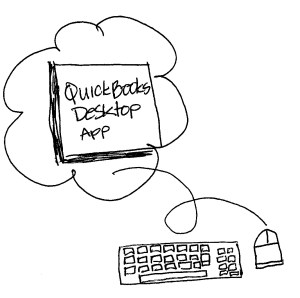
picture-hostedQBThis situation rears its ugly head quite frequently in the QuickBooks hosting world.  Perhaps it is because there are a lot of possible working models involving QuickBooks users, or maybe it’s simply a matter of people not seeing the value of paying for what they want to accomplish.  Either way, service providers find themselves being challenged every day in trying to explain to a customer why they need to have more than one license for QuickBooks and more than one service account if they want more than one person to access the hosted solution.

Different people at different times: The Concurrent User approach

One of the arguments people make for not having licenses for all of their users is that they don’t actually need everyone in the system at the same time.  The belief is that there should be licenses enough only for the number of concurrent, or simultaneous, users that will access the system, yet each individual human being/user should have a login to the system with the software available (for convenience, of course).  A QuickBooks 3-user license, they believe, should be able to be used by any number of business users as long as no more than 3 of them are in QuickBooks at any given time.

While the customer may be making a reasonable argument, it all falls down when you consider the license agreement for QuickBooks.  Each user of the product is supposed to have a specific license.  A business with a 3-user license (or 3 single-user licenses) for QuickBooks has the rights to allow 3 people (unique human beings) to use the software, not any combination of people as long as they number no more than 3 at a time.   There is to be no sharing of licenses, and there is no “concurrent” licensing model: each person/user/human being is supposed to have their own license for the product no matter how often they access it.

Look but don’t touch: The Read-Only User approach

Another of the arguments people make for not licensing all of their users is that there is somehow a belief that if you don’t actually enter information, then you aren’t really using the software.  This often comes up in situations where an accounting professional works with their client, or when business owners want to occasionally see what’s going on in the company.  The approach centers on the concept of what a “user” is and suggests that users are the people entering or changing the data, and people only viewing that information aren’t really “users” at all.  When the bookkeeper opens QuickBooks and enters an invoice, the bookkeeper is recognized to be a user.  But when the business owner opens QuickBooks to view the financial statement or see the bank account balance, isn’t the business owner also a user?  Yup, they sure are. Any person that actually opens the program on the computer is a user, regardless of what they do when the program is open.  Just looking around at the data still requires that the program be open, and opening the program requires a license.

Two Fer: But the other hosting company lets me…

Just because you can do something doesn’t mean that you should.  So, just because a different hosting provider might let you get away with things that aren’t right (but perhaps are convenient or cost saving in the short-term) doesn’t mean you should expect a different host to allow the same thing.  If your current host says things like “as long as you don’t tell us…”, you should be concerned.  This often comes up in a hosting scenario where there is an outside accounting or outsourced back-office professional working with a hosted client business.  The outsourcer will want to access the client books, so they will want to have a login and access to QuickBooks software on the host system.

The trouble starts when the outsource professional doesn’t want to have to pay for their own service or licensing, yet they want to be able to login to the system and run QB just like the client does.  Falling sometimes under that attempt to leverage a concurrent user approach (see above), these outsourcers just aren’t realizing that the benefits of accessing their client information and working in real-time with that data is often valuable enough to support the cost of a hosted account and license.  Instead, they want their access to be free of charge and not be bound by silly rules of licensing, often because their client won’t want to pay for the accountant service in addition to their own.

This is when the “if you don’t tell us” stuff comes in – where the service provider may suggest to the accountant or outsourcer that they can simply login as the client and nobody would be the wiser.  I’ll fess up and say I have even entertained this idea with clients a few times but always shy away from discussing it in-depth.  While it is basically true that the service provider doesn’t generally know which exact human being is sitting at the other end of that remote desktop connection, that doesn’t mean that it is okay to leverage it into an abuse of services or licensing.

Two or more people sharing a single login just isn’t good ju ju, and it’s usually against a whole bunch of licensing rules and rights of use.  The funny thing is that many customers who initially leverage their service in this manner end up finding it was a really bad idea.  I saw a scenario a few years ago where a business allowed their outside auditors to share the logins of regular employees in the finance department.  When an employee tried to login to their remote desktop, they opened the session the auditor had open – exposing the employee to a lot of data that was not theirs to see but which the auditor user in QB had access to.  The company called it a security breach and it was on their part – and it was allowed to happen because they shared their remote desktops with the auditors rather than giving the auditors their own accounts with their own security profiles.  What seemed like a good, cheap approach on one day rapidly turned into a big issue the next, and the service provider had no power to prevent it from happening.

The moral of this story is simply that following the rules is the right thing to do and most reputable hosting service providers will try, even if they don’t end up doing it really well.  There are always going to be those who figure that the risks don’t measure up to the potential rewards, so they will do what they choose to do.  I’m always left wondering about those guys; if they have no problems breaking these rules, I wonder what other rules (or confidences) they are willing to break.  Hmmm.

Make sense?

J

 

Accounting for Point of Sale

Accounting for Point of Sale

There are a lot of solutions available to help retail businesses get business done.  From touch screen technology to mobile credit card and payment processing, retailers have many choices when it comes to selecting the right technology for the establishment.  But even the best point of sale system can lack the critical element that makes it truly valuable for the business.  This critical element is integration to a trusted accounting and finance solution.  While the POS system may include a level of basic accounting functionality, the reality is that a dedicated financial application will perform better in the long run.

Just as specialized line of business applications are used to handle operational functions, the financial application should be considered to be the “line of business” solution for the accounting and finance department (even if it is a department of one). This system not only services essential processes like receivables management, bill payments and bank account reconciliation, it serves as the basis for payroll, financial, tax, performance and other reporting. Further, the financial systems are often the first and primary source of analytical data, illuminating KPIs and cash flows and ultimately the business value.

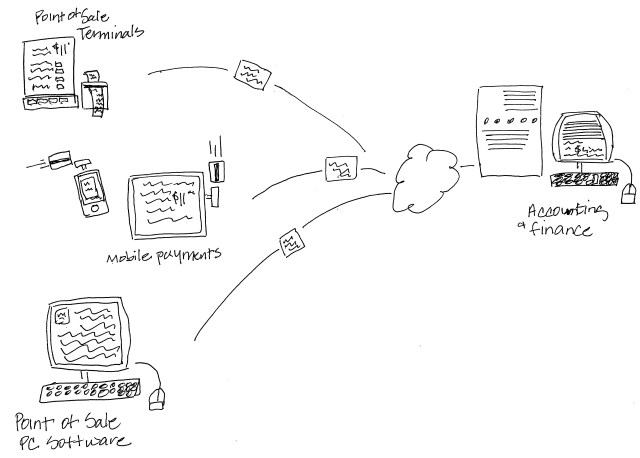
The point of sale application generally handles the selling of and payment processing for goods and services sold by the business.  Whether it is composed of registers and terminals connected to a host system, PCs running POS software, or mobile phones and tablets running mobile payment processing apps like Square or GoPayment, point of sale addresses the retailers need to capture and record sales and payment information, sometimes customer information, and often inventory information.

The data from the POS solution must make it to accounting in some manner, yet point of sale applications are too-often approached as a standalone business requirement, somehow disconnected from other aspects of the business including the back-office.  Sales and items may be recorded in the POS system, yet only summary sales data ends up being re-keyed into the accounting system.  Centralized inventory management is all but nonexistent in these cases, and gross sales total are often recorded rather than individual transactions and receipts being transmitted to the accounting system.  The process of re-keying information from the POS to accounting systems is not only an efficiency-killer, it is also introduces a great potential for errors.  When the business elects to conserve on data entry and post only summary information to the accounting system, valuable detailed sales and transaction data may be lost.

The right approach to bringing point of sale together with accounting is to automate the process of integrating POS data with accounting on a regular basis – with AUTOMATION being the key.  Rather than establishing a process that requires manual entry of information from either system, a data integration solution is the best approach, with an import/export solution running second. The point is the elimination of manual re-entry of information.

There are numerous tools available that can take formatted POS data and import it into products like QuickBooks, for example, where it can be properly accounted for.  While QuickBooks Point of Sale integrates with QuickBooks desktop products, other POS solutions can also connect with QuickBooks if the right integration tool is selected, and there are quite a few available.  Check with the POS vendor and ask about a direct integration with QuickBooks desktop or whatever financial system you use. If there isn’t a packaged integration solution available, then check out products like Transaction Pro Importer, which can automate a variety of data import processes and ease the burdens moving external data into QuickBooks.pointofsale

The other factor in getting point of sale data to accounting is actually getting it there… transporting the data from the POS location to where the accounting system lives.  In many situations it is not desirable to keep the accounting system on the same computers as the point of sale systems, and in some cases it isn’t even possible.  But there is generally a way to get the information in a form that makes it possible to transmit it in some manner.  Among the most popular approaches to solving the “getting the POS data from here to there” problem is to use a data sync solution like Dropbox.

If the point of sale data can be exported or output to a file on a PC hard drive, then it may be able to be stored in a Dropbox folder on that PC.  At the home office where the accounting system resides, the operator would access the sync’d files from the local PC Dropbox folder and import the data to QuickBooks.   For QuickBooks Point of Sale there is an option to create a “mailbag” of sorts from the POS data of a remote store, which QuickBooks POS at the home office would pick up from the Dropbox folder and push to the QuickBooks financial application.

For businesses using POS systems like Micros or POSitouch and others, there is likely a service or application that will produce the POS data for import to QuickBooks or other financial system, pulling POS data files placed in the Dropbox folders by the POS app or performing the function as a web service or SaaS integration.

While I am a big fan of application hosting services and running QuickBooks desktop editions in the cloud, I’m also a realist and recognize that many POS solutions either can’t or shouldn’t be hosted.  There are situations where a hosted point-of-sale makes a lot of sense, and then there are cases where no bandwidth or proprietary hardware-based solutions make hosting not even an option. That doesn’t mean that the financial systems shouldn’t be hosted, though, and there are numerous ways to get the sync’d POS exports to the hosted QuickBooks environment, for example.

The key for retailers is to make sure there is a solid process for getting detailed and accurate POS information into the accounting system on a regular basis.  Manual entry is never the best answer.  With all of the technology and tools available, manually re-entering sales information is a waste of time and is likely to produce errors.  The better answer is to use an approach that automates the regular collection of point-of-sale data from all sources, delivering the data in a regular and consistent manner to accounting, and providing the basis for end-to-end automation supporting the integration of the point of sale system data with the rest of the business accounting.

jmbunnyfeetMake Sense?

J

QuickBooks and Dropbox? Yeah… no.

mobile cloud dataHaving your data available from anywhere is awesome.  Storing files in the cloud and being able to sync them with files on the computer is a great way to make sure the files are centrally available regardless of which machine you use to access them with.  Dropbox is among those favored solutions which provide users with the cloud drive storage and an ability to seamlessly sync those files to various computers.  It’s pretty cool, but let’s face it: not every type of file loves living in a Dropbox or sync folder.  Particularly for folks who want to be able to store and sync their QuickBooks and other business files to the cloud, there are a few things to be aware of when using these nifty sync solutions.

A file is not always just a file.  What do I mean by this?  Well, there are lots of different types of files an application might store and use, and not all of them work the same way.  For example, Word documents are files that only one person can actually work on at a time – there’s no actual “multi-user” functionality when it comes to a Word doc.  You either get the file in a state that allows you to make changes to it, or you get it in ready-only mode.  Document files like this – Word docs, Excel spreadsheets, PDFs and text files – work great with sync solutions. This is because the type of file being sync’d is designed to allow only one person at a time to have it open and editable.  You sync it to your computer, work on the file, and then sync it back.  It’s pretty straightforward.

The file that isn’t just a file is a database – a file or series of files that make up a complete data set, and which have some type of database manager or other framework keeping track of things.  It’s this type of solution that often has problems working in a sync folder or system.  An Outlook data file (a .PST file) is a type of file which fits into this category.  While the Outlook file isn’t generally viewed as a multi-user data file or a database file, it is being communicated with and written to by various processes while the application is running.  There is information being added to the file as emails are received, even while the user may be writing an email or entering a calendar appointment.  The point is that there are multiple types of data elements being updated all the time and by various processes.  This type of file is always in use and getting changes, so there really isn’t a point in time when it’s closed and available to make copies of, which is what has to happen for a proper sync.    And, because the sync solutions often try to sync incremental file changes, there is a big possibility of ending up with a damaged file because some changes were properly written where others might not be, ending up with file conflicts and corrupt data.

A QuickBooks company file is also a database file, so the same issues around syncing an Outlook data file exist with QuickBooks.  When the QuickBooks software is open and a company file is being worked on, the file may get incremental changes throughout the work session.  As each of these little changes happens, the sync program may attempt to copy those changes to the file in the cloud.  Because the QuickBooks file is constantly being updated, the attempt to incrementally sync updates to the file in the cloud can easily cause damage and corruption to the file.  Folks who have attempted to fake a sort of multi-user access to QuickBooks data files by using Dropbox or other sync services quickly find that the system isn’t going to work for them that way.  Further, they often find that the QuickBooks data files can get pretty screwed up trying to manage the live company file in this manner.


The only way to use QuickBooks, Outlook and similar types of data files with Dropbox is to recognize that the sync folders are only viable as a backup storage location for the files, not the place where the actual, working data files can be stored.  If using an application such as QuickBooks, businesses should store the “working copy” of the file in the documents area on the machine, and then backup or copy the data file to the sync folder periodically.  Placing the backup files or file copies in the sync folder allows them to sync to the cloud, storing them as offsite backups in case you need them, and allows the file to remain where it can be used by the application.

Businesses who need access to QuickBooks applications and data from different computers or locations may want to consider checking out hosting services as an alternative to a sync solution. Hosting solutions can help businesses get their software and data available anytime, anywhere either from their own PC or from a secure environment so they can access their QuickBooks applications and data from any Internet-connected device.

When a company wants to keep backup copies of their information in the cloud, a sync service might be an okay solution.  For folks who need to be able to access a live file and applications from a variety of locations, or if multi-user access is required (especially if those users are in different locations), then a full hosted solution might be the better answer.  Hosting the applications and data in the cloud is a great way to get the company connected, and it’s a far better alternative to pretending the system can be multi-user when it really can’t.

jmbunnyfeetMake Sense?

J