‘Tis the (Filing) Season – Time for W2s and 1099 Reporting

1099-santa-hatEvery year-end brings with it not just the holiday spirit, but also the underlying dread felt by small business owners – a creepy and back-of-your-neck hair-raising feeling associated with annual business tax reporting and filing. That old saying about “death and taxes” has a lot of validity to it; sometimes they feel like the same thing to a small business owner. And this is the filing season. Ho ho ho.

The reporting requirements for small businesses seem to be growing at a rapid pace, and business owners are struggling to find the information and tools that ease the adjustment to increasingly burdensome reporting and compliance. The IRS has implemented a number of measures to increase tax revenues and enforce compliance, including stricter 1099 reporting requirements. With information provided at both ends of the “transaction” it is easier to identify those discrepancies which trigger audits.   With this type of business intelligence, the IRS has developed a fairly strong weapon to combat non-compliance, so small business owners need to really pay attention (the IRS is).  If the feds are tooling up, then business owners should, too.

Just to add to the seasonal festivities, make sure you upgrade your accounting software in time to benefit from the right rules and forms. If you run a small business and keep most of your information on spreadsheets (still? really?), that’s OK because there are solutions available which draw the information from spreadsheets, eliminating the need to re-enter data. Seriously, though, you should consider using actual bookkeeping or accounting software.

It is also important to remember that payroll tax filing dates for W-2s and 1099 forms were changed for 2016 taxes, and these changes continue for 2017. The filing deadline for 2017 W-2s and 1099 forms (including Form 1099-MISC) is January 31, 2018, which is a month earlier than the pre-2017 filing date. Thankfully, the deadline for providing W-2 forms to employees and 1099-MISC forms to other workers for 2017 has not changed. This deadline is still January 31, 2018. 

Using a cloud-based service to file 1099s online should be something your business considers doing if it isn’t already. Because most services include form and feature updates, users don’t have to go looking for the right documents or worry that they are using an outdated form.  In an online or hosted solution, users benefit from updates without downloads and get stricter security around their data than would likely be present on their own PC.  As it relates to your accounting software, make sure it has the capabilities you need in this area and don’t settle for limited functionality.

Here are some features you’ll want to look for in your e-filing solution this year:

  • The ability to print and/or mail forms to recipients as well as e-filing forms directly with the IRS or SSA
  • Have Form 1096 or W-3 automatically calculated and transmitted electronically with the detail forms
  • Upload volumes of data with Excel templates or import from your accounting software (saves time and reduces input errors)
  • Store data securely and provide full access to filed forms for multiple years
  • Maintain payer and recipient records securely for use year after year.
  • Encrypt data upon submission and keep it encrypted throughout the entire process
  • Supports 1099 Corrections (should allow filing of corrected forms regardless of how the original form was filed)
  • Accountants, Bookkeepers and Tax Preparers should be able to set up multiple payers and file on behalf of many clients from a single account, even filing for all clients at once or via batch submission

Year-end tax filing, especially dealing with 1099s and W2s, is an arduous task for most small businesses and their professional service providers, yet it is one of those things that simply can’t be put off.  Where there is a single income tax return there could be literally hundreds of associated 1099s or W2s to file.  1099 filing in particular has become more of a focus as authorities crack down on contractor versus employer classifications and seek to develop easier identification of audit candidates (something every business owner wants to avoid).

The point of the discussion is that there are cloud-based tools which are highly useful, feature rich, and very affordable… and business owners and their accountants or bookkeepers would be wise to take a look rather than assuming that the general accounting software will do the trick this year and the next.  Remember that tax filing season is an annual event, and being able to rely on a consistently useful solution can make the season a bit merrier (or at least a little less stressful) for all.

jmbunnyfeetMake Sense?

J

Hi! I was looking for the Frangos.

Like your Cheese, the QuickBooks ProAdvisor Website has Moved

Intuit is making big changes to the QuickBooks ProAdvisor program and website, clearly reflecting the desire to keep QuickBooks Online edition at the forefront of the solution set.

The QuickBooks ProAdvisor benefits are now delivered within QuickBooks Online Accountant, including desktop licenses, etc.  Earlier this year, Intuit began redirecting to QBOA for those looking for the ProAdvisor program information, and now the entire ProAdvisor site is about to be fully retired.

Those working with QuickBooks desktop editions should pay close attention here, because being a ProAdvisor no longer means simply getting training and software.  The belief is that all ProAdvisors are professionals serving a client base, and that these professionals should use QuickBooks Online Accountant to manage that client base.  Staff accountants, bookkeepers and those who wish to get accredited for their QuickBooks training, whether desktop or online, will be able to manage that activity only from within the QBOA app.

The ProAdvisor website used to be where enrolled advisors could obtain their training, certification, manage their listings for referrals, and get their software.  With the introduction of client and practice management features geared towards helping ProAdvisors manage their entire client bases (QBO and QB desktop clients), it seems that QBOA is now the sole way for professionals to engage with Intuit as ProAdvisors, too.  No longer a standalone site, ProAdvisors must now enroll and access their program benefits – including desktop benefits – as QuickBooks Online Accountants.

read more on Intuit’s website: ProAdvisor Website moving to QBOA – QuickBooks Learn & Support

Make Sense?

J

Client Experience and Perceived Value: It’s Looking Cloudy for Accountants Working with Small Business

Client Experience and Perceived Value: It’s Looking Cloudy for Accountants Working with Small Business

Every day it seems there is another professional accounting or bookkeeping firm asking questions about how to get new clients for their new “online accounting” business.  Most of these professionals are likely missing the point that their current clients are probably already looking at online accounting solutions and services. Just like in the days when QuickBooks was beginning to take the lead in the market; today’s increasingly popular online accounting solutions are gaining popularity with the direct users, and are bringing those solutions to the professional community (not the other way around).  Professionals who wish to build their businesses on what the market demands would do well to recognize that the push to the cloud coming from their clients is a reflection of past activities, and firms riding the wave are much more likely to see success than those fighting it.

In reflection, remember that QuickBooks, unlike the other business accounting and financial products at the time, was a retail product marketed to and sold via retail and direct-to-customer outlets rather than via a channel or reseller approach.  At that time, State of the Art Software (which became Peachtree and then Sage 50) was the solution preferred by most accounting professionals, yet more and more small business owners would come to the professionals with the QuickBooks product already in hand, so accountants threw up their hands and adopted (if not embraced) the software.  Over the years, QuickBooks became the “go to” software for small business accounting, and many professional firms didn’t just gear up to work with it, but went as far as developing standards and practices based on the product.

With the introduction of high-speed broadband access, business Internet connectivity and affordable remote/mobile service, businesses are now finding that their options for shopping for, purchasing and implementing various solutions to business problems is possible at any time and from anywhere.  Even more, social computing and the blurring of the lines between personal and business use has made it all but assured that new business owners will seek online solutions where they can access business information and perform business-related activities regardless of location or mode of access.  This is what they have come to expect as consumers of information and services, and the expectation extends no less into their small businesses.

Professional firms must recognize that these evolving paradigms represent opportunity, taking advantage of cloud-based, real-time collaboration models to provide more timely value to their clients.  Where the more traditional on-premises and paper-based models have flourished, the online working models representing lean process and sustainability become the focus.

The movement to the cloud for small business accounting started with the consumer, who ultimately became the small business, and who may eventually become the big business. The professionals who recognize the value of and wisely adopt cloud technologies and online application services in their businesses – specifically in terms of how they work with clients and deliver value – are the firms which recognize that the client experience and perception of value delivered are the most important elements of all.

jmbunnyfeetMake Sense?

J

CooperMann 2012 in review

CooperMann 2012 in review

2012 Was an interesting year, to say the least.  Not that it wasn’t a good year, but it certainly brought its share of challenges as well as opportunities.  At CooperMann.com, we attempted to reflect upon these challenges and opportunities, discussing how they impact our views on accounting and technology and business in general.

While the economy continued to struggle and churn, business owners found that reducing operating costs and creating sustainability in the business were initiatives they could no longer afford to minimally address. As advancements in technology and the growing popularity of cloud computing models resulted in a number of solutions to help businesses meet those cost and continuity issues, they also introduced new and different challenges for accounting and finance professionals seeking to reinforce their relevance and value to the business.  They say that the only constant is change, so we should expect no fewer challenges (or opportunities!) in the new year.

Joanie Mann Bunny Feet

As for CooperMann.com, here’s how we did in 2012, our inaugural year

600 people reached the top of Mt. Everest in 2012. This blog got about 10,000 views in the latter part of 2012. If every person who reached the top of Mt. Everest viewed this blog, it would have taken 17 years to get that many views.

The busiest day of the year was October 2nd: The most popular post that day was

Attractions in 2012

These are the posts that got the most views on CooperMann in 2012.

Changing How We See Software: QuickBooks 2013 interface frustrates power users

Is This The End Of ERP?

In Bookkeeping, Accounting, and Information Technology: The Value of Outsourcing

Working With the Right Numbers: Financial Data Analysis Requires Accurate Financial Data

Not Everybody’s Accounting Online: Outsourced Bookkeeping and Accounting for “Offline” Clients

Top 3 Favorite posts for 2012

One-Write System Revolutionizes Accounting: These guys had the right idea, they just didn’t have the cloud.

The race to find the “secret sauce” of hosted application services for small business

Accounting Professionals: It’s Good To Be Sticky

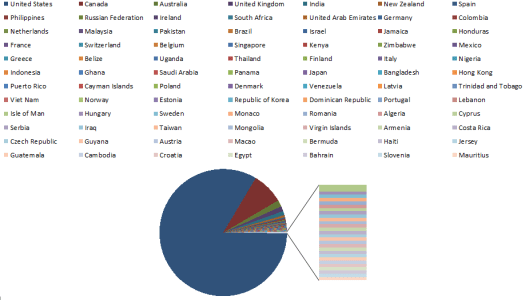
Where in the world is CooperMann viewed?

CMC2012-countries

buildingup-small-logoWhat’s coming up for 2013?  Keep watching CooperMann.com and BuildingUP.biz to stay on top of current issues and trends in accounting and business technology.

Changing How We See Software: QuickBooks 2013 interface frustrates power users

Changing How We See Software:

QuickBooks 2013 interface frustrates power users

You’re an accounting, bookkeeping or business professional and have been working with QuickBooks desktop software for years.  Your processes and methods for using QuickBooks to manage client accounting have been developed over time, and have been refined to the point where you are able to maximize your efforts and efficiently handle all your customer requirements.   Sure, there have been changes in the software over the years, and many of them have proven to be helpful.  But sometimes you have to wonder what they were thinking when they changed the interface for 2013.

Initially I thought it was the grumbling of a few people who simply resist change, some admittedly so.  But then the grumbling got louder, and started to come from folks I would expect to hear only “happy rainbows and sunshine” from when it comes to QuickBooks.  The new interface, they say, “sucks”.

So what’s the issue?  What did Intuit do with QuickBooks 2013 desktop editions that has inflamed so many devoted users?  One ProAdvisor puts it this way: “Basically no real enhancements at all, just the interface and relocation of options”.  In short, QuickBooks desktop editions now look a bit more like QuickBooks Online Edition, and “there’s extra stuff in the navigation – Intuit stuff“.

I understand Intuit’s motivations for making the desktop and online editions appearance more similar.  After all, the benefit of the QuickBooks product line is that you can start with an entry-level edition and move up the product line to more features and functionality without converting to and learning entirely new software.  Since the online edition of QuickBooks is positioned as the entry-level product for some businesses, it makes sense to continue that same look for the user as they upgrade to richer desktop editions.  Unfortunately for many accounting and bookkeeping professionals, this means giving up on some of the usability you’ve come to expect (like being able to fit all the necessary information on the screen, and having easy-to-read menus, or not seeing a lot of unusable space on the screen, or even being able to suppress Intuit in-product offers).

Many companies have successfully increased their revenue potential by adding offers for services via links in the software interface, which is much more acceptable now that people have adopted web technologies and are familiar with the “hyperlink” concept.  Building additional value (and revenue streams) in the solution makes sense from a business perspective, which is why you see so many software companies moving in this direction.  Software solutions and services can interconnect seamlessly and transparently via the web, so we should all expect to see software makers engage their customers in as many ways and with as many products and services as possible.  For Intuit, this means being positioned to take advantage of, initially, their partner network of interconnected solutions and, later, their own direct offerings in each area.

Software developers like Intuit DO listen to their users and market influencers, as they value your continued patronage.  They have come to learn, however, that devoted (or invested) users will accept change eventually – even more so when there is a chance to use the change to generate business opportunity.  QuickBooks accountants and trainers rely on change in order to keep their clients coming back for more.

The real target is the new user – the business not already adopted into the product – and it is primarily for this new user that the interface changes were made and in-product advertisements targeted to.

In the case of Intuit’s interface selection for QuickBooks 2013 desktop editions, it might seem like there’s “no enhancement, just the interface change”.  I would suggest, however, that the interface change IS the enhancement Intuit elected to deliver – enhancement of the acceptance of the online edition and connected services.

Make Sense?

J

Check out buildingup.biz and see what we’re up to these days