Enhancing Business Insight: Noobeh Cloud Services and Azure-Based Solutions

Technology is evolving and so are our ways of using it. While the rules of accounting haven’t changed for years, the solutions we use to do the work have changed a lot. Yet there remain many businesses that haven’t yet embraced the idea of fully digital workflows, integrating and automating how data moves through the “system” to provide a comprehensive view of the business and how it is performing.

This is where accountants and bookkeepers can best serve their clients, by helping them implement the platforms and solutions which transform operations and provide greater insight into these areas.

Over 20 years ago, a technology model was developed which allowed businesses and the accounting professionals who serve them to work directly and collaboratively in the clients’ accounting system. By hosting QuickBooks and Sage desktop products on host servers, small business users and their accountants could both access the software and the data in real time.

This new approach was a boon for accountants, bookkeepers and others working with small business clients as it not only enabled closer work, but also provided those advisors an opportunity to do more – and more complex – work with the client. Yet many platforms and working models created barriers to broadening the scope of service or access to client systems, limiting to just basic accounting products like QuickBooks, and not effectively addressing the rest of the business need.

As technology has evolved, so have these transformations.

More accounting professionals understand the benefits as well as the necessity of moving from analog to digital workflows, removing manual entry and improving efficiency and accuracy of data. Yet this improvement doesn’t require changing accounting software and undoing years of learning and business knowledge. Rather, the platforms and connections must be the primary focus, replacing the manual with automation and smoothing out the bumps where data isn’t flowing at all. If the system isn’t in place to handle the complete flow of the data, there is a break. Like a pipe leaking water, this break results in data loss – which is also loss of business intelligence.

A key to all of this is the consideration of where the data ultimately resides. When business data exists in closed silos – whether web-based software or closed hosting platform – it takes a comprehensive approach to collection, storage and analysis. This is among the benefits to be derived from the modern cloud and Noobeh’s Azure-based hosting approach.

Noobeh’s hosting is not just about the desktop or the applications.

The cloud platform, and Azure in particular, also provides resources for data analysis and business intelligence, workflow and data flow automations, improved security and identity management, IoT and computing on the network edge.

For professionals looking to evolve their practices by helping clients go beyond basic recordkeeping and reporting, it’s time to delve into the operational details, data flows and development of real business intelligence and insight. Noobeh Cloud Services and Mendelson Consulting have the platforms and the supporting services to help bring it all together, improving profitability and performance of their clients through the intelligent application of technology.

jm bunny feetMake Sense?

J

Help Your Business Streamline Operations and Bolster Agility

The landscape of information management is swiftly evolving, demanding that businesses prioritize enhanced efficiency and innovation within their IT infrastructure to attain peak performance and profitability. Cloud platforms emerge as indispensable allies in this pursuit, empowering businesses to streamline operations and bolster agility across various workflows, from finance to customer service and beyond.

In today’s technology-driven business environment, a modernized IT framework is imperative. While web-based applications and cloud-based software are often seen as panaceas, they frequently fall short of expectations, leaving businesses entangled in a web of inadequate solutions. The crux lies not just in software, but in establishing a robust IT foundation that seamlessly integrates applications and processes, enabling efficient data flow without the risk of errors or loss.

Cloud platforms not only facilitate seamless collaboration and remote access but also provide centralized data access, enhancing workflow efficiency and inclusivity (no more data silos!). Furthermore, the integration of connectivity solutions ensures smooth data flow throughout the system, minimizing errors and maximizing accuracy.

As businesses increasingly rely on interconnected data ecosystems, there arises a demand for professionals who are adept at navigating and optimizing these connections. Traditionally the realm of IT specialists, this responsibility is now shifting towards accounting and finance teams, reflecting the profound financial implications of every business operation.

Noobeh cloud services and Mendelson Consulting teams work with accountants, CFOs and operations professionals who wish to transform business activities into digital workflows and dynamic sources of intelligence and insight.

Using platforms such as Microsoft Azure, PowerBI and more, plus leveraging solutions such as Clearify’s QQube for QuickBooks, Noobeh helps growing businesses implement the platforms and services that support greater efficiency now, and which have the agility to adjust and adapt to changing conditions, ensuring future support and service.

Gone are the days when accounting and finance were mere repositories of historical data; today, they serve as frontline guardians of business viability. Microsoft Azure cloud platform and services from Noobeh, your business applications, and direct data integrations furnish businesses with real-time insights, transcending conventional silos of historical data and illuminating the intricacies of business performance.

jm bunny feetMake Sense?

J

Good and Proper Accounting for Small Business

There are many reasons why a small business needs to have quality accounting, and it isn’t just about the cash. Especially when a business is small or growing, a strong financial management and reporting process will benefit the business in a number of important ways. Managing the cashflow and keeping money in the bank to cover payroll and inventory is critical, but good accounting data helps support better decision-making for more than just cash management.

Accounting and financial systems help small businesses keep track of their financial performance. This includes monitoring income and expenses (money in and money out) and creating financial statements. By having accurate and up-to-date financial information, small businesses can make informed decisions about how to allocate resources and grow the business.

Tax compliance is another area where good accounting data is essential. Small businesses are required to file taxes just like larger ones, and proper recordkeeping helps small businesses stay compliant with tax laws and regulations and to avoid penalties and fines.
Securing funding for operations and growth is another area where quality accounting data is critical. Banks and investors usually require financial statements and other financial information before providing any funding. By having accurate and well-organized financial records, small businesses can demonstrate their financial health and increase their chances of securing funding.

Knowing more about the business is always helpful, but being able to look at trends and understand what the numbers indicate is the real power. From budgeting and forecasting to identifying and reducing areas of risk, accounting data is the foundation for developing a true understanding of business activity and performance and finding ways to improve.

Track business performance, remain compliant with taxes, and get funding or investment when it’s needed. With good and proper accounting supporting management decisions, decisions become more informed and relevant and are likely to bring a better result.

jm bunny feetMake Sense?

J

Cloud Platforms for Client Data Help Reduce Workload Compression in Accounting and Finance

Accounting professionals have always viewed much of their work as being seasonal, waxing and waning with the turn of the months. From monthlies and quarterlies to the annual tax return, accountants’ work is focused as much on when as it is how much work must be completed. This regularity in the timing of the work has created somewhat of a false barrier to efficiency, largely because many professionals wait for the workload to appear, and it always appears at the last minute. Instead, we suggest leveraging technology to create new working models with clients to alleviate workload compression and deliver improved service and insight in real time, when it really matters.

Accounting is no longer considered to be a final resting place for financial and performance information. Accounting isn’t passive; it is an active participant in developing and managing data as it flows through a business. Professionals who continue to perform write-up and other time-consuming “re-accounting” tasks will often find that their approach removes them from the truly interesting part of the job. Instead, when the professional participates with their clients’ businesses and information on a regular basis, the accounting data can be adjusted so it is treated properly from the start. Better data provides for more informed decision making, and this is the real benefit the accountant can deliver.

The key for every accounting professional is the technology and how it might be applied to decompress the workload and even things out. Structuring standard processes for client intake, implementing workflow tools to closely manage data and deliverables, and improving the speed and quality of internal communications are all areas where tech can make the work more consistent and manageable. Much focus can be placed on the technologies a modern accounting firm would apply to its own workflows and data handling processes, yet there is often little consideration for how the accounting professional might maximize efficiency as well as effectiveness in working with the client data at the source.

Most fundamentally, accountants typically work in places where the client or data is not. Business is done at the business location, and that’s usually not where the public accountant is. Even in large enterprise, the work gets done and data created by others than those in finance, so it is up to finance to find the way to gain access to the data and ensure its proper treatment throughout the system. This is among the reasons for the emergence of remote access solutions and services. Through remote access the professional can access the information of the client businesses, performing data entry or adjustments directly into the client’s accounting system and avoid lengthy reviews and write-ups later.

While remote access solutions may work for some, the time-sharing approach that leaves the client waiting while the accountant does the work does little to maximize the efficiency of either party. Instead, an online working model that allows the client and the accounting professional to work independently yet collaboratively addresses the needs of both.

Online working models in no way require web-based or online applications as the sole foundation. For many operations, online or web-based versions of accounting and line-of-business applications lack the cohesion and functionality that more robust desktop and network applications can provide. Where some businesses have limited functional requirements that a simpler online app may meet, others continue to rely on the maturity and proven functionality of desktop solutions. For these businesses, the adoption of virtual IT platforms brings the “online” working model, system agility and managed service potential that are at the center of web-app popularity.

Once the accounting professional has access to the clients’ systems as well as the data they produce, the accountant can take a more proactive approach to correction and adjustment, as well as gaining a basis for providing insight and advice. The after-the-fact approach to accounting is the essential flaw in attempting to decompress the workload of an accounting practice. As long as the tabulation and treatment of business data remains a job to be completed at the end of the period, there will always be urgency in completing the task and the value of the work product is unlikely to increase.

However, through the intelligent application of technology – online application services and virtual computing platforms – accounting professionals can not only help their clients embrace transformative efforts to improve business and performance, but the accountant can relieve workload compression while delivering even greater value on a continuous basis.

jm bunny feetMake Sense?

J

The Last of the One-Time-Purchase QuickBooks Licenses… 2019 is End of Life

Tax time isn’t the only annual event businesses have to pay attention to. Each year, just like clockwork, Intuit sunsets another version of QuickBooks desktop software to move the market forward and focus on the newer versions. Technology advancements, feature additions and functional improvements are constantly being introduced so license holders are regularly asked to update and (annually) upgrade their software. When a new version of the software is released, Intuit ends support for the older versions. In this case, as QuickBooks 2022 becomes mainstream, QuickBooks 2019 goes out of support.

Intuit always notifies license holders in advance as services for older versions of QuickBooks Desktop are put on the schedule to be discontinued. For some, this notification comes via email or phone, but for many it is a notification provided right in the software. A popup or other message is displayed that notifies the user that their software needs to be upgraded to the newer version.

Service discontinuation will happen on the schedule provided by Intuit. The key date is May 31, 2022. After that date, access to any add-on services will end for those using QuickBooks Desktop 2019, for Windows platform. The discontinuation of services applies to all 2019 desktop editions of QuickBooks, including QuickBooks Pro, QuickBooks Premier, QuickBooks Accountant, and QuickBooks Enterprise Solutions.

For users of QuickBooks Point of Sale, the key date is August 10, 2022. After this date, QB POS v18 will no longer have access to add-on services

If you don’t use any add-on services in QuickBooks desktop 2019, then your product will likely still work for you. There won’t be any live support available, and none of the other Intuit services that work with QuickBooks desktop will work with your 2019 version, and you won’t receive any updates or patches for security or other fixes.

Losing security updates should be reason enough to upgrade your software, even if you don’t need the add-on services. It’s your financial data, so you should consider the value of having better security than your out-of-date software can provide.

When Intuit decides to discontinue services for QuickBooks Desktop 2019, what that means is that the software will no longer connect to services it once worked with. Services no longer available with QuickBooks desktop 2019 (after May 31, 2022) include

  • QuickBooks Desktop Payroll Services
  • QuickBooks Live Support
  • QuickBooks Online Backup
  • QuickBooks Online Banking
  • Other services QB 2019 connects to…

You also won’t receive critical security updates starting June 1, 2022. If you receive any security updates before this date, install them.

To upgrade your QuickBooks software, you will need to purchase a subscription to the new version.

Yes, that’s right…. A subscription. There is no longer any option to do an outright purchase of your QuickBooks software license. Rather, you will be purchasing an annual subscription to the software, which must be maintained in order to keep using the software. Under the 2019 license, you can still use the software even if the support lapses because the application will still run, just without any connected services or updates. But with the subscription license, the subscription must be active for the software to run. In short, keeping the license subscription current and the software updated becomes mandatory, not optional.

This is the full list of QuickBooks products affected by service discontinuation after May 31, 2022.

  • QuickBooks Desktop Pro 2019
  • QuickBooks Desktop Premier 2019 (General Business, Contractor, Manufacturing & Wholesale, Nonprofit, Professional Services, and Retail)
  • QuickBooks Enterprise Solutions 19
  • QuickBooks Premier Accountant Edition 2019
  • QuickBooks Enterprise Accountant 19
  • QuickBooks Desktop for Mac 2019

These are the products/services affected by service discontinuation after August 10, 2022

  • QuickBooks Desktop Point of Sale 18.0 payments services:
    • Intuit Payments integration
    • Intuit Service Store Exchange
    • Mobile Sync feature

While Intuit sunsets the older versions of QuickBooks every year after a new version is released, these days they’re being a little more aggressive in trying to convert folks to QuickBooks Online. QBO does offer some neat features such as automatic bank account updates, but it isn’t quite what QuickBooks desktop users have come to expect from their beloved QB. The functionality of QBO is quite different from QB desktop, as is the data format. QuickBooks desktop “power users” will likely as not disapprove of how QBO handles things and will find that the functionality is limited in comparison.

QuickBooks Online may be a good alternative for Pro version users who don’t need much detailed functionality from their software… paying bills and invoicing customers is easily handled in QBO, but more advanced requirements still need desktop to get it done. Another sticky issue with QBO is where multiple company files are involved. With Online, each company is a separate “subscription”, where QuickBooks desktop sees it as just another company file. With QBO, you pay per-company, but not with QB desktop. For some businesses with many files or business entities to manage, this is a deal-breaker for using QBO.

For businesses that need the features and functionality of the desktop editions but also want the benefits of anytime/anywhere access, consider running your QuickBooks on the Microsoft cloud with NOOBEH. For single-user needs, a Microsoft CloudPC for small business may be just the ticket. It’s affordable (same price or less than with shared hosting) and you can run ALL your business software on it for no additional fees. When multi-user access is needed, NOOBEH delivers completely private cloud servers where all your users can access your business applications and data securely, from anywhere you need them to.

No, Intuit is not ending support for QuickBooks desktop software

Intuit is not doing away with the desktop versions of QuickBooks, no matter what a QuickBooks sales agent may tell you. While the QuickBooks tele-sales group may be focusing on getting people subscribed to QuickBooks Online, there remain millions of users of the desktop editions and the company is more than happy to continue selling them software. The features and functionality of QuickBooks desktop editions, particularly Premier and Enterprise, continue to be in high demand by growing businesses around the world. There are also many 3rd party solutions which integrate only with the desktop editions of QuickBooks, due largely to the advanced functionality available.

QuickBooks Online is an easy first introduction to finance software for a new small business owner, and the solution may work for the business for some time. As the business grows and as needs change and become more complex, it will be necessary to implement software solutions that can adapt and address the new requirements. If that’s QBO, great. If QuickBooks desktop editions can handle things better, that’s also great.  Either way, Mendelson Consulting and NOOBEH have the right solution for you, along with the best way to keep it running and working for your business.

jm bunny feetMake Sense?

J

QuickBooks 2022 Boasts Modernized Foundation

Every year, businesses around the world anxiously await the release of the new versions of QuickBooks desktop software. While that may sound a bit silly, the truth is that QuickBooks is widely used in numerous countries around the world and when Intuit makes big changes to QuickBooks it impacts a lot of businesses.

While the focus for Intuit, like most software companies, is online subscription service, the fact remains that the desktop products and the ecosystem around them continues to grow.

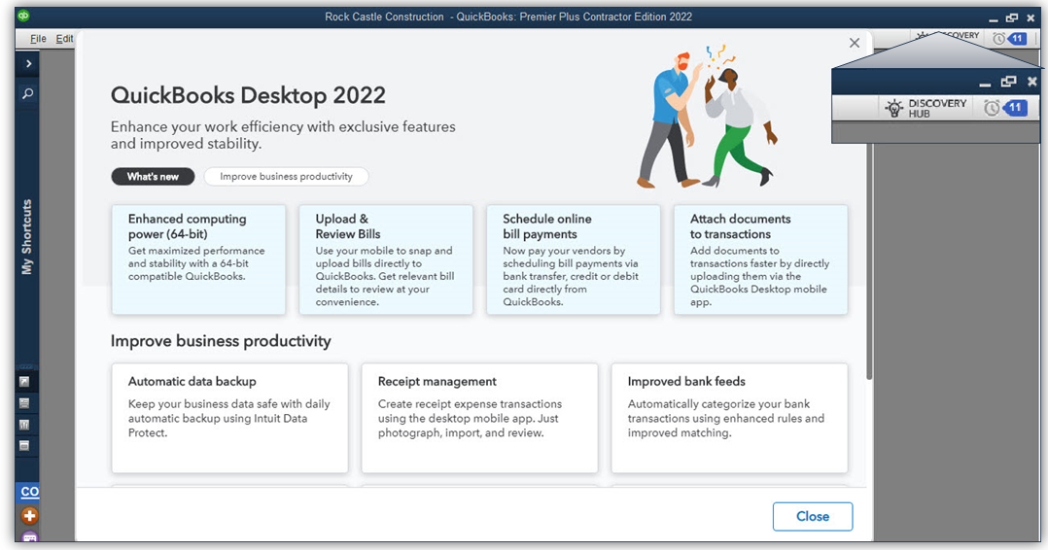
Over the past few years, the company has invested in artificial intelligence and platform solutions that extend and add value to the desktop and online products. Some of these investments are becoming clearer with the launch of QuickBooks desktop 2022 editions.

64-bit QuickBooks [1]

The “guts” of QuickBooks was elderly and wasn’t up to current processing standards. Now, QuickBooks has a 64-bit foundation and the full capability of 64-bit processors can be used. This typically means faster application and data load times, faster report generation and an ability to handle larger data sets more efficiently. Beware of QB 2022 until you verify that your computers are all 64-bit machines, because QB 2022 can’t be installed on 32-bit systems. If you’re working with a hosting platform, you’ll need to make sure your host has modern infrastructure and up-to-date operating systems.

E-commerce for QuickBooks with Webgility [2]

Need to track your revenue from different selling platforms like Amazon, eBay, and Shopify, and sync the data directly with QuickBooks? There are a lot of e-commerce integrations for QuickBooks desktop, but Webgility wins when it comes to working with QuickBooks. There’s now a bundle that makes it easier to get the Webgility e-commerce integration for QuickBooks. Customers still must sign up with Webgility to get the service but purchasing the bundle package makes that quite a bit easier. Webgility uses a database to keep track of orders, so you’ll want to make sure your system is able to handle the extra load. If you’re on a hosting platform (other than NOOBEH), be ready to pay additional fees to support running Webgility.

Bill payment approval process

Improve your accounts payable process by creating a structured approval process so that only the right bills get paid. AP workflows can help businesses manage cash flow and improve transparency. Working in conjunction with the user’s Intuit.com account, the company can set up rules for QuickBooks to check which bills need approval for entry and payment. Users are then prompted to send bills for approval

Pay and schedule bills faster with Melio payments

Some subscription holders of QuickBooks Desktop Pro Plus, Premier Plus, or Enterprise are working with the new feature (from Melio Payments) that allows businesses to use QuickBooks to schedule and pay bills using a bank transfer, credit card or debit card. The vendor doesn’t have to have a Melio account; they can receive their payments either as ACH or paper check.

Bill entry automation and customized bill payment stubs

Save time and have QuickBooks automate bill entries from the QuickBooks Desktop mobile app (iOS or Android versions) or from bills sent via email. Review the bill data once it’s uploaded and match it to existing transactions in QB. Bill payment stubs are now on the list of customizable forms, so you can set up and email formal payment confirmations to vendors.

Upload documents [3]

Instead of scanning files on your PC to attach to QuickBooks transactions, you can now use the QuickBooks Desktop mobile app to attach documents to transactions. The attached documents feature of QuickBooks is awesome because it lets you use QB as kind of a document management solution where you can store original copies of bills, receipts, contracts, or other documents that associate with financial transactions or entities in your QB files. This new feature that allows documents to be uploaded via the QuickBooks Desktop mobile app is a great solution for businesses operating on some hosted platforms that can’t or won’t support scanning. One “gotcha” with attached documents is that many businesses forget that they have them, and when they go to migrate their QB data to another platform or computer, the file attachments either get forgotten or are so voluminous that it makes the migration difficult.

Choose from multiple customer contacts

Only available with Plus and Enterprise subscriptions is the ability to add multiple customer contacts to batch email runs. The program now lets you send emails more quickly by choosing batch mail recipients from a list of customer or vendor contacts, reducing the chances of email troubles caused by manual entry of addresses.

Instant deposit

When you use QuickBooks Payments (or any other payment service), it generally takes a few days for the money to wind up in your bank account. With a QuickBooks Payments account and for an additional fee, Intuit is now letting you get your money faster when customers pay. Instant Deposit is a service that works with a VISA or debit card to deposit the money into your checking account – any processing or other fees will continue to be debited from your regular payments bank account.

Payment links

Now you can do in QuickBooks what you can do with PayPal, Zelle and other money transfer apps. Businesses can use simple Payment links to collect payments before work is performed and even before an invoice is created. As with all other payments features, you need a QuickBooks Payments account to use this one.

Changes to software purchasing options

QuickBooks Desktop 2022 is only available as a subscription purchase. There is no outright purchase option for QuickBooks desktop any longer. For businesses that need only the most basic features of QB, Intuit is hoping the QBO platform will work, and changing the software from purchase to subscription is just one more step in moving users to adopt the web application. QuickBooks Pro and Premier are still widely used so they will be available for some time to come, but Intuit is clearly making moves to try to push smaller edition desktop users to the web.

[1] NOOBEH deploys only modern architecture, 64-bit systems for QB on Azure and other hosted solutions

[2] NOOBEH doesn’t charge extra to have Webgility or any other applications installed in your QB on Azure service

[3] NOOBEH QB on Azure  and other cloud hosting solutions support scanning directly from your local PC to QuickBooks, using specialty 3rd party tools. Whether you use QuickBooks mobile or scan directly to QB using the Attached Documents feature, NOOBEH supports it.

jm bunny feetMake Sense?

J