Cloud Platforms for Client Data Help Reduce Workload Compression in Accounting and Finance

Accounting professionals have always viewed much of their work as being seasonal, waxing and waning with the turn of the months. From monthlies and quarterlies to the annual tax return, accountants’ work is focused as much on when as it is how much work must be completed. This regularity in the timing of the work has created somewhat of a false barrier to efficiency, largely because many professionals wait for the workload to appear, and it always appears at the last minute. Instead, we suggest leveraging technology to create new working models with clients to alleviate workload compression and deliver improved service and insight in real time, when it really matters.

Accounting is no longer considered to be a final resting place for financial and performance information. Accounting isn’t passive; it is an active participant in developing and managing data as it flows through a business. Professionals who continue to perform write-up and other time-consuming “re-accounting” tasks will often find that their approach removes them from the truly interesting part of the job. Instead, when the professional participates with their clients’ businesses and information on a regular basis, the accounting data can be adjusted so it is treated properly from the start. Better data provides for more informed decision making, and this is the real benefit the accountant can deliver.

The key for every accounting professional is the technology and how it might be applied to decompress the workload and even things out. Structuring standard processes for client intake, implementing workflow tools to closely manage data and deliverables, and improving the speed and quality of internal communications are all areas where tech can make the work more consistent and manageable. Much focus can be placed on the technologies a modern accounting firm would apply to its own workflows and data handling processes, yet there is often little consideration for how the accounting professional might maximize efficiency as well as effectiveness in working with the client data at the source.

Most fundamentally, accountants typically work in places where the client or data is not. Business is done at the business location, and that’s usually not where the public accountant is. Even in large enterprise, the work gets done and data created by others than those in finance, so it is up to finance to find the way to gain access to the data and ensure its proper treatment throughout the system. This is among the reasons for the emergence of remote access solutions and services. Through remote access the professional can access the information of the client businesses, performing data entry or adjustments directly into the client’s accounting system and avoid lengthy reviews and write-ups later.

While remote access solutions may work for some, the time-sharing approach that leaves the client waiting while the accountant does the work does little to maximize the efficiency of either party. Instead, an online working model that allows the client and the accounting professional to work independently yet collaboratively addresses the needs of both.

Online working models in no way require web-based or online applications as the sole foundation. For many operations, online or web-based versions of accounting and line-of-business applications lack the cohesion and functionality that more robust desktop and network applications can provide. Where some businesses have limited functional requirements that a simpler online app may meet, others continue to rely on the maturity and proven functionality of desktop solutions. For these businesses, the adoption of virtual IT platforms brings the “online” working model, system agility and managed service potential that are at the center of web-app popularity.

Once the accounting professional has access to the clients’ systems as well as the data they produce, the accountant can take a more proactive approach to correction and adjustment, as well as gaining a basis for providing insight and advice. The after-the-fact approach to accounting is the essential flaw in attempting to decompress the workload of an accounting practice. As long as the tabulation and treatment of business data remains a job to be completed at the end of the period, there will always be urgency in completing the task and the value of the work product is unlikely to increase.

However, through the intelligent application of technology – online application services and virtual computing platforms – accounting professionals can not only help their clients embrace transformative efforts to improve business and performance, but the accountant can relieve workload compression while delivering even greater value on a continuous basis.

jm bunny feetMake Sense?

J

The Last of the One-Time-Purchase QuickBooks Licenses… 2019 is End of Life

Tax time isn’t the only annual event businesses have to pay attention to. Each year, just like clockwork, Intuit sunsets another version of QuickBooks desktop software to move the market forward and focus on the newer versions. Technology advancements, feature additions and functional improvements are constantly being introduced so license holders are regularly asked to update and (annually) upgrade their software. When a new version of the software is released, Intuit ends support for the older versions. In this case, as QuickBooks 2022 becomes mainstream, QuickBooks 2019 goes out of support.

Intuit always notifies license holders in advance as services for older versions of QuickBooks Desktop are put on the schedule to be discontinued. For some, this notification comes via email or phone, but for many it is a notification provided right in the software. A popup or other message is displayed that notifies the user that their software needs to be upgraded to the newer version.

Service discontinuation will happen on the schedule provided by Intuit. The key date is May 31, 2022. After that date, access to any add-on services will end for those using QuickBooks Desktop 2019, for Windows platform. The discontinuation of services applies to all 2019 desktop editions of QuickBooks, including QuickBooks Pro, QuickBooks Premier, QuickBooks Accountant, and QuickBooks Enterprise Solutions.

For users of QuickBooks Point of Sale, the key date is August 10, 2022. After this date, QB POS v18 will no longer have access to add-on services

If you don’t use any add-on services in QuickBooks desktop 2019, then your product will likely still work for you. There won’t be any live support available, and none of the other Intuit services that work with QuickBooks desktop will work with your 2019 version, and you won’t receive any updates or patches for security or other fixes.

Losing security updates should be reason enough to upgrade your software, even if you don’t need the add-on services. It’s your financial data, so you should consider the value of having better security than your out-of-date software can provide.

When Intuit decides to discontinue services for QuickBooks Desktop 2019, what that means is that the software will no longer connect to services it once worked with. Services no longer available with QuickBooks desktop 2019 (after May 31, 2022) include

  • QuickBooks Desktop Payroll Services
  • QuickBooks Live Support
  • QuickBooks Online Backup
  • QuickBooks Online Banking
  • Other services QB 2019 connects to…

You also won’t receive critical security updates starting June 1, 2022. If you receive any security updates before this date, install them.

To upgrade your QuickBooks software, you will need to purchase a subscription to the new version.

Yes, that’s right…. A subscription. There is no longer any option to do an outright purchase of your QuickBooks software license. Rather, you will be purchasing an annual subscription to the software, which must be maintained in order to keep using the software. Under the 2019 license, you can still use the software even if the support lapses because the application will still run, just without any connected services or updates. But with the subscription license, the subscription must be active for the software to run. In short, keeping the license subscription current and the software updated becomes mandatory, not optional.

This is the full list of QuickBooks products affected by service discontinuation after May 31, 2022.

  • QuickBooks Desktop Pro 2019
  • QuickBooks Desktop Premier 2019 (General Business, Contractor, Manufacturing & Wholesale, Nonprofit, Professional Services, and Retail)
  • QuickBooks Enterprise Solutions 19
  • QuickBooks Premier Accountant Edition 2019
  • QuickBooks Enterprise Accountant 19
  • QuickBooks Desktop for Mac 2019

These are the products/services affected by service discontinuation after August 10, 2022

  • QuickBooks Desktop Point of Sale 18.0 payments services:
    • Intuit Payments integration
    • Intuit Service Store Exchange
    • Mobile Sync feature

While Intuit sunsets the older versions of QuickBooks every year after a new version is released, these days they’re being a little more aggressive in trying to convert folks to QuickBooks Online. QBO does offer some neat features such as automatic bank account updates, but it isn’t quite what QuickBooks desktop users have come to expect from their beloved QB. The functionality of QBO is quite different from QB desktop, as is the data format. QuickBooks desktop “power users” will likely as not disapprove of how QBO handles things and will find that the functionality is limited in comparison.

QuickBooks Online may be a good alternative for Pro version users who don’t need much detailed functionality from their software… paying bills and invoicing customers is easily handled in QBO, but more advanced requirements still need desktop to get it done. Another sticky issue with QBO is where multiple company files are involved. With Online, each company is a separate “subscription”, where QuickBooks desktop sees it as just another company file. With QBO, you pay per-company, but not with QB desktop. For some businesses with many files or business entities to manage, this is a deal-breaker for using QBO.

For businesses that need the features and functionality of the desktop editions but also want the benefits of anytime/anywhere access, consider running your QuickBooks on the Microsoft cloud with NOOBEH. For single-user needs, a Microsoft CloudPC for small business may be just the ticket. It’s affordable (same price or less than with shared hosting) and you can run ALL your business software on it for no additional fees. When multi-user access is needed, NOOBEH delivers completely private cloud servers where all your users can access your business applications and data securely, from anywhere you need them to.

No, Intuit is not ending support for QuickBooks desktop software

Intuit is not doing away with the desktop versions of QuickBooks, no matter what a QuickBooks sales agent may tell you. While the QuickBooks tele-sales group may be focusing on getting people subscribed to QuickBooks Online, there remain millions of users of the desktop editions and the company is more than happy to continue selling them software. The features and functionality of QuickBooks desktop editions, particularly Premier and Enterprise, continue to be in high demand by growing businesses around the world. There are also many 3rd party solutions which integrate only with the desktop editions of QuickBooks, due largely to the advanced functionality available.

QuickBooks Online is an easy first introduction to finance software for a new small business owner, and the solution may work for the business for some time. As the business grows and as needs change and become more complex, it will be necessary to implement software solutions that can adapt and address the new requirements. If that’s QBO, great. If QuickBooks desktop editions can handle things better, that’s also great.  Either way, Mendelson Consulting and NOOBEH have the right solution for you, along with the best way to keep it running and working for your business.

jm bunny feetMake Sense?

J

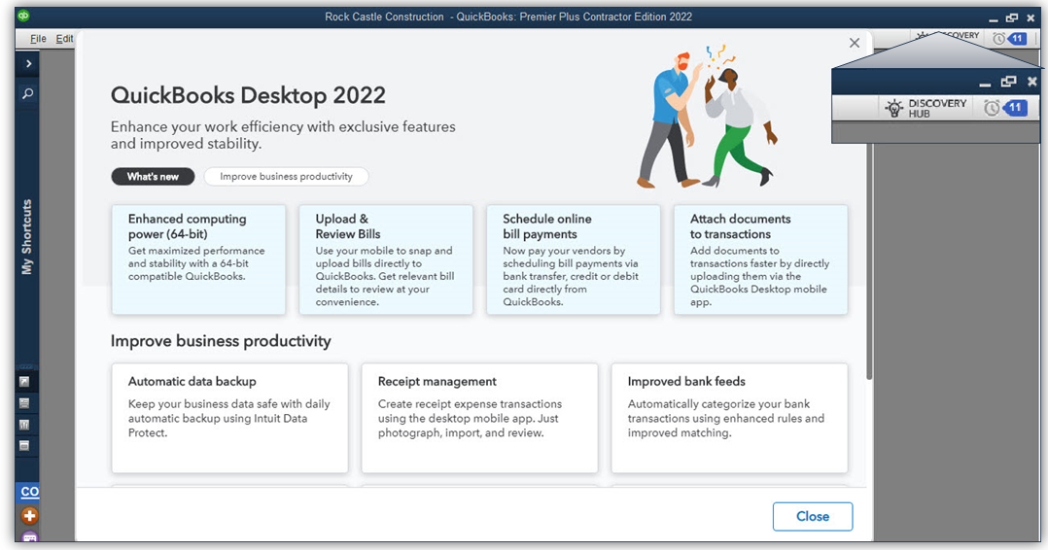
QuickBooks 2022 Boasts Modernized Foundation

Every year, businesses around the world anxiously await the release of the new versions of QuickBooks desktop software. While that may sound a bit silly, the truth is that QuickBooks is widely used in numerous countries around the world and when Intuit makes big changes to QuickBooks it impacts a lot of businesses.

While the focus for Intuit, like most software companies, is online subscription service, the fact remains that the desktop products and the ecosystem around them continues to grow.

Over the past few years, the company has invested in artificial intelligence and platform solutions that extend and add value to the desktop and online products. Some of these investments are becoming clearer with the launch of QuickBooks desktop 2022 editions.

64-bit QuickBooks [1]

The “guts” of QuickBooks was elderly and wasn’t up to current processing standards. Now, QuickBooks has a 64-bit foundation and the full capability of 64-bit processors can be used. This typically means faster application and data load times, faster report generation and an ability to handle larger data sets more efficiently. Beware of QB 2022 until you verify that your computers are all 64-bit machines, because QB 2022 can’t be installed on 32-bit systems. If you’re working with a hosting platform, you’ll need to make sure your host has modern infrastructure and up-to-date operating systems.

E-commerce for QuickBooks with Webgility [2]

Need to track your revenue from different selling platforms like Amazon, eBay, and Shopify, and sync the data directly with QuickBooks? There are a lot of e-commerce integrations for QuickBooks desktop, but Webgility wins when it comes to working with QuickBooks. There’s now a bundle that makes it easier to get the Webgility e-commerce integration for QuickBooks. Customers still must sign up with Webgility to get the service but purchasing the bundle package makes that quite a bit easier. Webgility uses a database to keep track of orders, so you’ll want to make sure your system is able to handle the extra load. If you’re on a hosting platform (other than NOOBEH), be ready to pay additional fees to support running Webgility.

Bill payment approval process

Improve your accounts payable process by creating a structured approval process so that only the right bills get paid. AP workflows can help businesses manage cash flow and improve transparency. Working in conjunction with the user’s Intuit.com account, the company can set up rules for QuickBooks to check which bills need approval for entry and payment. Users are then prompted to send bills for approval

Pay and schedule bills faster with Melio payments

Some subscription holders of QuickBooks Desktop Pro Plus, Premier Plus, or Enterprise are working with the new feature (from Melio Payments) that allows businesses to use QuickBooks to schedule and pay bills using a bank transfer, credit card or debit card. The vendor doesn’t have to have a Melio account; they can receive their payments either as ACH or paper check.

Bill entry automation and customized bill payment stubs

Save time and have QuickBooks automate bill entries from the QuickBooks Desktop mobile app (iOS or Android versions) or from bills sent via email. Review the bill data once it’s uploaded and match it to existing transactions in QB. Bill payment stubs are now on the list of customizable forms, so you can set up and email formal payment confirmations to vendors.

Upload documents [3]

Instead of scanning files on your PC to attach to QuickBooks transactions, you can now use the QuickBooks Desktop mobile app to attach documents to transactions. The attached documents feature of QuickBooks is awesome because it lets you use QB as kind of a document management solution where you can store original copies of bills, receipts, contracts, or other documents that associate with financial transactions or entities in your QB files. This new feature that allows documents to be uploaded via the QuickBooks Desktop mobile app is a great solution for businesses operating on some hosted platforms that can’t or won’t support scanning. One “gotcha” with attached documents is that many businesses forget that they have them, and when they go to migrate their QB data to another platform or computer, the file attachments either get forgotten or are so voluminous that it makes the migration difficult.

Choose from multiple customer contacts

Only available with Plus and Enterprise subscriptions is the ability to add multiple customer contacts to batch email runs. The program now lets you send emails more quickly by choosing batch mail recipients from a list of customer or vendor contacts, reducing the chances of email troubles caused by manual entry of addresses.

Instant deposit

When you use QuickBooks Payments (or any other payment service), it generally takes a few days for the money to wind up in your bank account. With a QuickBooks Payments account and for an additional fee, Intuit is now letting you get your money faster when customers pay. Instant Deposit is a service that works with a VISA or debit card to deposit the money into your checking account – any processing or other fees will continue to be debited from your regular payments bank account.

Payment links

Now you can do in QuickBooks what you can do with PayPal, Zelle and other money transfer apps. Businesses can use simple Payment links to collect payments before work is performed and even before an invoice is created. As with all other payments features, you need a QuickBooks Payments account to use this one.

Changes to software purchasing options

QuickBooks Desktop 2022 is only available as a subscription purchase. There is no outright purchase option for QuickBooks desktop any longer. For businesses that need only the most basic features of QB, Intuit is hoping the QBO platform will work, and changing the software from purchase to subscription is just one more step in moving users to adopt the web application. QuickBooks Pro and Premier are still widely used so they will be available for some time to come, but Intuit is clearly making moves to try to push smaller edition desktop users to the web.

[1] NOOBEH deploys only modern architecture, 64-bit systems for QB on Azure and other hosted solutions

[2] NOOBEH doesn’t charge extra to have Webgility or any other applications installed in your QB on Azure service

[3] NOOBEH QB on Azure  and other cloud hosting solutions support scanning directly from your local PC to QuickBooks, using specialty 3rd party tools. Whether you use QuickBooks mobile or scan directly to QB using the Attached Documents feature, NOOBEH supports it.

jm bunny feetMake Sense?

J

For Accounting Professionals: Private Hosted Solutions and Helping Clients Cope with the New Normal

Accounting professionals have an opportunity right now to help their business clients through the difficulties presented by the COVID-19 pandemic. With work-from-home mandates and increasingly fluid reporting requirements to support grants, loans and loan forgiveness, business owners need all the support and good advice they can get.

The global pandemic is changing the landscape of business worldwide. Many small businesses in the US have either closed or are on the brink, looking for ways to keep the doors open and employees paid. Supply chains are strained, distribution has slowed, and workers are being asked to work from home if possible.

These are challenging times, but the guidance and support you can provide to your business clients can be just what they need to help keep the doors open and workers producing. Remote access, cloud hosted applications and data, and real-time accounting support and management reporting are the weapons you and your clients will use to fight the conditions that are currently working against you both.

Help your clients deploy cloud hosting services for their entire business.

Running applications and storing data on an in-house network increases the cost and complexity of supporting a remote or mobile workforce, for you and for your clients.

Remote access and supporting work from home requires that users have the means to communicate with each other and to collaborate on the work. Tools to support communication and collaboration are critical when the workforce is distributed, operating from a variety of locations and with whatever device is available. Yet business owners, operators and managers may find that collaboration apps and other online tools don’t provide access to the applications and data required to do all their work.

To address the problem of working on client data, some accountants may install the client software and copy the data to their own in-house networks. This creates a situation where the accountant is paying for computing resources, space and management of client applications and data in addition to their own. This increases the cost of internal operations for the accounting firm and can impact internal system performance while also reducing overall productivity.

More to the point, this model only supports doing after-the-fact work for the client, which results in the data and reporting being outdated and far less useful to the client in supporting daily decision-making. This model also does nothing to help the firm with their own possible work-from-home needs even as IT support and on-site service becomes more limited.

Accounting professionals wanting to provide services to clients proactively rather than reactively must have real time access to the same applications and data that the client uses. The old fallback to remote control solutions is one approach, yet it is not really an optimum solution to the problem.

Remote control, like PCAnywhere, GoToMyPC or LogMeIn expose the professional to more of the client computing environment than is necessary, introducing risk and the potential for blame if something goes wrong. And remote-control solutions are single user, reducing productivity because the client can’t use their system while the accountant controls the computer. RC solutions also rely on the availability and function of the on-premises systems. If the on-prem systems aren’t turned on, up and running and accessible, then the remote user can’t connect.

It may be that online or web-based applications are an option, but for many businesses they aren’t really a viable solution. QuickBooks Online is simplified software and is not appropriate or usable for many businesses. The QBO subscription model is per-company, limiting options and reducing cost-efficiency for businesses with multiple entities. And QBO doesn’t address other business needs, such as working with documents and reports, and it can’t provide any access or support for other business applications. Even the ability to backup and preserve data is very limited without specialized services and tools.

Shared hosting service might be closer to the right answer, yet shared hosting is generally only useful for very small organizations and supports only core QuickBooks functions, so it can be as restrictive QBO. Shared infrastructure used by the shared hosting platforms can also introduce significant risk to every business on the platform because ransomware and malware can easily move through connected file systems and servers.

Compare shared services to a public pool where it is very easy to transmit from one person to another; in these networks an intrusion can end up spreading malware to the entire network and platform, resulting in days or even weeks of outages. Unfortunately, disaster recovery is often limited to recovery of the provider hosting platform and does not always include recovery of all customer data.

The best solution for business is private, managed cloud hosting service delivered on a trusted and proven platform like Microsoft Azure.

Hosting service that takes advantage of the Microsoft Azure cloud  platform allows the business to centralize access to all their important applications and data, making it possible to provide complete application functionality for all users no matter where they are located.

Using the Azure platforms means that security, fault tolerance, scalability and agility are designed into the solution rather than being extras from the hosting provider. Microsoft-managed datacenters and Microsoft-managed hardware means the experts in systems and security are handling the big stuff while the service provider focuses on what the client needs.

The virtualization technology enables the agility to meet changing business needs, scaling systems up or down if necessary. Massively scalable platform allows services to be right sized now without concern for future resource requirements (no buying ahead based on possible future needs). There are no arbitrary limitations placed on the applications or services the business needs to run on the cloud platform, and no fees for running more apps.

Making all the applications and data available to workers, when and where they need them, is the key to promoting higher levels of productivity while delivering the data management needs to support daily decision-making.

Now that you have access, provide pro-active support and help business owners and managers make the right decisions.

Better data and reporting to support business and finance management is more important than ever, especially when having the right information can mean the difference between keeping the doors open and closing shop for good. Whether the goal is to shore up finances to keep employees on staff or to create a cushion to help weather supply chain disruptions, businesses owners need quality financial and performance data in order to make the right decisions for the company.

Once the accounting professional has real-time access to client systems, they can work cooperatively in the data to ensure that the right information is available when it is needed. As business owners seek to take advantage of grants and loan programs available due to the pandemic, the financial and other performance data becomes even more essential in terms of developing qualification and eventually forgivability of the loan.

With timely access, proper reporting tools and regular support and oversight, business owners benefit from a closer working relationship with their accounting professionals. The additional support and proactive service is more necessary now than ever. For the accounting pro, an elevated relationship with client is being developed, where the services provided become more meaningful and the value of those services more evident.

Make sense?

J

Optimize Costs of Business IT With Cloud Hosting on Azure

Small business owners, like managers of enterprise workgroups, face daily challenges in keeping business information secure yet available to co-workers and business partners. Each type of user has a different need when it comes to applications and data, and users often work from different locations.

For a small business owner, this may mean keeping a set of books at each of several business locations or maybe packing up the information and bringing home the data to work on at night. For a business enterprise it may be the challenge of providing centralized application and data access to multiple branch offices or a distributed workforce.

The problem is in providing affordable secure access to keep people productive. A great solution is moving from local IT to cloud IT on the Microsoft Azure platform with Noobeh.

QuickBooks on Azure from Noobeh

Anytime, Anywhere Access

Managing business data in a distributed environment or multi-location business is very difficult. When data files are stored on local PCs or on multiple servers, the organization may be spending quite a bit of money to backup and protect only some of its information assets. The data that rests on desktops, laptops and tablets is often overlooked and left unprotected.

Noobeh’s cloud service is a better alternative, hosting business applications and data on the massively scalable, agile and secure Microsoft Azure cloud. The service puts the business information and applications users need where they need them, allowing users to work from any location at any time.

Lower Cost of Supporting Productivity and Uptime

The #1 motivator for cloud adoption is cost optimization, according to the Microsoft Survey SMB Cloud Journey 2018. This is especially true for small and midsize businesses who are often running their businesses on lean budgets.

Compared to the costs traditionally associated with owning and maintaining a business network, managed hosting services can represent significant cost savings while improving the stability and security of the network overall.
It may seem that buying equipment and running it until it can’t go any more is the most cost-efficient way to handle business IT, but the real investment gets realized when businesses face the costs of lost productivity, incompatibility with modern technologies or services, and the risks that outdated systems introduce.

No Penalty For Going Back

Perhaps the most important element of application hosting services is the reality that the business aren’t penalized for making a different choice in the future.  Business conditions change and most small businesses want to know that they could return to localized operation if desired, and much more easily than if they had invested in a purely cloud-based or SaaS solution. When a business migrates to an online application, the process of converting back if it doesn’t work out is a daunting and costly task if it can really be done at all.

With the application hosting approach, you continue to use the applications and data you already have investments in… you simply use them from your cloud environment instead of running everything on your local PCs and server.

Application hosting services from Noobeh allow you to continue using the desktop products your business relies on but to also take advantage of modern platforms and cloud service. Noobeh delivers the applications and data from the Microsoft cloud platform, keeping it all managed and working.

But if you don’t want to keep working that way, you can always discontinue the service and pull your data back to your local computers where you simply install your software and keep working.

Noobeh cloud services help businesses get more from their investments in software, associated data assets and personnel training. Users get all the benefits of managed IT service and anytime, anywhere access to their applications and data plus the security of knowing their systems are running on a highly redundant and robust platform. Even with all of that, if the working model is not to their liking, they still have the option of taking their ball and going home.

Make Sense?

J

Better QuickBooks Hosting: Noobeh Cloud Solutions on Azure Help Businesses Avoid Data Loss, Improve Application Performance and Implement QuickBooks Integrations

They said back in 1999 that the desktop was dead, but desktop software is far from gone. In fact, application hosting services for products like QuickBooks desktop editions just keeps growing in popularity because it delivers the access, mobility and managed services businesses need.

Service providers have been hosting QuickBooks for years, and I’ve been right there all the way, ever since the model was originally developed. In fact, the company I worked with is still selling that original service model today while many other providers have come along to follow it and take advantage of the opportunity.

Using the cloud to support accounting and other business processes makes a lot of sense, and the best part is that it doesn’t require businesses adopt the online versions of the software that just doesn’t work as well. I have a background in accounting so I understand the issues of working remotely with clients, when the business is done in one place but the accounting is done in another. And I love the technology and finding ways to make it easier and more efficient to get small business accounting done.

The benefits of using hosted QuickBooks services are many.

Anytime/anywhere access and fully-managed service are among the most obvious benefits for QuickBooks desktop users, but the advantages of centralized information and applications, secure support for mobile and remote workers, and real-time integrations and analytics capabilities can be transformational for the entire business.  Having the means to affordably extend applications to the entire workforce and keep everyone working with the same data in real time can become the foundation for improved processes, greater efficiency and better business performance.

Among the key benefits of the application hosting model is the fact that businesses are not forced to adopt software subscription services or invest their data in web applications that do not provide the functionality or features required. Even more, the business can elect to move their hosted system back to in-house computers, because the hosting is simply an alternative platform for running the software the business owns. You can take your ball and go home if you don’t want to stay.

With all the benefits of hosting QuickBooks, there are also risks involved, especially when working with shared hosting platforms.

Shared hosting platforms are architectures where the service provider spreads the cost of their infrastructure across many customers to help keep the costs down. Using conventional technologies to create divisions between customers on servers, networks and so on, services providers can deliver at a lower cost when they are able to generate revenue from lots of customers for the same pieces of equipment. As more customers are added, more servers are joined into the network. After a while, there are many servers handling the customer load.

Unfortunately, the greater the number of servers, the more complicated and costly it becomes to update the platform. This is among the reasons why many service providers have aged platforms, with server operating systems that are going out of support and offering only legacy desktop views. In addition to compatibility and modernization, a big problem with allowing the platform to age is that it becomes less secure and more difficult to keep protected.

Protecting against disaster is not the same as doing backups.

Many hosted QuickBooks customers have been faced with the ugly reality that their service provider backups are not enough to recover from disaster. This is largely the fault of the providers and is somewhat by design.  Businesses hosting their financial and other business applications and data want to know that their information is safe and secure. Performing data backups is part of the promise of protecting customer data, so most customers believe that their service provider is backing up in a way that ensures the data can be recovered.

What most hosting customers don’t understand is that the provider backups are there to help the provider recover from disaster and not necessarily to get the customer back where they were.

Hosting companies know that they need to do backups so they can support customers when files get deleted or become corrupted. Hosting companies typically do regular backups of customer data, but they do not necessarily retain individual backup data sets and they often backup all customer data together. This means that the backup data is constantly being updated, and that fully restoring the data of just one customer may be problematic. Service provider backups are there to support the continued operations of the service provider and may not provide the level of archive or retention needed by the customer. Just to make sure their data is safe and recoverable, I strongly recommend that clients keep any hosted data archived in at least one other location off the host’s platform.

In just the past year, outages caused by malware have been experienced by service providers Cetrom, Skyline, Cloud9 and Insynq, demonstrating just how devastating an outage can be when the service provider doesn’t have adequate protections in place.

In many cases customers lost data because the service provider wasn’t able to recover it from compromised or nonexistent backups. Suggesting that customers should have their data backed up locally is never part of the marketing or onboarding with the QuickBooks host, but it is often the fallback position in times of trouble.

Perhaps the most troubling aspects of these provider failures are that many of the problems stem from the shared nature of the platform.

When we first started building QuickBooks hosting services the hardware and software to make it work was terribly expensive. To approach some level of affordability, a shared platform approach was developed. This allowed the service to scale while offering a lower cost of service to customers. When the services were initially developed, there was concern about protecting from viruses and Trojans, but the nature of malware in the wild was not nearly as troublesome as it has become. Things were manageable.

But technology has evolved and so have the threats and bad actors.

The smarter bad guys should be forcing platform providers to reconsider their shared management and delivery models.

Affordable computing resources are available from platforms like Microsoft Azure and Amazon AWS, offering small businesses the opportunity to have not only powerful and scalable platforms for their business IT, but also offering a means of operating privately. Not being forced to operate in the same network or on the same VMs as other companies means not having to worry about the behavior of other people or applications in your business network. It also means that the focus is on recovering your system if disaster strikes, not on recovering the systems of hundreds or thousands of other businesses at the same time.

Considering the move to a more private cloud hosting solution is an important way to reduce risk and improve IT performance for the business.

When they were in-house, the networks were private and no other businesses were sharing the servers. Moving to the cloud should not radically change that profile, and should offer customers the same privacy from outsiders and the same flexibility to implement whatever applications the business needs.

The Microsoft Azure platform provides this capability and businesses can benefit without compromising the budget. With private accounts on the Microsoft Azure platform, our customers are able to take advantage of the current and emerging technologies while safely and affordably supporting their business requirements, which is something the shared platforms fail to offer.

Make Sense?

J