QuickBooks Accountant Niche Practice Specialties: Tools for Accountants Working With Contractors

QuickBooks Niche Practice Specialties:

Tools for Accountants Working With Contractors

For accounting and bookkeeping in a small business, Intuit QuickBooks is still the “go to” solution.  QuickBooks has functionality needed by most businesses, and some editions of QuickBooks offer more in-depth process support for specific industries and business types.  Accountants and bookkeepers working with QuickBooks may rely on essential bookkeeping and reporting features to get basic accounting done, but supporting the processes and offering the functionality business owners and managers need – processes and functions which are specific to the business type and how it operates – is essential to developing a solid business management and reporting system.

Accounting and bookkeeping professionals can be instrumental in developing these systems for their clients, and can use the data collected within these solutions to provide more detailed reporting and actionable advice relating to business activities and trends.  Creating a niche practice and specialty means knowing how to address the needs of the niche client and having the tools to make it happen, so accounting professionals working with QuickBooks clients should seek to leverage the Intuit partner network of developers and QuickBooks-connected solutions and extensions to orient their services to the needs of specific industries and client business types.

The most obvious example of applying an industry-specific orientation of QuickBooks is to use the Premier Industry offering of QuickBooks desktop edition.  With the Premier Industry editions, additional functionality and reporting for specific industries is addressed directly within the application.  Industry editions exist for non-profit, manufacturing, and contractors, among others.  A lot of practitioners have met the additional needs of their business clients by using these industry-specific editions.

With QuickBooks Premier Contractor edition, for example, businesses can go beyond general accounting and address specific needs of a contractor or construction business, including tracking and reporting on job costs and profitability, handling estimates and change orders, and billing clients by time and materials, job phase, or percentage completion.  Accountants and bookkeepers working with construction businesses can help their clients more accurately and efficiently address the unique requirements of this type of business by offering the user functionality which is relevant to their daily tasks, such as making deposits, entering and tracking bills, and reporting on the progress and status of jobs.

Contractors may also have unique payroll reporting requirements, most of which are not adequately addressed within the QuickBooks solution directly.  It is in this area of compliance and complex reporting where the accounting professional may be of particular value, ensuring that these additional business requirements are met and that the data is complete, accurate and timely.

By utilizing the Intuit partner-developed application from Sunburst Software Solutions to extend the functionality of QuickBooks, contractors and the accountants who support them are able to create comprehensive and accurate prevailing wage payroll reports, including the most frequently required WH-347 Payroll Certification Form and the WH-348 Statement of Compliance Form.  Further, the solution also provides reporting for nearly all municipal, state, and federal paper forms required in each state. The solution even includes electronic certified payroll submission, compatible with LCPtracker, Hill International {formerly TRS Consultants}, Elation Systems, and other agencies.

QuickBooks has the framework for holding information about customers and jobs, tracks estimates, progress invoicing from current accounts receivable and work complete, and a means to accurately record and track retainage payable and/or receivable.  To complete the requirement for AIA billing and other construction business-specific needs, Sunburst CAPS application for QuickBooks holds additional project information, architect information, retainage method data, and billing forms to print in linked records.  CAPS also provides a mechanism for percentage of completion calculations with full accounting for stored materials.  The information is then merged together from both programs to generate the final billings – ready for signature, notarization, and mailing.

Addressing this additional level of complexity and compliance for contractors is a critical element, and an essential benefit, of working with accounting professionals who understand the needs of construction businesses and employ the tools and applications to meet those needs well.  It is through specialization, and knowing how to address the unique requirements of (and to capitalize on the opportunities presented in) the client industry and business, that accountants and bookkeepers will demonstrate and retain their value in today’s challenging economy.

Make Sense?

J

CooperMann 2012 in review

CooperMann 2012 in review

2012 Was an interesting year, to say the least.  Not that it wasn’t a good year, but it certainly brought its share of challenges as well as opportunities.  At CooperMann.com, we attempted to reflect upon these challenges and opportunities, discussing how they impact our views on accounting and technology and business in general.

While the economy continued to struggle and churn, business owners found that reducing operating costs and creating sustainability in the business were initiatives they could no longer afford to minimally address. As advancements in technology and the growing popularity of cloud computing models resulted in a number of solutions to help businesses meet those cost and continuity issues, they also introduced new and different challenges for accounting and finance professionals seeking to reinforce their relevance and value to the business.  They say that the only constant is change, so we should expect no fewer challenges (or opportunities!) in the new year.

Joanie Mann Bunny Feet

As for CooperMann.com, here’s how we did in 2012, our inaugural year

600 people reached the top of Mt. Everest in 2012. This blog got about 10,000 views in the latter part of 2012. If every person who reached the top of Mt. Everest viewed this blog, it would have taken 17 years to get that many views.

The busiest day of the year was October 2nd: The most popular post that day was

Attractions in 2012

These are the posts that got the most views on CooperMann in 2012.

Changing How We See Software: QuickBooks 2013 interface frustrates power users

Is This The End Of ERP?

In Bookkeeping, Accounting, and Information Technology: The Value of Outsourcing

Working With the Right Numbers: Financial Data Analysis Requires Accurate Financial Data

Not Everybody’s Accounting Online: Outsourced Bookkeeping and Accounting for “Offline” Clients

Top 3 Favorite posts for 2012

One-Write System Revolutionizes Accounting: These guys had the right idea, they just didn’t have the cloud.

The race to find the “secret sauce” of hosted application services for small business

Accounting Professionals: It’s Good To Be Sticky

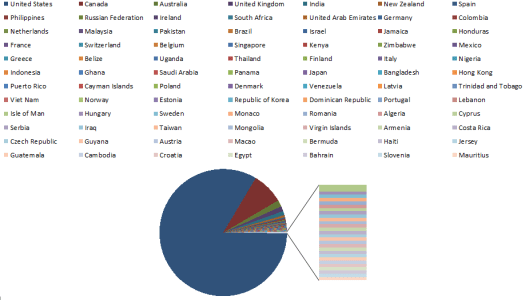
Where in the world is CooperMann viewed?

CMC2012-countries

buildingup-small-logoWhat’s coming up for 2013?  Keep watching CooperMann.com and BuildingUP.biz to stay on top of current issues and trends in accounting and business technology.

Accounting Professionals: Is Your Value Tied Up in The Accounting Software?

Accounting Professionals: Is Your Value Tied Up in The Accounting Software?

Subtitle: when all you have is a hammer…

There was a time, not so many years ago, when it made sense for an accounting firm to take the position that all clients must use the firm’s preferred accounting software product or they would not be clients.  For these firms, the concept of standardizing transaction entry and data processing across the client base made sense, and provided a means to create maximum efficiency in handling the bookkeeping and accounting processes.  Typically, firms handling small business clients would select Intuit QuickBooks for client use, and offered QuickBooks training, QuickBooks transaction processing, and use of QuickBooks add-ons to support the model.  With Intuit QuickBooks “owning” the small business market for accounting software, it made sense for accounting professionals to leverage the popularity of the solution to the benefit of the practice.

As cloud-based solutions and online application services have emerged (including QuickBooks Online Edition and Intuit Partner Platform – IPP – integrations), many accounting professionals have simply continued with the philosophy of applying QuickBooks (the hammer) to every client engagement.  These firms focus on the software as a basis for delivering what they believe is value in the engagement.  In short, these professionals focus their value in the use of the product (licensing, installation, training and support), and in their data entry skills (efficiency in entering and reviewing transactions in the product), rather than in the greater value of business intelligence, insight and actionable advice.

The new challenge facing many professionals – the reality of the current market – is that there are myriad solutions and approaches available to address client bookkeeping and process needs which work really well, and it is not always a good idea to try to turn a client using one of them into a “nail” just so you can hit it with your favorite hammer – QuickBooks.   With Freshbooks, Wave Accounting, Xero and other solutions which handle various business accounting or bookkeeping requirements quite well and for an attractive price, small business owners are more frequently electing to implement applications outside of the QuickBooks product line even as their accounting professionals are continuing to promote QuickBooks for everyone.  The reason business owners are electing to use these other tools is simple: they work for them.

In reality, this issue has existed in some form for a very long time, and was perceived to be primarily in markets where technology adoption and use is low for various reasons.  The truth is that a lot of small business owners find ways to accommodate their information management and record keeping needs, and they use whatever approach works for them and what they want to accomplish.  Sometimes the approach involves Internet solutions and online applications, and sometimes it does not (Excel spreadsheets with stapled piles of receipts are still quite popular and in widespread use by SMBs and Entrepreneurs).  When that small business elects to engage the help of an accounting professional, the last thing they want to be told is that they have to make a big change to how they get things done.  It’s fine for the accountant to provide guidelines for when information will be made available to support getting the accounting work processed, but it is not necessarily okay to dictate immediate changes in software and systems supporting the business daily operations.  In a lot of cases, the accounting professional simply has no real basis for the requirement to change, other than to support their own efficiency (which is the wrong basis for making a client change their systems).   It’s that silly cost-benefit thing. If it costs the client a lot (change always = cost), and the client does not perceive or experience an expected benefit, then it makes no sense for them to make the change.

Consider a professional accounting firm in Los Angeles, California.  This firm serves small businesses, and has a pretty significant market available to sell to.  LA is a market where technology adoption is high and broadband Internet is cheap and reliable, so this firm has elected to use a product-based focus (e.g., the QuickBooks approach) in qualifying clients and crafting engagements.  Clients must conform to the solution set and the workflow in order to participate with the firm.

Now, consider a professional accounting firm in Elkton, Oregon.  This firm serves just about every business in town (population 195) as well as businesses from a few nearby towns.  Broadband Internet service is sketchy at times, and provider options are few.  This rural area of Oregon is not known for being particularly “high tech”, and computers and software and online application services are not among the things many of these business owners focus on or even care about.  The accounting firm serving this market is not focused on what accounting solution the client uses (or not), and they aren’t pushing to have all their clients purchase and install the same accounting software so that the firm’s processes can be more efficient.  Interestingly enough, this firm is likely doing better work and probably developed a closer and more intimate relationship with their client than those who have fully “standardized” the client base.  The reason is that the firm, whether out of necessity or out of desire, recognizes that each of their clients may have unique needs, and it is up to the firm alone to create maximum efficiency in meeting them.  Further, delivering personal service and useful insight instead of simply providing the work product has allowed the professional to more fully reveal their value to the client.

The truth of the small business accounting market is that there are more businesses like those in Elkton than in LA. Accounting professionals should consider whether they are in a position to “filter” their client opportunities based on use of certain software products and online solutions, or if they will accept that business clients come in all sizes and shapes – with various needs and wants and self-developed methods of getting things done – and that the firm is willing to embrace them as they are and work with them.

Make Sense?

J

Reinventing your Business – What Happens When Systems Fail?

Reinventing your Business – What Happens When Systems Fail?

There is a lot of discussion today about how our children are growing up in a world where high technology is simply part of life and lifestyle.  I even read an article about how people are evolving because of the availability of information; evolving to the point where we no longer store and retrieve information, but store information on how to get information.  The article cited an example of someone who couldn’t recall the name of an actress in a movie they had seen, so the immediate response was to search for the answer on Google.  In the past, people relied upon memory, and found various ways to mentally associate and store information so it was able to be recalled.  Now, there’s an app for that.

Are we losing our ability to effectively store and recall information?  Are we forgetting how to do things before we had all this technology to help us?  It makes you wonder sometimes, how technology-dependent we are. We look at the ruins of past civilizations and view seemingly impossible structures, (impossible given what we know about the technology available at the time) and wonder how they came to be.  The knowledge was there at some point, but is now lost.

Is your business at risk from a similar fate?  Maybe it sounds silly, but it makes sense to at least think about it, because there are a lot of companies out there today that are not paying attention to critical issues such as knowledge management and sustainability.  Finding ways to capture business knowledge and protect it is essential in every organization, whether small business or large enterprise.

Small businesses are often centered on an owner who started the operation, and who just knows how things are done.  The primary goal in this situation is to capture that knowledge and turn it into process.   Only through this approach may a business begin to reduce its reliance upon a single individual, and this is a critical step in creating both sustainability and continuity in the business. In larger enterprises, process and structure are essential to keep the various parts and participants moving in the same general direction.

Once those processes are established, generally using technology to support or facilitate them, is that the end of the task?  Many businesses seem to believe so, and move along with the impression that they have things well in hand.  And then a major system or technology failure occurs, and folks are left standing around, unable to get their jobs done.  In the worst cases, there isn’t anyone in the business who really understands how to pull things back together or there is no longer access to electronically stored information necessary to continue operations.  How would you handle things if your systems – your computers and software and systems – were no longer available to you?

While GPS and high-tech auto-pilot systems can bring tremendous efficiencies to the process of flying, they also can give a false sense of security that encourages complacency. If something goes wrong, the auto-pilot will adjust and the computer will tell you where to go, won’t it?

Here is where technology has the ability to distract pilots–and entrepreneurs–from asking themselves if they’re both focused on and capable of solving the right problems.

http://www.inc.com/chris-mittelstaedt/business-lessons-from-air-france-447-crash.html

Each and every business must consider how they would address a severe information technology outage, and should take steps to protect and preserve business knowledge so that there is some hope of recovery from such an event.  In an article on Inc.com (Survival Skills Every Entrepreneur Needs), writer Chris Mittelstaedt makes this observation, and suggests that business owners address how they might get things done “old school”, just in case all this nifty technology fails us unexpectedly.

Make sense?

J

Accountants and Small Manufacturers

rollingballGetting in Front of the Ball

There’s a lot more to accountability in a manufacturing or inventory-based business than simply keeping track of money in and money out.  Particularly in an economy when nobody can afford to build or stock products too far ahead of demand, it is essential that these businesses have a means to not only track and manage purchasing, manufacturing, distribution and stocking activities, but to understand conditions or trends which impact the flow of materials and cash through the business.  Further, this understanding must come in a timely manner in order for the business owner to make decisions and take action when it matters most.  Unfortunately, many business owners find themselves “behind the ball”, constantly pushing to make forward strides, and often due to not having the information they need to make business decisions that matter now, today.

Why is it so critical for these businesses to have more and better information to help them make strategic decisions and answer daily operational questions?  In a word: connectedness.  The Internet has truly made the world smaller when it comes to participation with even the smallest of local businesses.  Globalization of markets has impacted manufacturers in significant ways, and these businesses (like so many others) must now be prepared to address the realities of global supply chains, outsourcing, and a remote or mobile workforce and market.  While many of the software solutions addressing the functional business requirements of manufacturing and inventory or warehouse management are “locally implemented” solutions, extending and integrating these solutions to address the new global and mobile paradigm may represent a significant expenditure in time and resources for the small enterprise.

Application hosting and web-based solutions have emerged to help businesses address the need to “modernize” legacy applications and enable greater levels of system management and access.  Introducing the applications into a centralized and remotely accessible environment allows the business to immediately deliver the necessary support for remote work and mobile access, and positions the system to facilitate collaboration within the business and with outside participants, such as outsourced bookkeepers, accounting and finance professionals.

These professionals can be instrumental in assisting their clients manage the change to new collaborative computing paradigms.  Where accounting was previously viewed as an after-the-fact process, accountability through detailed activity tracking and reporting is now a focus which begins at the front end of the business, and accounting professionals are finding far greater value in helping structure and manage this daily activity in order to deliver greater operational information and insight.  Rather than being the last people to know what is happening in the business, accounting professionals are recognizing that their ability to positively impact business performance requires getting “in front of the ball”, initiating process structure, data control and collection which ultimately results in better and more informed decision-making through better and more timely access to more meaningful information.

Businesses at all levels are realizing that new computing paradigms can ease the burdens of collecting and sharing information, yet most small companies need help in determining exactly how to approach this “enabling” of the business and systems.  While accountants are also experiencing dramatic change in how they do business, it makes sense for them to embrace the opportunity and recognize that enabling client systems will ultimately allow the accounting professional to work more closely and to deliver more tangible value to their client on an ongoing basis.  Online accounting approaches are no longer a fad but are the new reality supporting how many bookkeepers and accountants work with their business clients.  Extending access beyond accounting and bookkeeping systems, and incorporating support for operational and line-of-business solutions, is the next step which will bring the accountant closer to the client business, and position both to benefit from deeper collaboration and useful insight.

Make Sense?

J

Changing How We See Software: QuickBooks 2013 interface frustrates power users

Changing How We See Software:

QuickBooks 2013 interface frustrates power users

You’re an accounting, bookkeeping or business professional and have been working with QuickBooks desktop software for years.  Your processes and methods for using QuickBooks to manage client accounting have been developed over time, and have been refined to the point where you are able to maximize your efforts and efficiently handle all your customer requirements.   Sure, there have been changes in the software over the years, and many of them have proven to be helpful.  But sometimes you have to wonder what they were thinking when they changed the interface for 2013.

Initially I thought it was the grumbling of a few people who simply resist change, some admittedly so.  But then the grumbling got louder, and started to come from folks I would expect to hear only “happy rainbows and sunshine” from when it comes to QuickBooks.  The new interface, they say, “sucks”.

So what’s the issue?  What did Intuit do with QuickBooks 2013 desktop editions that has inflamed so many devoted users?  One ProAdvisor puts it this way: “Basically no real enhancements at all, just the interface and relocation of options”.  In short, QuickBooks desktop editions now look a bit more like QuickBooks Online Edition, and “there’s extra stuff in the navigation – Intuit stuff“.

I understand Intuit’s motivations for making the desktop and online editions appearance more similar.  After all, the benefit of the QuickBooks product line is that you can start with an entry-level edition and move up the product line to more features and functionality without converting to and learning entirely new software.  Since the online edition of QuickBooks is positioned as the entry-level product for some businesses, it makes sense to continue that same look for the user as they upgrade to richer desktop editions.  Unfortunately for many accounting and bookkeeping professionals, this means giving up on some of the usability you’ve come to expect (like being able to fit all the necessary information on the screen, and having easy-to-read menus, or not seeing a lot of unusable space on the screen, or even being able to suppress Intuit in-product offers).

Many companies have successfully increased their revenue potential by adding offers for services via links in the software interface, which is much more acceptable now that people have adopted web technologies and are familiar with the “hyperlink” concept.  Building additional value (and revenue streams) in the solution makes sense from a business perspective, which is why you see so many software companies moving in this direction.  Software solutions and services can interconnect seamlessly and transparently via the web, so we should all expect to see software makers engage their customers in as many ways and with as many products and services as possible.  For Intuit, this means being positioned to take advantage of, initially, their partner network of interconnected solutions and, later, their own direct offerings in each area.

Software developers like Intuit DO listen to their users and market influencers, as they value your continued patronage.  They have come to learn, however, that devoted (or invested) users will accept change eventually – even more so when there is a chance to use the change to generate business opportunity.  QuickBooks accountants and trainers rely on change in order to keep their clients coming back for more.

The real target is the new user – the business not already adopted into the product – and it is primarily for this new user that the interface changes were made and in-product advertisements targeted to.

In the case of Intuit’s interface selection for QuickBooks 2013 desktop editions, it might seem like there’s “no enhancement, just the interface change”.  I would suggest, however, that the interface change IS the enhancement Intuit elected to deliver – enhancement of the acceptance of the online edition and connected services.

Make Sense?

J

Check out buildingup.biz and see what we’re up to these days