The Question You Never Want to Have to Ask

Why MFA Shouldn’t Be Optional

“Do you offer any help for decrypting files due to ransomware?”

This is a question we are asked with more frequency than ever before. And, sadly, it is often followed up with the information that their files were on “an internal server that was missed in the backup protocol by IT”.

Email phishing and brute force attacks are the most common methods cyber criminals use to get into your business network where they can set up to initiate ransomware attacks. The ransomware (malware) encrypts your data, which becomes unrecoverable without the decryption key. Usually, the only way to recover from a malware/ransomware attack is to rebuild systems and restore data from backups. If you have backups.

A “brute force” attack is typically used to get personal information such as passwords or passphrases, usernames, and Personal Identification Numbers (PINS). Scripts or specialized apps are used to carry out a string of continuous attempts to get the information desired. Cybersecurity researchers at Coveware analyzed ransomware attacks during the second quarter of 2021 and found that phishing and brute force attacks on unsecured desktops (remote and local) are among the most popular entry points for starting ransomware attacks. This is at least partly because it is relatively cheap and can be highly effective.

Phishing attacks are when cyber criminals send emails containing a malicious file attachment or hyperlink directing to a compromised website that delivers ransomware. Attacks against desktop logins include methods where cyber criminals use brute force to leverage weak or default usernames and passwords – or even get access because they got legitimate login credentials via a phishing email.

Software vulnerabilities and web-based application services are also among the popular vectors for delivering ransomware or exposing corporate networks to cyber criminals. While this type of attack is somewhat less frequent than the others, they are often leveraged by some of the most sophisticated and disruptive ransomware groups and nation/state bad actors.

  • Sodinokibi – also known as REvil – is responsible for some of the most high-profile ransomware attacks this year, including the massive ransomware attack on customers of Kaseya.
  • Contij – one of the most high-profile attacks by the group was the attack against the Irish healthcare system. Healthcare services across Ireland remained disrupted for months.
  • Avaddon – ransomware distributed via phishing emails.
  • Mespinoza and Hello Kitty are new forms of ransomware recently identified.

All of these have a common purpose in that they take advantage of weaknesses in security and exploit phishing tactics to lay the foundation for an attack on your network and possibly others.

Keeping systems updated, applying security patches and application software updates is an important aspect to keeping things secure. Known vulnerabilities can be exploited to gain access to the network, so keeping up with updates as the vendor supplies them has become more important than ever.

To help protect networks from being compromised, businesses should also apply multi-factor authentication (MFA) to desktop and applications.

MFA is an important tool to help stop intruders from breaching accounts and gaining access to the corporate network, and it can be the difference between keeping your data safe and working or discovering your files are digitally encrypted and completely unusable. Data encryption changes the data into code, and only the decryption key can read the code and return the data to a useable form. If you don’t have the key, the data typically cannot be decrypted.

Cyberattacks continue to evolve in their sophistication and frequency, and consequences of such attacks are growing. Private companies and public agencies alike must adapt their security techniques and embrace new security technologies while providing more end-user education and training.

Mendelson Consulting and NOOBEH Cloud Services take security very seriously and we have the experience and expertise to assist businesses with transforming their operations to be more efficient and effective. Our cloud team works exclusively with private tenant accounts on Microsoft Azure, and offers MFA security and other solutions to protect local and remote resources, helping keep your valuable information safe and available when you need it.

“How can we get started?” is the question you should be asking.

jm bunny feetMake Sense?
J

QuickBooks Desktop 2021: Getting Paid Faster, Being More Efficient, and Improving Data Security

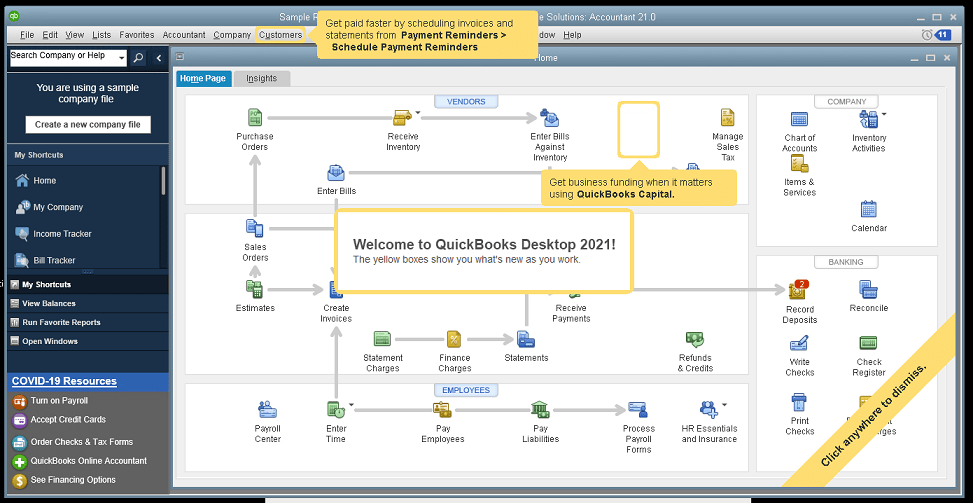
The new QuickBooks Desktop 2021 editions have new and improved features that help businesses get paid faster and secure data more effectively, making the software work even better for your company.

Many of the improvements center on automation and workflow, enabling users to get more done with fewer keystrokes and setting up automatic activities so that items don’t have to be handled manually.

Other improvements center on data and information access, allowing admins to get granular with setting user permissions and access to certain types of information, even down to the record.

Intuit has also delivered several enhancements to existing functionality in QuickBooks desktop, especially in the Enterprise edition and where inventory is involved.

Here is a brief summary of the main changes or additions introduced with QuickBooks 2021 editions.

Improved Bank Feeds
Review bank transactions and match them to existing ones in your books or quickly add new transactions using the advanced bank feeds capability. You can automatically categorize or batch-edit bank transactions by payees, accounts and classes. This can dramatically reduce the time and complexity of reconciling entered transactions with the items the bank processes.

Automated Payment Reminders and Statements
Now you can send statements automatically to customers, with each statement tailored to the customer’s needs or preferences. Set automatic reminders for customers when their invoices are due and schedule statements for your customers to let them know when they have invoices they still need to pay you for. Timely communications with customers regarding their invoices and activity is more likely to keep a customer coming back for more. It also reduces the time required to communicate individually with customers, making AR management and collection activities more efficient.

Customized Payment Receipts
Want to send certain customers a customized message on their receipts? You can use custom templates for forms like invoices, sales receipts, estimates, statements, and purchase orders so each form has the right look and information. Then use the new customer groups capability to get the right form for the right customer every time.

PDF preview
It is always a good idea to preview a document before you send it via email, but that wasn’t always a convenient thing to do in QuickBooks. Now QuickBooks lets you automatically preview attachments before emailing them to customers. You can even preview multiple attachments at once without having to manually open each one outside of QuickBooks, saving huge time and effort and smoothing out a previously-clunky workflow.

Receipt Management
Receipt management in QuickBooks desktop is a new feature that makes entering expense receipts easier and faster. You can give users access to upload expense receipts to QuickBooks using the mobile app or directly from your computer. Automate creating categorized receipt expense entries using the QuickBooks Desktop Mobile App, an option available only with the Plus subscriptions (not the one-time purchase option).

Create Customer Groups
Improve customer communication with rule-based customer groups based on fields like customer type, location, or balance. Creating customer groups allows you to find all customers that match certain criteria. Then you can create automated statements, send payment reminders or create mailing lists for specific groups of customers.
In QuickBooks Desktop Enterprise, you can even use customer groups to define permissions and access at customer and vendor group level.

Data Level Permission
Data level permissions is a new feature in QuickBooks Enterprise 21.0 that gives you more control regarding restricting access for users and roles. This makes it so the admin can create users and roles with access permissions all the way down to the record level for customers and vendors.

With data level permissions you can improve security and confidentiality of information by assigning users access only to the specific data, transactions and reports that they are responsible for. Users will only be able view, edit, or delete specific customers, vendors, or data with the permissions you delegate to them.

NOTE: Data level permissions don’t appear to be available in QuickBooks Enterprise Accountant, nor are they available with a Silver or Gold subscription. To get this feature, you have to go Platinum or Diamond, so it’ll cost you.

Add prices to barcode labels
Wouldn’t it be great if you could print barcode labels with pricing information as well as the item name and description? Now you can! Barcode labels help you accurately identify and manage inventory, providing the information most often needed by employees and customers.

Landed cost
Gain more control and flexibility over how you calculate and share landed inventory costs. Set up landed cost accounts as “COGS” (Cost of Goods sold) or “Other current assets”, and accurately calculate landed cost for old item bills from closed accounting periods. You can also print bills with or without landed cost, allowing you to better control the information you present.

Alternate vendor reports
Key inventory reports can now include alternate vendor information, improving visibility into vendor information on inventory stock status by item, inventory valuation summary and other reports. Linking to alternate vendors via these reports simplifies and streamlines the process of reordering from alternate vendors.

QuickBooks desktop software continues to be the cornerstone of small business accounting. From very small business to the growing enterprise, QuickBooks delivers the functionality that every company needs to manage their income and outgo, customers and vendors, and all their banking activities.

Starting with the early 1999 version to the current 2021 release, Intuit has continued to add capability and enhance features and usability to keep QuickBooks as the most popular small business accounting product on the market. Remember the motto “if you can write a check, you can do your own books“? That’s QuickBooks.

jm bunny feetMake Sense?

J

Update your Mac to keep getting Office application updates

Microsoft’s upcoming November 2020 update has some direct impacts to users running macOS, especially if running macOS 10.31 or earlier. As of November 10, 2020, existing Microsoft 365 for Mac users running macOS 10.13 or earlier will not receive any further Office application updates. If the machine is upgraded to macOS10.14 or later, updates will be allowed to proceed on that computer.

With the Microsoft 365 for Mac November 2020 update, users running macOS must be running 10.14 Mojave or later in order to continue to receive updates for Office applications, and any new installs of Microsoft 365 for Mac will require macOS 10.14 or later.

Word, Excel, PowerPoint, Outlook and OneNote are the applications included which will no longer receive updates – including security updates – if the macOS they’re running on is too outdated.

Among the benefits of using Microsoft 365 is that the software is always kept up to date, including enhancements and new features as well as security and safety updates that help keep the software (and the associated data) more secure. You may continue with the older version of macOS, and your Office applications will continue to work. But losing out on updates not only keeps you from benefitting from the most current capabilities of the software (and getting full value from your subscription), but it also puts your security and compliance at risk.

Microsoft 365 applications are continuously updated with new features, connected services and enhancements to security. Modern operating system platforms are necessary to support some of these improvements, requiring users to update their computer operating systems as well as the applications running on them. With the Microsoft 365 November update, Mac users need to be running one of the three most recent versions of macOS to keep their Office applications recent, too.

Make Sense?

J

Office 2013 Loses Support for Commercial Office 365 Services

If you’re not on a subscription for your Office desktop applications, you may lose access to your email box and other services.  Why? Because Microsoft announced that, effective October 13th, 2020, Office 365 services (like OneDrive, Hosted Exchange and more) will only support client connectivity from subscription clients or perpetual clients with mainstream support.

Basically this means that Office 2013 is about to be no fun any more.

You won’t be able to use Office 2013 Outlook to connect to your Microsoft-hosted Exchange mailbox, and your Word and Excel won’t connect to OneDrive.  If you are with a hosting provider who supplies your Office licenses as part of the service, cross your fingers and hope that it isn’t Office 2013. It will be pretty frustrating if your Outlook suddenly has problems accessing your Microsoft-hosted mailbox.

Like many other products, a lot of the functionality in the desktop software has been turned into web service and the Microsoft Office applications are a great example. With cloud connectivity being the focus, desktop solutions are more frequently leveraging online resources to extend and expand their capabilities. This also means they’re more frequently turning from one-time software purchases to subscription service.

After October, Microsoft’s ongoing investments in the Office 365 cloud services – including Exchange Online, SharePoint Online, and OneDrive for Business – will be made based on “post-Office 2013 requirements”.  Now is the time to migrate your Office 2013 to Microsoft 365 Apps (formerly Office 365 ProPlus). We highly recommend this move anyway, so businesses can take advantage of using their Office applications seamlessly on Azure servers as well as their local PC desktops and mobile devices.

Users of Office 2016 and Office 2019 have a little more time before their software no longer supports the cloud services. That end date is currently October 2023. You can find the support lifecycle site for Office mainstream support dates here.

It isn’t that Microsoft plans to actively block older Office clients from connecting to Office 365 services. It’s just that older applications may have performance or reliability issues when they try to connect to the constantly-updated cloud services.  Increased security risks are certain and users may even find that they are no longer compliant with certain requirements. The big thing is that Microsoft support will likely not be able to resolve issues related to unsupported connections.

The days of buying software once and running it forever are just about over.

Developers have recognized that cloud services can expand and enhance their solutions in ways that static local installation can’t. For many businesses, it becomes easier and ultimately more efficient to migrate to subscription service for IT platform and software. Azure cloud servers, for example, allow businesses to always have modern infrastructure that is more fault tolerant and agile than on-premises hardware.

Combing these benefits with software that is cloud-connected and always up to date means the business never faces lost productivity or revenues due to outdated systems or lost compatibility with newer solutions.

Make Sense?

J

Windows Server 2012/R2 Not Aging Well, Loses Support for Microsoft 365 Apps

Lots of people loved (and continue to love and use) Windows Server 2012/R2. This Windows Server release introduced several new and improved features that made it a cornerstone of business and service provider networks worldwide. Notable improvements in virtualization with Hyper-V, along with improvements in storage, networking, remote access and server administration features, made 2012/R2 a necessary upgrade from the 2003 and 2008 versions still present in many networks.

Sadly, even though Release 2 (R2) for Server 2012 was largely a new OS due to its features and capabilities, it did not receive a new lifecycle end date and instead inherited the end dates for 2012 version. And an extended lifecycle end-date doesn’t guarantee extended usefulness or compatibility.

Windows Server 2012 began with mainstream support on October 30, 2012 and that mainstream support ended in January 2018, including for R2. Extended support for 2012/R2 goes through January 2023, but that is only if you are paying for Software Assurance for your licenses.

During this period where extended support may still be available for the OS, there is no guarantee that it will remain as a supported platform for your application software. An example of this is the Microsoft Office 365 Apps suite formerly known as ProPlus. The Office 365 apps, which include Outlook, Word, Excel, Powerpoint and more, are staples of business users worldwide. These applications are no longer supported on Windows Server 2012/R2.

Microsoft 365 Apps ended support on Windows Server 2012/R2 on January 14, 2020.

Innovative features and functionality continues to be released for the Microsoft 365 Apps and Microsoft needs to know that the platforms running the applications will work properly with those innovations. As the software is improved and new capabilities introduced, stability and performance issues can plague the install when it is running on older or unsupported operating systems.

Microsoft has pointed out that any Microsoft 365 Apps updated to version 2005 or later will result with functionality and stability problems because there are changes that are specifically not compatible with Windows 8 and Windows Server 2012.

The pace of change is increasing no matter what industry you are in. With technology adoption rates rising faster than ever in all sectors, business owners cannot rely upon outdated systems if their operations are to remain competitive. Application software as well as the operating system platforms it runs on must be regularly updated in order to provide the reliable performance and useful functionality demanded by today’s business users.

jmbunnyfeetMake Sense?

J

Working from Home: Remote Access Capability to Address Coronavirus Concerns

Scanning electron microscope image of the  coronavirus SARS-CoV-2 (blue) emerging from the surface of cells cultured in the lab. Image credit: NIAID-RML

COVID-19, as the new human coronavirus is now known, is spreading around the world and that means that individuals and families – and businesses – should prepare.

The Centers for Disease Control has said that it fully expects community transmission in the United States and is asking families to be ready for the possibility of significant disruption to our lives. This shouldn’t be a call to incite panic and doomsday scenarios, but it also isn’t something to be taken lightly.

Business need to consider how they will help keep their workforce working as symptomatic individuals quarantine themselves and others look to reduce their exposure in public.

Being at risk personally isn’t the only reason to prepare. Many will feel that the risk to them is small, recognizing that the disease is quite mild in most of those that become infected. But the primary reason to prepare is to help lessen the risk for everyone. Taking preventative steps to limit the spread of the disease is essential for everyone.

Prevention means doing more of what you should already be doing to help prevent the spread of any communicable disease…

  • Wash your hands
  • Cover your mouth when coughing
  • See a doctor if you’re sick
  • Avoid other people if you are infected or showing symptoms

This means staying home from work if you are even a little bit sick.

Look at what’s happening in Japan, a country known to promote spending long hours in the office as a crucial element to success. Authorities there are urging companies to break with that long-standing belief system. They are encouraging businesses to have their employees work from home to help limit the spread of the virus, yet most businesses aren’t prepared at all to handle a remote workforce.

Panasonic, NEC, and Mitsubishi are among the growing number of firms that have mandated or recommended remote work for tens of thousands of staff. The change is testing the ability of the nation’s companies to embrace a more flexible work style—overturning a workplace culture that dates back decades and values physical presence and endurance of long hours over productivity or efficiency. https://fortune.com/2020/03/01/coronavirus-japan-government-remote-work/

This is where cloud hosting services can be a big benefit for the business. Migrating the desktop and networked applications to a cloud-hosted platform allows the business to continue using the software and systems already working in the business, but to run them from a cloud platform that enables workers to access from anywhere… including from home.

Rather than trying to convert to web-based applications, requiring retraining of employees and conversions of data, businesses find great success in simply moving their in-house systems to an agile, scalable cloud platform that can be accessed via the Internet. Particularly when it comes to enabling remote offices and at-home workers, a cloud hosting approach is the way to rapidly move critical IT infrastructure out of the office, providing a means to support remote workers almost immediately.

Businesses find great benefits from hosting their applications and data in the cloud every day and without the pressures of global disaster and pandemic facing them. When the need to support remote and mobile workers becomes a work-from-home mandate, the business is already poised to meet the demand and still get the work done. It’s just another form of prevention for the business.

Make Sense?
J