Finance Department Participation in Supply Chain Management

When most businesses approach Supply Chain Management, the focus is on the item or product – the physical thing that ultimately gets delivered somewhere, somehow. What many businesses do not consider is that the orchestration and timing of “supply chain” activities can have significant impacts on financial performance, reporting and cash flow. The current processes could just be working just “okay”, and not delivering the financial benefit that might be obtained through modernization of technologies and transformations in approaches. The key is to get the right people involved.

One big aspect of seeking to integrate electronic commerce and collaboration with customers, suppliers and payment services is the recognition that supply chain activities involving orders, invoices, payments, and remittances are directly related to finances, revenue recognition and cash management.

For any project to be successful, it should include execs from both the supply chain and finance areas so that all concerns relating to event timing may be addressed to allow proper treatment in the financial statements. After all, the same things that trigger supply chain activities (orders etc) are the same documents which drive finance. When the information is accurate and timely, and when the inefficient manual processes can be replaced with electronic workflows, the business is best positioned to improve cash flow and overall financial performance as well as business value.

Unfortunately, few business owners have a real understanding of the costs associated with manual entry activities and how the direct financial impacts they have. The speed and accuracy of processing orders and invoicing customers means faster cash in, and leveraging the speed of electronic data interchange with suppliers so that “just in time” orders may be placed and logistics processes more fully enabled means cash out when necessary and not ahead of time.

“… using a digital transaction for payments allowed [businesses] to hold on to cash longer and better control the timing of the release of funds, something more difficult to control when mailing a physical check. Check fraud remains rampant across many industries. According to an AFP payment fraud and control survey, 70% of U.S. organizations reported check fraud in 2019, responsible for more than $18 billion in losses.” –

source: What Every CFO Needs to Know About Supply Chains; Study published by DiCentral and Lehigh University; 2012

For example, there are many studies which show that purchase orders that are not sent digitally are most often manually processed, and that this manual processing may be done by any number of departments in the company – but most often the job falls to finance. Rather than looking to eliminate the manual entry of data and the errors and delays that come along with it, businesses execs first looked to where the lowest labor cost rests and had them handle the extra data input.

A digital strategy that transforms inefficient manual process into efficient electronic workflows is the better solution. While many companies have approached streamlining of activities by exchanging manual entry operations for data file formatting and imports, they still have not solved the problem as would be with an integration that takes even less human time and effort.

The real goal of any business improvement effort is to improve overall business value. By bringing in finance along with supply chain execs to the “digital transformation” discussion, the business is much better positioned to make real progress in areas that directly impact cash performance as well as long-term business value. It comes down to having all the information and being able to weigh the risks against the potential rewards to be gained from the contemplated changes.

jm bunny feetMake Sense?

J

Where in The World is Your Data?

Where in the World is Your Data? Even better.. where would you like it to be? In a datacenter near you? In a datacenter far away from you? Maybe you’d like your production system nearby, but backups stored on the other side of the country. Or perhaps you want redundant systems on each coast as well as something somewhere in the middle.
With Microsoft Azure as your platform, you have all the choices in the world, literally.

Microsoft Azure is the platform of choice for businesses of all sizes, offering virtualized infrastructure and services that can be tailored and tuned to meet the unique needs of any organization. No longer tied to on-premises infrastructure, companies find that they can implement better and more comprehensive solutions because they have the agility to adapt systems to immediate needs while retaining the ability to adjust as conditions change.

With Microsoft Azure and Microsoft 365 Services, NOOBEH enables businesses to focus on transformation and improving efficiency, not the IT that supports it.

NOOBEH cloud services, part of the Mendelson Consulting team, sets up Azure infrastructure and manages it for their clients. Business users focus on getting their work done, not on the IT supporting it. NOOBEH QuickBooks on Azure services give small and medium size businesses the most flexible and resilient infrastructure available to run all their desktop and network applications.

Because QuickBooks is rarely a standalone solution, NOOBEH QuickBooks on Azure services have no limitations on what add-ons, extensions, integrations or other applications the business may need to use. All the software a business needs can be deployed on the platform, allowing the company to keep its information systems and assets secure, fully-managed and available when and where they are needed.

While NOOBEH uses Azure platform and Microsoft 365 services to continue to deliver new capability for private sector users, Microsoft is advancing innovation in the delivery of connected services and computing power for private and government sector users wherever it is needed. Azure Modular Datacenters represent a partnership that delivers computing and communications capacity anywhere in the world… and beyond.

Microsoft Azure Modular Datacenters and SpaceX

The Azure modular datacenter is basically a “data center in a box”. It comes with everything needed to deliver computing capacity anywhere in the world.

“We designed the Azure Modular Datacenter (MDC) for customers who need cloud computing capabilities in hybrid or challenging environments, including remote areas. This announcement is complemented by our Azure Space offerings and partnerships that can extend satellite connectivity anywhere in the world. Scenarios range from mobile command centers, humanitarian assistance, military mission needs, mineral exploration, and other use cases requiring high intensity, secure computing on Azure.”

https://azure.microsoft.com/en-us/blog/introducing-the-microsoft-azure-modular-datacenter/

It has power and everything else it needs, and now it also has the connectivity needed, even when there is no (zip, zero) infrastructure. Microsoft has partnered with SpaceX, using SES satellites to bring Internet connectivity to remote areas.

“We can connect via satellite links any element on the Earth to another point on the Earth..”

https://arstechnica.com/information-technology/2020/10/microsofts-new-data-center-in-a-box-will-use-spacex-starlink-broadband/

They’re calling it part of “a multi-orbit, multi-band, multi-vendor” approach to connectivity. That’s pretty cool, if you ask me.

It takes the whole bookkeeping in bunny slippers philosophy of “work when and where it works for you” to an entirely new level.

Make Sense?

jm bunny feet

J

QuickBooks Desktop 2021: Getting Paid Faster, Being More Efficient, and Improving Data Security

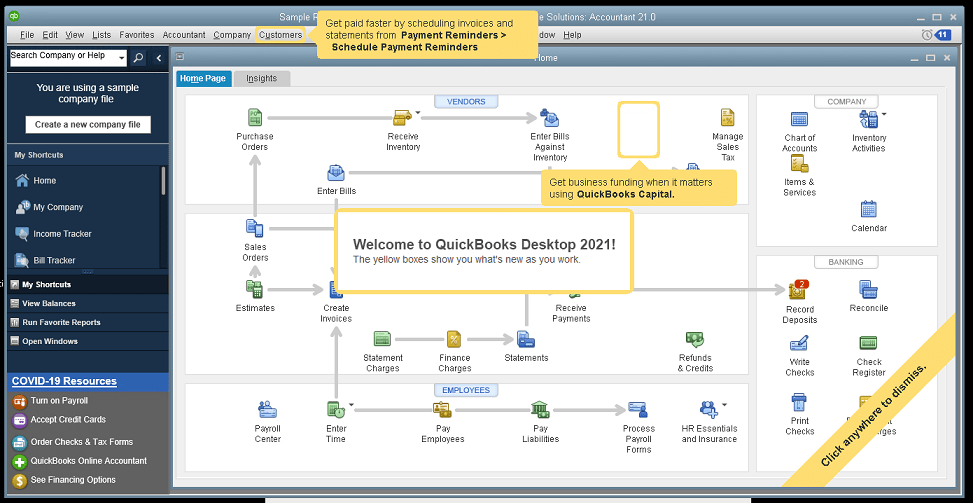
The new QuickBooks Desktop 2021 editions have new and improved features that help businesses get paid faster and secure data more effectively, making the software work even better for your company.

Many of the improvements center on automation and workflow, enabling users to get more done with fewer keystrokes and setting up automatic activities so that items don’t have to be handled manually.

Other improvements center on data and information access, allowing admins to get granular with setting user permissions and access to certain types of information, even down to the record.

Intuit has also delivered several enhancements to existing functionality in QuickBooks desktop, especially in the Enterprise edition and where inventory is involved.

Here is a brief summary of the main changes or additions introduced with QuickBooks 2021 editions.

Improved Bank Feeds
Review bank transactions and match them to existing ones in your books or quickly add new transactions using the advanced bank feeds capability. You can automatically categorize or batch-edit bank transactions by payees, accounts and classes. This can dramatically reduce the time and complexity of reconciling entered transactions with the items the bank processes.

Automated Payment Reminders and Statements
Now you can send statements automatically to customers, with each statement tailored to the customer’s needs or preferences. Set automatic reminders for customers when their invoices are due and schedule statements for your customers to let them know when they have invoices they still need to pay you for. Timely communications with customers regarding their invoices and activity is more likely to keep a customer coming back for more. It also reduces the time required to communicate individually with customers, making AR management and collection activities more efficient.

Customized Payment Receipts
Want to send certain customers a customized message on their receipts? You can use custom templates for forms like invoices, sales receipts, estimates, statements, and purchase orders so each form has the right look and information. Then use the new customer groups capability to get the right form for the right customer every time.

PDF preview
It is always a good idea to preview a document before you send it via email, but that wasn’t always a convenient thing to do in QuickBooks. Now QuickBooks lets you automatically preview attachments before emailing them to customers. You can even preview multiple attachments at once without having to manually open each one outside of QuickBooks, saving huge time and effort and smoothing out a previously-clunky workflow.

Receipt Management
Receipt management in QuickBooks desktop is a new feature that makes entering expense receipts easier and faster. You can give users access to upload expense receipts to QuickBooks using the mobile app or directly from your computer. Automate creating categorized receipt expense entries using the QuickBooks Desktop Mobile App, an option available only with the Plus subscriptions (not the one-time purchase option).

Create Customer Groups
Improve customer communication with rule-based customer groups based on fields like customer type, location, or balance. Creating customer groups allows you to find all customers that match certain criteria. Then you can create automated statements, send payment reminders or create mailing lists for specific groups of customers.
In QuickBooks Desktop Enterprise, you can even use customer groups to define permissions and access at customer and vendor group level.

Data Level Permission
Data level permissions is a new feature in QuickBooks Enterprise 21.0 that gives you more control regarding restricting access for users and roles. This makes it so the admin can create users and roles with access permissions all the way down to the record level for customers and vendors.

With data level permissions you can improve security and confidentiality of information by assigning users access only to the specific data, transactions and reports that they are responsible for. Users will only be able view, edit, or delete specific customers, vendors, or data with the permissions you delegate to them.

NOTE: Data level permissions don’t appear to be available in QuickBooks Enterprise Accountant, nor are they available with a Silver or Gold subscription. To get this feature, you have to go Platinum or Diamond, so it’ll cost you.

Add prices to barcode labels
Wouldn’t it be great if you could print barcode labels with pricing information as well as the item name and description? Now you can! Barcode labels help you accurately identify and manage inventory, providing the information most often needed by employees and customers.

Landed cost
Gain more control and flexibility over how you calculate and share landed inventory costs. Set up landed cost accounts as “COGS” (Cost of Goods sold) or “Other current assets”, and accurately calculate landed cost for old item bills from closed accounting periods. You can also print bills with or without landed cost, allowing you to better control the information you present.

Alternate vendor reports
Key inventory reports can now include alternate vendor information, improving visibility into vendor information on inventory stock status by item, inventory valuation summary and other reports. Linking to alternate vendors via these reports simplifies and streamlines the process of reordering from alternate vendors.

QuickBooks desktop software continues to be the cornerstone of small business accounting. From very small business to the growing enterprise, QuickBooks delivers the functionality that every company needs to manage their income and outgo, customers and vendors, and all their banking activities.

Starting with the early 1999 version to the current 2021 release, Intuit has continued to add capability and enhance features and usability to keep QuickBooks as the most popular small business accounting product on the market. Remember the motto “if you can write a check, you can do your own books“? That’s QuickBooks.

jm bunny feetMake Sense?

J

For Accounting Professionals: Private Hosted Solutions and Helping Clients Cope with the New Normal

Accounting professionals have an opportunity right now to help their business clients through the difficulties presented by the COVID-19 pandemic. With work-from-home mandates and increasingly fluid reporting requirements to support grants, loans and loan forgiveness, business owners need all the support and good advice they can get.

The global pandemic is changing the landscape of business worldwide. Many small businesses in the US have either closed or are on the brink, looking for ways to keep the doors open and employees paid. Supply chains are strained, distribution has slowed, and workers are being asked to work from home if possible.

These are challenging times, but the guidance and support you can provide to your business clients can be just what they need to help keep the doors open and workers producing. Remote access, cloud hosted applications and data, and real-time accounting support and management reporting are the weapons you and your clients will use to fight the conditions that are currently working against you both.

Help your clients deploy cloud hosting services for their entire business.

Running applications and storing data on an in-house network increases the cost and complexity of supporting a remote or mobile workforce, for you and for your clients.

Remote access and supporting work from home requires that users have the means to communicate with each other and to collaborate on the work. Tools to support communication and collaboration are critical when the workforce is distributed, operating from a variety of locations and with whatever device is available. Yet business owners, operators and managers may find that collaboration apps and other online tools don’t provide access to the applications and data required to do all their work.

To address the problem of working on client data, some accountants may install the client software and copy the data to their own in-house networks. This creates a situation where the accountant is paying for computing resources, space and management of client applications and data in addition to their own. This increases the cost of internal operations for the accounting firm and can impact internal system performance while also reducing overall productivity.

More to the point, this model only supports doing after-the-fact work for the client, which results in the data and reporting being outdated and far less useful to the client in supporting daily decision-making. This model also does nothing to help the firm with their own possible work-from-home needs even as IT support and on-site service becomes more limited.

Accounting professionals wanting to provide services to clients proactively rather than reactively must have real time access to the same applications and data that the client uses. The old fallback to remote control solutions is one approach, yet it is not really an optimum solution to the problem.

Remote control, like PCAnywhere, GoToMyPC or LogMeIn expose the professional to more of the client computing environment than is necessary, introducing risk and the potential for blame if something goes wrong. And remote-control solutions are single user, reducing productivity because the client can’t use their system while the accountant controls the computer. RC solutions also rely on the availability and function of the on-premises systems. If the on-prem systems aren’t turned on, up and running and accessible, then the remote user can’t connect.

It may be that online or web-based applications are an option, but for many businesses they aren’t really a viable solution. QuickBooks Online is simplified software and is not appropriate or usable for many businesses. The QBO subscription model is per-company, limiting options and reducing cost-efficiency for businesses with multiple entities. And QBO doesn’t address other business needs, such as working with documents and reports, and it can’t provide any access or support for other business applications. Even the ability to backup and preserve data is very limited without specialized services and tools.

Shared hosting service might be closer to the right answer, yet shared hosting is generally only useful for very small organizations and supports only core QuickBooks functions, so it can be as restrictive QBO. Shared infrastructure used by the shared hosting platforms can also introduce significant risk to every business on the platform because ransomware and malware can easily move through connected file systems and servers.

Compare shared services to a public pool where it is very easy to transmit from one person to another; in these networks an intrusion can end up spreading malware to the entire network and platform, resulting in days or even weeks of outages. Unfortunately, disaster recovery is often limited to recovery of the provider hosting platform and does not always include recovery of all customer data.

The best solution for business is private, managed cloud hosting service delivered on a trusted and proven platform like Microsoft Azure.

Hosting service that takes advantage of the Microsoft Azure cloud  platform allows the business to centralize access to all their important applications and data, making it possible to provide complete application functionality for all users no matter where they are located.

Using the Azure platforms means that security, fault tolerance, scalability and agility are designed into the solution rather than being extras from the hosting provider. Microsoft-managed datacenters and Microsoft-managed hardware means the experts in systems and security are handling the big stuff while the service provider focuses on what the client needs.

The virtualization technology enables the agility to meet changing business needs, scaling systems up or down if necessary. Massively scalable platform allows services to be right sized now without concern for future resource requirements (no buying ahead based on possible future needs). There are no arbitrary limitations placed on the applications or services the business needs to run on the cloud platform, and no fees for running more apps.

Making all the applications and data available to workers, when and where they need them, is the key to promoting higher levels of productivity while delivering the data management needs to support daily decision-making.

Now that you have access, provide pro-active support and help business owners and managers make the right decisions.

Better data and reporting to support business and finance management is more important than ever, especially when having the right information can mean the difference between keeping the doors open and closing shop for good. Whether the goal is to shore up finances to keep employees on staff or to create a cushion to help weather supply chain disruptions, businesses owners need quality financial and performance data in order to make the right decisions for the company.

Once the accounting professional has real-time access to client systems, they can work cooperatively in the data to ensure that the right information is available when it is needed. As business owners seek to take advantage of grants and loan programs available due to the pandemic, the financial and other performance data becomes even more essential in terms of developing qualification and eventually forgivability of the loan.

With timely access, proper reporting tools and regular support and oversight, business owners benefit from a closer working relationship with their accounting professionals. The additional support and proactive service is more necessary now than ever. For the accounting pro, an elevated relationship with client is being developed, where the services provided become more meaningful and the value of those services more evident.

Make sense?

J

QuickBooks changes and enhancements for 2020: My 2 Favorite Fixes and Let’s Talk Cloud Hosting

Accounting professionals and small businesses worldwide use QuickBooks software to manage business finances. Launching Basic and Pro versions in 2000 and increasing market share from 74% in 2004 to boasting more than 94% in 2008, Intuit continues to successfully serve the needs of small and growing businesses.

Over the past few years, Intuit has focused quite a bit on SaaS and online services, promoting QuickBooks Online Edition, mobile payments and full service payroll as solutions that can meet specific business needs and which drive new customer adoption of the products. While customers may initially attach to QuickBooks because of one of these capabilities, it is the richer functionality found in Pro, Premier and Enterprise which often causes the business to run the desktop editions.

Intuit knows that the desktop editions remain hugely popular, which is why they continue to be updated and supported. And this is also why payments, payroll and other functions supported by the product are handled as integrated service rather than software; It’s a great way to make sure customers upgrade their QuickBooks software regularly, even when it sits on the desktop.

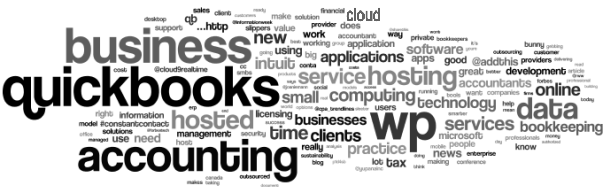
qbwordle

The changes in QuickBooks for 2020 aren’t amazing… it seems like they are more tweaks and adjustments than real feature releases. I’ll list a few of the changes below, but first I’d like to point out the 2 changes that I think might make a big difference.

These are my 2 favorite changes with QB 2020

1. QuickBooks Enterprise 2020:  Landed cost

How did you get along without this before? Manual calculation, that’s how. Landed cost capability gives visibility to actual, complete product costs because it adds freight, duties, insurance and whatever other expenses relate to the purchase. Allocate the costs to item bills and you now have a complete view and tracking of the real cost of bringing in the product.

2. It is Now Easier to Reset the Admin Password

Yay! No more 20 questions! The Admin password for a company file may now be reset without having to enter a bunch of information and answer a lot of questions to verify identity.  The process now asks that the user pick their email address from a drop down list of emails registered with the QuickBooks license. A token is emailed to the address to use in resetting the Admin password.  The key here is to make sure your QuickBooks registration information remains up to date so that an email you can get to is used for this process.

Here’s the list of changes in QB 2020.

You can see more on Intuit’s website.

QuickBooks Desktop Pro, Premier, and Accountant

  • Automated Payment Reminders
  • Automatically add customer PO# to Invoice emails
  • Combine all invoices meant for a single customer into one email
  • Find and open your company files with the addition of a file search option
  • Enhanced Accessibility to improve usability for vision-challenged users
  • Collapse columns in reports
  • View detailed status of direct deposit payroll
  • Smart Help: Press F1 for improved content and search experience

QuickBooks Enterprise Solutions 20.0

Here are the changes specific to QB Enterprise

  • Complete picking and packing operations as part of single workflow
  • Track product landed cost
  • Manage product vendors with primary and alternate vendor selections

Intuit continues to do a fine job of making QuickBooks desktop the most useful and easy-to-use solution for small business finance, and we make it run best in the cloud.

Where QBO (the online edition) might work for very small businesses and those with very limited requirements, the real work gets done in the desktop editions. My team helps make running the QuickBooks desktop editions easier and even more useful in the cloud.

A quality cloud hosting approach can deliver anytime/anywhere access, greater IT resiliency and faster disaster recovery, but only if done properly (note my favor for private tenant hosting rather than multi-tenant or shared hosting). The wrong platform introduces poor performance, limitations on applications and breaks in processes and workflows, and may even compromise security and complicate recovery when something does go wrong.

QuickBooks desktop solutions are the right fit for many small businesses, and these businesses demand mobility, security and flexibility in their IT systems. Providing this is our way of helping make QuickBooks desktop a little bit better.

jmbunnyfeetMake Sense?

J

How Accounting Professionals Can Improve the Profitability of Their Existing Business Using Cloud

Working Closer with Business Clients

Accounting professionals are increasingly asked to provide more meaning behind the numbers they report on. Small business owners care about the bank balance and their tax bill, but they care far more about how profitable and productive the business is operating. And small business owners care about how they can improve performance – earn more profits and keep more of it. Accounting professionals can help their small business clients do this more efficiently using cloud and hosting technologies.

Small businesses need their accounting professionals to take a more direct level of involvement in support of daily processes than larger companies do.

For small and mid-size businesses, the accounting office may be asked to handle bookkeeping, payroll processing, bank account reconciliations, paying bills and invoicing customers and more. In order to have close access to the information and applications supporting these processes, it becomes necessary for accounting pros to be able to connect remotely to client systems. This isn’t a new requirement, but the technology available today to make it work allows for closer and more immediate interaction between the client and the accounting professional.

When a small and growing business runs their applications on a cloud platform, the variety of users that need to work with the information are able to access it regardless of where they are located because the Internet becomes the network.  This model doesn’t in any way require that businesses adopt web-based applications instead of the desktop applications they have come to rely on.  Desktop applications like QuickBooks, Sage50, Microsoft Office and more can be hosted on cloud platforms, allowing business users to login and use the software they are familiar with and that supports their various processes.

With a cloud hosting model for running business applications and storing business data companies can take advantage of fully-managed deployments of their software and systems without having to employ the IT staff to implement and manage it all. This allows small businesses to have the advantage of high performance IT without the typically high-cost budgets required to support it. The other advantage is that the accounting professionals working with the business are able to access the systems in real time from their offices or other locations, enabling the close working relationship the business needs.

The key value proposition for the accounting professional is the improved profitability to be found in existing client engagements.

Whether it is through an increase in the number and type of services offered to the client or through an improved level of efficiency found with operating on the hosted system, professionals can increase revenues and reduce costs of supporting existing clients. That’s the secret to success in working with the small clients: earn enough working for them while at the same time keeping their costs down so they can grow into larger more profitable business clients.

Make Sense?

J