Trends Impacting Every Business | Forbes.com

Trends Impacting Every Business | Forbes.com

You think good accounting isn’t a big factor in getting business credit?  Consider this tidbit from Intuit’s CEO Brad Smith, from a recent article on Forbes.com:

Two-thirds of Intuit’s QuickBooks customers were declined a loan due to poor FICO scores and other credit measurements. In the Loan Finder trial, a business could opt-in to allow banks to use QuickBooks data to evaluate if a prospect was a credit risk. As a result of this additional data, the banks provided several hundred new loans with an average of $10 million dollars.

Accounting professionals… isn’t this something you could be helping your clients with?

Read more about helping make small businesses bankable 

Make Sense?

J

  • Read more about how accountants need business intelligence, too
  • Read more about how there’s no fear and loathing in accounting
  • Read more about the pressure on accountants to deliver more value and intelligence to their clients
  • Read more about Data Warriors: accounting in the cloud

Using Structured Workflow to Manage Offline Clients | Intuit Accountants News Central

Using Structured Workflow to Manage Offline Clients | Intuit Accountants News Central

The demand today requires that accounting professionals be more attentive and, yes, aggressive, in terms of “attacking” a regular flow of processing client information rather than batching it at period end. This drives a great need to structure and organize the work, and workflow, so that the repetitive and regularly performed processes may be streamlined and made easier to manage on an ongoing regular basis. It is no longer good enough to wait for clients to deliver the information and request the resultant reports. We must proactively request and gather the required information for processing, especially with offline clients, in order to get the work done more frequently.

Read the entire article at Intuit Accountants News Central

J

SmartVault Scan to QuickBooks – When you need to know, go to the source

SmartVault Scan to QuickBooks – When you need to know, go to the source

One of the biggest challenges in business bookkeeping is keeping track of the paper documents and items which back up the data in the accounting system.  If you’ve ever had to produce an expense report, or provide a receipt for a business purchase, you know what I’m talking about.  That piece of paper is the supporting information for a financial transaction, proof that the entry in the books matches what was actually done.  This is what is referred to as the “source” document, and it’s pretty important to keep around, especially in the event of an audit.

Keeping track of paper receipts, bills and other documents which support bookkeeping or accounting transactions can be quite a challenge for any business.  In many cases, notes are made in journal entries or in transaction descriptions identifying source documents, but finding the document then becomes an adventure in the paper filing system where you hope the paper you’re looking for is actually in the file referenced.  Just the time it takes to organize, store and then later find those documents makes the whole process inefficient, time-consuming, and costly.

What makes sense for many businesses is to attach those source documents right to the transaction in the accounting system.  When the accounting was manual, it was easy to do this – simply paperclip the invoice or receipt to the page with the journal entry.  In the world of electronic information and computerized accounting software, the process is a bit different, but not much if you use SmartVault and QuickBooks together.

One of the best features of SmartVault, an online document storage and secure file sharing solution, is the integration it offers with QuickBooks financial software.  Using SmartVault and QuickBooks together, business owners and the bookkeepers and accountants who support them are able to easily and efficiently manage source accounting documents, connect them to transactions in the accounting system, and retrieve them at any later date required.  The process of connecting the source document to the transaction in QuickBooks is the easiest thing to do, too, because you simply use the familiar paperclip to hook the two items together which ultimately deliver an integrated QuickBooks document management solution.

When working in QuickBooks, the SmartVault toolbar is visible on the screen.  Operators who need to make entries in the financial system are able to attach source documents right to the transaction using the SmartVault,toolbar – the user simply clicks on the paperclip icon on the toolbar to scan, browse or drag and drop files onto the toolbar and into SmartVault. The source document is now attached to that specific QuickBooks transaction – later, when a user views the QuickBooks entry, clicking on the folder icon on the toolbar will display the attached document, providing instant access to the supporting documentation for the entry and a built-in audit trail.  Users can even scan documents as they make the QuickBooks entries, because SmartVault can grab the image from vault folders or directly from the SmartVault Inbox.  This gives users scan to cloud functionality and makes scanning, naming and saving documents much easier, and eliminates the need for the user to have computer skills required for storing, organizing, and finding documents on their PC before they can be put into SmartVault.

Considering the volume and variety of paper documents that most businesses deal with, having a simple and fool-proof means to keep important financial documents available is critical.  Even more, having those source accounting documents readily available and viewable right from the accounting software becomes an essential element to making sure you have the right information, and the back up to support it, in your accounting and bookkeeping systems.

Make Sense?

Joanie Mann Bunny FeetJ

Dashboard Reporting Tools: Gauging Accounting Relevance

Dashboard Reporting Tools: Gauging Accounting Relevance

Dashboard reporting tools can be of great assistance when accounting professionals want to help their clients understand how the business is performing.  In most cases, these tools do a good job of showing owners the details of the profit and loss or cash flow reports, presenting the information in a way that non-accountants can understand.  Many accounting professionals have turned to these reporting solutions to increase the value of the accounting work performed.  After all, if the client can’t really understand the P&L and the Balance Sheet, then the reports won’t do them much good.

While simplified graphical reporting solutions are beneficial to the business, providing more insight into historical business performance, they don’t do much for the client on a daily basis if the accounting data isn’t up to date.  Accounting professionals should recognize that these dynamic reporting solutions, tools which can provide business owners with real-time information on business activities and performance, can go a long way towards increasing the relevance of the accountant’s involvement in the client business.

Accounting professionals today are fighting battles on several fronts, and remaining relevant to the client is one of them.   This isn’t too surprising, given that many accounting professionals see their clients only at year-end when the tax return needs to be prepared.  In some cases, the business owner doesn’t even remember the name of their accountant – they just know they went there last year at tax time.  This arm’s length relationship between the accounting professional and the business clients leaves a lot of opportunity on the table for both parties.

When accounting professionals aren’t closely involved with their clients, they risk losing the client to a more attentive, consultative professional.  Many firms believe that the low profitability of bookkeeping and processing daily work for clients means that they should focus only on “higher level” opportunities, yet business owners will tend to seek advice from those who work with them on a regular basis, and who understand the issues that challenge growth and profitability.

Accounting professionals who recognize the value of providing regular bookkeeping services to their clients also recognize the value of working closer with the client, providing useful and actionable information rather than historic data long after-the-fact.  These professionals are more likely to reap the rewards of “higher level” engagement opportunities from the client, because they help to identify the need and are able to support it with real data and insight earned through regular involvement with the business.

Make Sense?

J

  • Read more about how accountants need business intelligence, too
  • Read more about how there’s no fear and loathing in accounting
  • Read more about Data Warriors: accounting in the cloud

CooperMann 2012 in review

CooperMann 2012 in review

2012 Was an interesting year, to say the least.  Not that it wasn’t a good year, but it certainly brought its share of challenges as well as opportunities.  At CooperMann.com, we attempted to reflect upon these challenges and opportunities, discussing how they impact our views on accounting and technology and business in general.

While the economy continued to struggle and churn, business owners found that reducing operating costs and creating sustainability in the business were initiatives they could no longer afford to minimally address. As advancements in technology and the growing popularity of cloud computing models resulted in a number of solutions to help businesses meet those cost and continuity issues, they also introduced new and different challenges for accounting and finance professionals seeking to reinforce their relevance and value to the business.  They say that the only constant is change, so we should expect no fewer challenges (or opportunities!) in the new year.

Joanie Mann Bunny Feet

As for CooperMann.com, here’s how we did in 2012, our inaugural year

600 people reached the top of Mt. Everest in 2012. This blog got about 10,000 views in the latter part of 2012. If every person who reached the top of Mt. Everest viewed this blog, it would have taken 17 years to get that many views.

The busiest day of the year was October 2nd: The most popular post that day was

Attractions in 2012

These are the posts that got the most views on CooperMann in 2012.

Changing How We See Software: QuickBooks 2013 interface frustrates power users

Is This The End Of ERP?

In Bookkeeping, Accounting, and Information Technology: The Value of Outsourcing

Working With the Right Numbers: Financial Data Analysis Requires Accurate Financial Data

Not Everybody’s Accounting Online: Outsourced Bookkeeping and Accounting for “Offline” Clients

Top 3 Favorite posts for 2012

One-Write System Revolutionizes Accounting: These guys had the right idea, they just didn’t have the cloud.

The race to find the “secret sauce” of hosted application services for small business

Accounting Professionals: It’s Good To Be Sticky

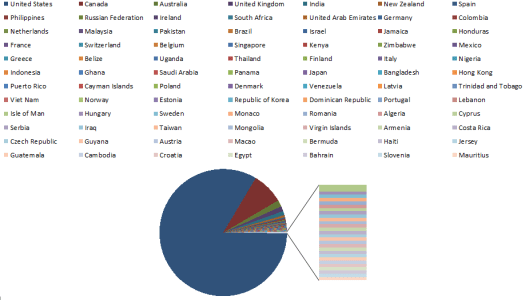
Where in the world is CooperMann viewed?

CMC2012-countries

buildingup-small-logoWhat’s coming up for 2013?  Keep watching CooperMann.com and BuildingUP.biz to stay on top of current issues and trends in accounting and business technology.