Where in The World is Your Data?

Where in the World is Your Data? Even better.. where would you like it to be? In a datacenter near you? In a datacenter far away from you? Maybe you’d like your production system nearby, but backups stored on the other side of the country. Or perhaps you want redundant systems on each coast as well as something somewhere in the middle.
With Microsoft Azure as your platform, you have all the choices in the world, literally.

Microsoft Azure is the platform of choice for businesses of all sizes, offering virtualized infrastructure and services that can be tailored and tuned to meet the unique needs of any organization. No longer tied to on-premises infrastructure, companies find that they can implement better and more comprehensive solutions because they have the agility to adapt systems to immediate needs while retaining the ability to adjust as conditions change.

With Microsoft Azure and Microsoft 365 Services, NOOBEH enables businesses to focus on transformation and improving efficiency, not the IT that supports it.

NOOBEH cloud services, part of the Mendelson Consulting team, sets up Azure infrastructure and manages it for their clients. Business users focus on getting their work done, not on the IT supporting it. NOOBEH QuickBooks on Azure services give small and medium size businesses the most flexible and resilient infrastructure available to run all their desktop and network applications.

Because QuickBooks is rarely a standalone solution, NOOBEH QuickBooks on Azure services have no limitations on what add-ons, extensions, integrations or other applications the business may need to use. All the software a business needs can be deployed on the platform, allowing the company to keep its information systems and assets secure, fully-managed and available when and where they are needed.

While NOOBEH uses Azure platform and Microsoft 365 services to continue to deliver new capability for private sector users, Microsoft is advancing innovation in the delivery of connected services and computing power for private and government sector users wherever it is needed. Azure Modular Datacenters represent a partnership that delivers computing and communications capacity anywhere in the world… and beyond.

Microsoft Azure Modular Datacenters and SpaceX

The Azure modular datacenter is basically a “data center in a box”. It comes with everything needed to deliver computing capacity anywhere in the world.

“We designed the Azure Modular Datacenter (MDC) for customers who need cloud computing capabilities in hybrid or challenging environments, including remote areas. This announcement is complemented by our Azure Space offerings and partnerships that can extend satellite connectivity anywhere in the world. Scenarios range from mobile command centers, humanitarian assistance, military mission needs, mineral exploration, and other use cases requiring high intensity, secure computing on Azure.”

https://azure.microsoft.com/en-us/blog/introducing-the-microsoft-azure-modular-datacenter/

It has power and everything else it needs, and now it also has the connectivity needed, even when there is no (zip, zero) infrastructure. Microsoft has partnered with SpaceX, using SES satellites to bring Internet connectivity to remote areas.

“We can connect via satellite links any element on the Earth to another point on the Earth..”

https://arstechnica.com/information-technology/2020/10/microsofts-new-data-center-in-a-box-will-use-spacex-starlink-broadband/

They’re calling it part of “a multi-orbit, multi-band, multi-vendor” approach to connectivity. That’s pretty cool, if you ask me.

It takes the whole bookkeeping in bunny slippers philosophy of “work when and where it works for you” to an entirely new level.

Make Sense?

jm bunny feet

J

QuickBooks Desktop 2021: Getting Paid Faster, Being More Efficient, and Improving Data Security

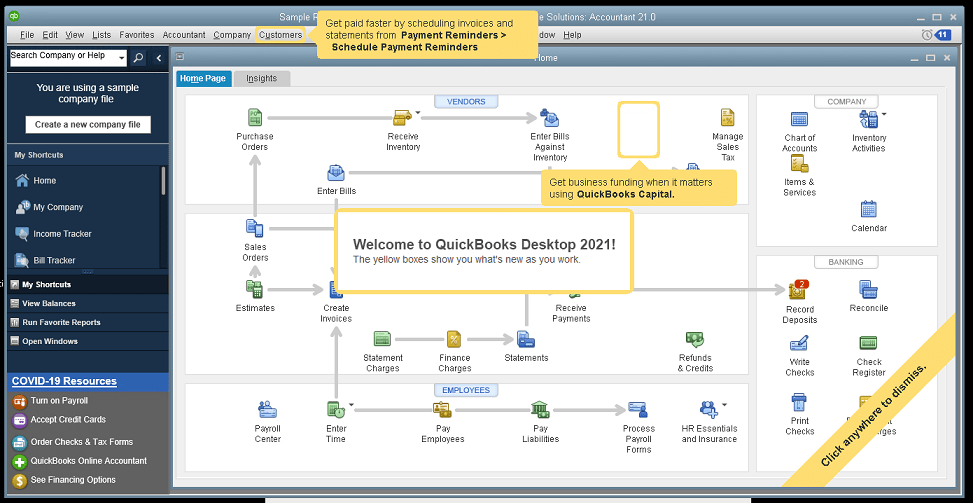
The new QuickBooks Desktop 2021 editions have new and improved features that help businesses get paid faster and secure data more effectively, making the software work even better for your company.

Many of the improvements center on automation and workflow, enabling users to get more done with fewer keystrokes and setting up automatic activities so that items don’t have to be handled manually.

Other improvements center on data and information access, allowing admins to get granular with setting user permissions and access to certain types of information, even down to the record.

Intuit has also delivered several enhancements to existing functionality in QuickBooks desktop, especially in the Enterprise edition and where inventory is involved.

Here is a brief summary of the main changes or additions introduced with QuickBooks 2021 editions.

Improved Bank Feeds
Review bank transactions and match them to existing ones in your books or quickly add new transactions using the advanced bank feeds capability. You can automatically categorize or batch-edit bank transactions by payees, accounts and classes. This can dramatically reduce the time and complexity of reconciling entered transactions with the items the bank processes.

Automated Payment Reminders and Statements
Now you can send statements automatically to customers, with each statement tailored to the customer’s needs or preferences. Set automatic reminders for customers when their invoices are due and schedule statements for your customers to let them know when they have invoices they still need to pay you for. Timely communications with customers regarding their invoices and activity is more likely to keep a customer coming back for more. It also reduces the time required to communicate individually with customers, making AR management and collection activities more efficient.

Customized Payment Receipts
Want to send certain customers a customized message on their receipts? You can use custom templates for forms like invoices, sales receipts, estimates, statements, and purchase orders so each form has the right look and information. Then use the new customer groups capability to get the right form for the right customer every time.

PDF preview
It is always a good idea to preview a document before you send it via email, but that wasn’t always a convenient thing to do in QuickBooks. Now QuickBooks lets you automatically preview attachments before emailing them to customers. You can even preview multiple attachments at once without having to manually open each one outside of QuickBooks, saving huge time and effort and smoothing out a previously-clunky workflow.

Receipt Management
Receipt management in QuickBooks desktop is a new feature that makes entering expense receipts easier and faster. You can give users access to upload expense receipts to QuickBooks using the mobile app or directly from your computer. Automate creating categorized receipt expense entries using the QuickBooks Desktop Mobile App, an option available only with the Plus subscriptions (not the one-time purchase option).

Create Customer Groups
Improve customer communication with rule-based customer groups based on fields like customer type, location, or balance. Creating customer groups allows you to find all customers that match certain criteria. Then you can create automated statements, send payment reminders or create mailing lists for specific groups of customers.
In QuickBooks Desktop Enterprise, you can even use customer groups to define permissions and access at customer and vendor group level.

Data Level Permission
Data level permissions is a new feature in QuickBooks Enterprise 21.0 that gives you more control regarding restricting access for users and roles. This makes it so the admin can create users and roles with access permissions all the way down to the record level for customers and vendors.

With data level permissions you can improve security and confidentiality of information by assigning users access only to the specific data, transactions and reports that they are responsible for. Users will only be able view, edit, or delete specific customers, vendors, or data with the permissions you delegate to them.

NOTE: Data level permissions don’t appear to be available in QuickBooks Enterprise Accountant, nor are they available with a Silver or Gold subscription. To get this feature, you have to go Platinum or Diamond, so it’ll cost you.

Add prices to barcode labels
Wouldn’t it be great if you could print barcode labels with pricing information as well as the item name and description? Now you can! Barcode labels help you accurately identify and manage inventory, providing the information most often needed by employees and customers.

Landed cost
Gain more control and flexibility over how you calculate and share landed inventory costs. Set up landed cost accounts as “COGS” (Cost of Goods sold) or “Other current assets”, and accurately calculate landed cost for old item bills from closed accounting periods. You can also print bills with or without landed cost, allowing you to better control the information you present.

Alternate vendor reports
Key inventory reports can now include alternate vendor information, improving visibility into vendor information on inventory stock status by item, inventory valuation summary and other reports. Linking to alternate vendors via these reports simplifies and streamlines the process of reordering from alternate vendors.

QuickBooks desktop software continues to be the cornerstone of small business accounting. From very small business to the growing enterprise, QuickBooks delivers the functionality that every company needs to manage their income and outgo, customers and vendors, and all their banking activities.

Starting with the early 1999 version to the current 2021 release, Intuit has continued to add capability and enhance features and usability to keep QuickBooks as the most popular small business accounting product on the market. Remember the motto “if you can write a check, you can do your own books“? That’s QuickBooks.

jm bunny feetMake Sense?

J

Building A Solid Foundation for Business Cybersecurity

The cybersecurity threat landscape has changed dramatically in the last few years. No longer primarily a big-business concern, cybersecurity has become a key focus of businesses small and large. Attacks on SMBs are on the rise, perhaps because they represent a plentiful and often easy target. And the cost of damage and disruption to business just keeps going up.

Cybersecurity is not a problem you can simply throw a bunch of money and tools at to fix.

No matter how much great software or fancy systems you implement, the people will always be a big part of the equation. The root cause of over half the data breaches reported is a result of negligent employees or contractors.

That means that nearly half of all attacks are being executed through phishing or social engineering. The only tool you can apply to this problem is education. Efforts should be focused on security awareness and training workers to be more cautious to the point of almost being paranoid. Better to be safe than sorry in this case.

Training workers to be more careful as they work with emails, documents and websites is part of it, but there is much more to making sure the business is addressing the entire cybersecurity issue. NIST (National Institute of Standards and Technology) offers a wide variety of information and guides that businesses can use to learn more about and implement cybersecurity practices. Among these resources is the Cybersecurity Framework.

According to NIST, “the Framework focuses on using business drivers to guide cybersecurity activities and considering cybersecurity risks as part of the organization’s risk management processes.” It is a highly useful tool in helping the business align and prioritize activities with business requirements, risk tolerances and resources. The standard framework includes elements that are consistent and common across sectors and critical infrastructure, so it can be oriented to any business.

Even if the business is not prepared to delve into the details of a comprehensive cybersecurity policy and guideline, a basic outline and approach cannot be avoided without asking for disaster.

Putting this squarely into the Risk Management category, there is an ongoing process of identifying, assessing, and responding to risk situations or conditions. To manage the risk, businesses need to consider the likelihood that an event will occur and what the potential impact is as a result.

Knowing the acceptable level of risk for reaching the business objective is the risk tolerance. If a business understands its risk tolerance, the company can prioritize cybersecurity activities and make informed decisions about cybersecurity expenditures.

There are five key functions to consider as it relates to cybersecurity risk: Identification, Protection, Detection, Response and Recovery. How the business addresses each of these in the context of the systems and activities is essentially the business’s cybersecurity posture, a high-level and somewhat strategic view of the organization’s management of cybersecurity risk.

The key to building a solid foundation for  business cybersecurity practice is to establish a platform where all the business applications and data can be identified and access secured.

User desktops, productivity applications, operational software and business data can be hosted on private cloud servers, allowing the business to fully-manage data and application access. The server-based model reduces or eliminates the need to sync data to devices, and remote desktops keep user environments secure, patched and up-to-date.

Our consultants can’t write your cybersecurity policies or determine your risk tolerance, but we can help implement a solution that improves fault tolerance, resilience, and recovery.

Make Sense?

J

Office 2013 Loses Support for Commercial Office 365 Services

If you’re not on a subscription for your Office desktop applications, you may lose access to your email box and other services.  Why? Because Microsoft announced that, effective October 13th, 2020, Office 365 services (like OneDrive, Hosted Exchange and more) will only support client connectivity from subscription clients or perpetual clients with mainstream support.

Basically this means that Office 2013 is about to be no fun any more.

You won’t be able to use Office 2013 Outlook to connect to your Microsoft-hosted Exchange mailbox, and your Word and Excel won’t connect to OneDrive.  If you are with a hosting provider who supplies your Office licenses as part of the service, cross your fingers and hope that it isn’t Office 2013. It will be pretty frustrating if your Outlook suddenly has problems accessing your Microsoft-hosted mailbox.

Like many other products, a lot of the functionality in the desktop software has been turned into web service and the Microsoft Office applications are a great example. With cloud connectivity being the focus, desktop solutions are more frequently leveraging online resources to extend and expand their capabilities. This also means they’re more frequently turning from one-time software purchases to subscription service.

After October, Microsoft’s ongoing investments in the Office 365 cloud services – including Exchange Online, SharePoint Online, and OneDrive for Business – will be made based on “post-Office 2013 requirements”.  Now is the time to migrate your Office 2013 to Microsoft 365 Apps (formerly Office 365 ProPlus). We highly recommend this move anyway, so businesses can take advantage of using their Office applications seamlessly on Azure servers as well as their local PC desktops and mobile devices.

Users of Office 2016 and Office 2019 have a little more time before their software no longer supports the cloud services. That end date is currently October 2023. You can find the support lifecycle site for Office mainstream support dates here.

It isn’t that Microsoft plans to actively block older Office clients from connecting to Office 365 services. It’s just that older applications may have performance or reliability issues when they try to connect to the constantly-updated cloud services.  Increased security risks are certain and users may even find that they are no longer compliant with certain requirements. The big thing is that Microsoft support will likely not be able to resolve issues related to unsupported connections.

The days of buying software once and running it forever are just about over.

Developers have recognized that cloud services can expand and enhance their solutions in ways that static local installation can’t. For many businesses, it becomes easier and ultimately more efficient to migrate to subscription service for IT platform and software. Azure cloud servers, for example, allow businesses to always have modern infrastructure that is more fault tolerant and agile than on-premises hardware.

Combing these benefits with software that is cloud-connected and always up to date means the business never faces lost productivity or revenues due to outdated systems or lost compatibility with newer solutions.

Make Sense?

J

Windows Server 2012/R2 Not Aging Well, Loses Support for Microsoft 365 Apps

Lots of people loved (and continue to love and use) Windows Server 2012/R2. This Windows Server release introduced several new and improved features that made it a cornerstone of business and service provider networks worldwide. Notable improvements in virtualization with Hyper-V, along with improvements in storage, networking, remote access and server administration features, made 2012/R2 a necessary upgrade from the 2003 and 2008 versions still present in many networks.

Sadly, even though Release 2 (R2) for Server 2012 was largely a new OS due to its features and capabilities, it did not receive a new lifecycle end date and instead inherited the end dates for 2012 version. And an extended lifecycle end-date doesn’t guarantee extended usefulness or compatibility.

Windows Server 2012 began with mainstream support on October 30, 2012 and that mainstream support ended in January 2018, including for R2. Extended support for 2012/R2 goes through January 2023, but that is only if you are paying for Software Assurance for your licenses.

During this period where extended support may still be available for the OS, there is no guarantee that it will remain as a supported platform for your application software. An example of this is the Microsoft Office 365 Apps suite formerly known as ProPlus. The Office 365 apps, which include Outlook, Word, Excel, Powerpoint and more, are staples of business users worldwide. These applications are no longer supported on Windows Server 2012/R2.

Microsoft 365 Apps ended support on Windows Server 2012/R2 on January 14, 2020.

Innovative features and functionality continues to be released for the Microsoft 365 Apps and Microsoft needs to know that the platforms running the applications will work properly with those innovations. As the software is improved and new capabilities introduced, stability and performance issues can plague the install when it is running on older or unsupported operating systems.

Microsoft has pointed out that any Microsoft 365 Apps updated to version 2005 or later will result with functionality and stability problems because there are changes that are specifically not compatible with Windows 8 and Windows Server 2012.

The pace of change is increasing no matter what industry you are in. With technology adoption rates rising faster than ever in all sectors, business owners cannot rely upon outdated systems if their operations are to remain competitive. Application software as well as the operating system platforms it runs on must be regularly updated in order to provide the reliable performance and useful functionality demanded by today’s business users.

jmbunnyfeetMake Sense?

J

For Accounting Professionals: Private Hosted Solutions and Helping Clients Cope with the New Normal

Accounting professionals have an opportunity right now to help their business clients through the difficulties presented by the COVID-19 pandemic. With work-from-home mandates and increasingly fluid reporting requirements to support grants, loans and loan forgiveness, business owners need all the support and good advice they can get.

The global pandemic is changing the landscape of business worldwide. Many small businesses in the US have either closed or are on the brink, looking for ways to keep the doors open and employees paid. Supply chains are strained, distribution has slowed, and workers are being asked to work from home if possible.

These are challenging times, but the guidance and support you can provide to your business clients can be just what they need to help keep the doors open and workers producing. Remote access, cloud hosted applications and data, and real-time accounting support and management reporting are the weapons you and your clients will use to fight the conditions that are currently working against you both.

Help your clients deploy cloud hosting services for their entire business.

Running applications and storing data on an in-house network increases the cost and complexity of supporting a remote or mobile workforce, for you and for your clients.

Remote access and supporting work from home requires that users have the means to communicate with each other and to collaborate on the work. Tools to support communication and collaboration are critical when the workforce is distributed, operating from a variety of locations and with whatever device is available. Yet business owners, operators and managers may find that collaboration apps and other online tools don’t provide access to the applications and data required to do all their work.

To address the problem of working on client data, some accountants may install the client software and copy the data to their own in-house networks. This creates a situation where the accountant is paying for computing resources, space and management of client applications and data in addition to their own. This increases the cost of internal operations for the accounting firm and can impact internal system performance while also reducing overall productivity.

More to the point, this model only supports doing after-the-fact work for the client, which results in the data and reporting being outdated and far less useful to the client in supporting daily decision-making. This model also does nothing to help the firm with their own possible work-from-home needs even as IT support and on-site service becomes more limited.

Accounting professionals wanting to provide services to clients proactively rather than reactively must have real time access to the same applications and data that the client uses. The old fallback to remote control solutions is one approach, yet it is not really an optimum solution to the problem.

Remote control, like PCAnywhere, GoToMyPC or LogMeIn expose the professional to more of the client computing environment than is necessary, introducing risk and the potential for blame if something goes wrong. And remote-control solutions are single user, reducing productivity because the client can’t use their system while the accountant controls the computer. RC solutions also rely on the availability and function of the on-premises systems. If the on-prem systems aren’t turned on, up and running and accessible, then the remote user can’t connect.

It may be that online or web-based applications are an option, but for many businesses they aren’t really a viable solution. QuickBooks Online is simplified software and is not appropriate or usable for many businesses. The QBO subscription model is per-company, limiting options and reducing cost-efficiency for businesses with multiple entities. And QBO doesn’t address other business needs, such as working with documents and reports, and it can’t provide any access or support for other business applications. Even the ability to backup and preserve data is very limited without specialized services and tools.

Shared hosting service might be closer to the right answer, yet shared hosting is generally only useful for very small organizations and supports only core QuickBooks functions, so it can be as restrictive QBO. Shared infrastructure used by the shared hosting platforms can also introduce significant risk to every business on the platform because ransomware and malware can easily move through connected file systems and servers.

Compare shared services to a public pool where it is very easy to transmit from one person to another; in these networks an intrusion can end up spreading malware to the entire network and platform, resulting in days or even weeks of outages. Unfortunately, disaster recovery is often limited to recovery of the provider hosting platform and does not always include recovery of all customer data.

The best solution for business is private, managed cloud hosting service delivered on a trusted and proven platform like Microsoft Azure.

Hosting service that takes advantage of the Microsoft Azure cloud  platform allows the business to centralize access to all their important applications and data, making it possible to provide complete application functionality for all users no matter where they are located.

Using the Azure platforms means that security, fault tolerance, scalability and agility are designed into the solution rather than being extras from the hosting provider. Microsoft-managed datacenters and Microsoft-managed hardware means the experts in systems and security are handling the big stuff while the service provider focuses on what the client needs.

The virtualization technology enables the agility to meet changing business needs, scaling systems up or down if necessary. Massively scalable platform allows services to be right sized now without concern for future resource requirements (no buying ahead based on possible future needs). There are no arbitrary limitations placed on the applications or services the business needs to run on the cloud platform, and no fees for running more apps.

Making all the applications and data available to workers, when and where they need them, is the key to promoting higher levels of productivity while delivering the data management needs to support daily decision-making.

Now that you have access, provide pro-active support and help business owners and managers make the right decisions.

Better data and reporting to support business and finance management is more important than ever, especially when having the right information can mean the difference between keeping the doors open and closing shop for good. Whether the goal is to shore up finances to keep employees on staff or to create a cushion to help weather supply chain disruptions, businesses owners need quality financial and performance data in order to make the right decisions for the company.

Once the accounting professional has real-time access to client systems, they can work cooperatively in the data to ensure that the right information is available when it is needed. As business owners seek to take advantage of grants and loan programs available due to the pandemic, the financial and other performance data becomes even more essential in terms of developing qualification and eventually forgivability of the loan.

With timely access, proper reporting tools and regular support and oversight, business owners benefit from a closer working relationship with their accounting professionals. The additional support and proactive service is more necessary now than ever. For the accounting pro, an elevated relationship with client is being developed, where the services provided become more meaningful and the value of those services more evident.

Make sense?

J